

Pass Google Business verification with a video-first checklist. Film one continuous 30 second take, fix flagged issues, and know when to hire help.
How web development powers local service business growth
TL;DR:
- Ongoing web development significantly improves local visibility, leads, and customer trust.
- Technical decisions like speed, SEO structure, and mobile optimization impact rankings and conversions.
- Treat your website as a growth engine through regular updates, optimization, and strategic investment.
A basic website felt like enough five years ago. Today, it’s the equivalent of handing a customer a business card with no phone number. Local service businesses that treat their website as a one-time setup are quietly bleeding leads to competitors who understand that web development is an active, ongoing growth tool. This article breaks down why web development matters far beyond aesthetics, what it actually includes when done right, which technical decisions drive real local visibility, and how you can take practical steps to start seeing measurable results from your site.
Table of Contents
Table of Contents
- Why web development matters for local service businesses
- What web development actually includes (beyond coding)
- How technical choices impact visibility and leads
- Practical checklist: Improving your local business website
- Our perspective: Why web development is your local growth engine, not a ‘tech cost’
- Ready to unlock more local customers? Get expert web development help
- Frequently asked questions
Key Takeaways
| Point | Details |
|---|---|
| Web development drives growth | Thoughtful web development helps local businesses reach and convert more customers online. |
| Technical choices impact SEO | Site structure, speed, and accessibility determine how easily customers find your business. |
| Regular updates are vital | Ongoing maintenance and improvements keep your site competitive and trustworthy. |
| Professional help accelerates results | Expert support unlocks advanced features, stronger rankings, and faster growth for local businesses. |
Why web development matters for local service businesses
Most local service business owners think of their website the way they think of their storefront sign: put it up once, and it does its job forever. That’s not how it works anymore. Customers searching for a plumber, HVAC technician, or pest control company on their phones are making snap decisions in seconds. If your website doesn’t load fast, look professional, and clearly tell them what you do and where you serve, they’re gone.
Modern web development affects core business metrics like visibility and conversion, not just how your site looks. That means the technical choices behind your site directly impact how many people find you on Google, how many of those visitors actually call or fill out a form, and whether those customers come back and refer others.
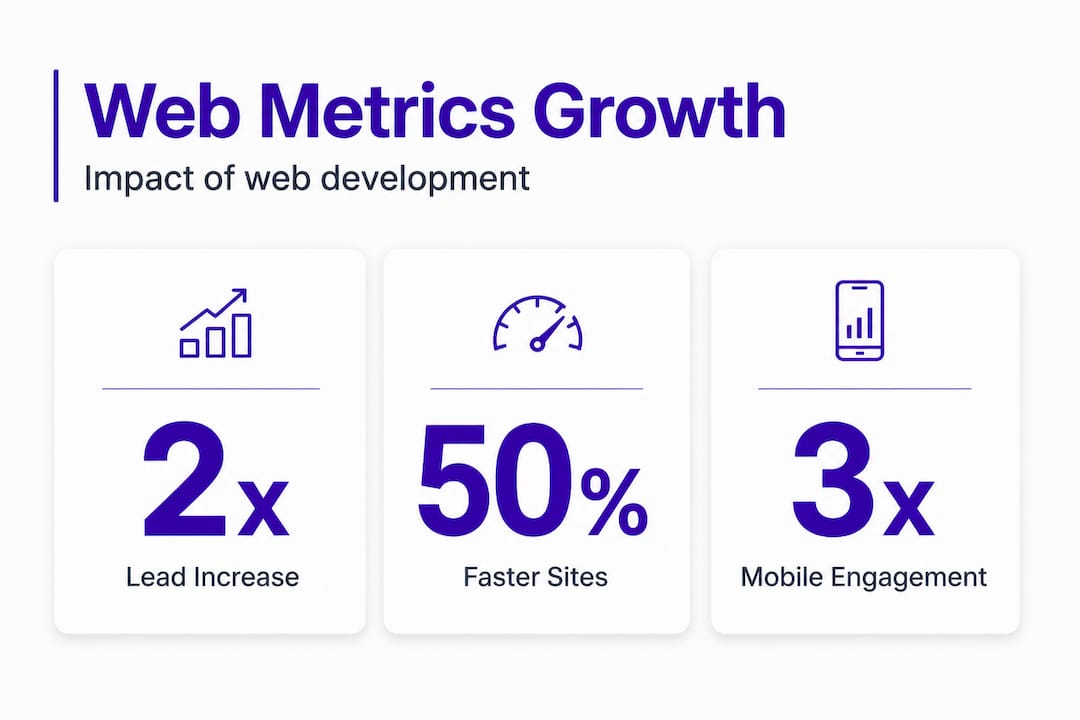
Here’s what strong web development does for local service businesses in real terms:
| Metric | Basic DIY Website | Professionally Developed Site |
|---|---|---|
| Average monthly local leads | 3 to 5 | 15 to 30+ |
| Google local ranking | Page 2 or 3 | Page 1 (top 3 map pack) |
| Mobile conversion rate | 1 to 2% | 4 to 7% |
| Customer return visits | Low (no reason to return) | Higher (updated content, reviews) |
| Trust signals present | Minimal | Full (reviews, credentials, photos) |
Those numbers aren’t hypothetical. They represent patterns we see consistently across local service businesses in industries like disaster restoration, landscaping, and med spas. The difference between a site that generates leads and one that doesn’t often comes down to decisions made during development.
Tangible benefits of professional web development for local businesses:
- Credibility at a glance. A fast, clean, well-structured site signals professionalism before a visitor reads a single word.
- Mobile conversions. Over 60% of local searches happen on mobile devices. A site built with mobile users in mind converts dramatically better.
- Word-of-mouth readiness. When satisfied customers recommend you, they tell their neighbors to “Google you.” What those neighbors see when they land on your site either confirms or kills the referral.
- Review integration. Well-developed sites display and encourage reviews, boosting both social proof and local SEO rankings.
- Accessibility for all users. Sites that meet accessibility standards reach more customers and avoid legal risk.
The speed factor deserves special attention. Fast-loading, accessible sites consistently show two times higher engagement compared to slow, clunky alternatives. Every second of delay costs you potential customers who simply tap the back button and choose your competitor.
Having set up why web development isn’t a “nice to have,” next we clarify what web development covers for real-world local business needs.
What web development actually includes (beyond coding)
Ask most local business owners what web development means, and they’ll say something like “building the website.” That’s technically true but wildly incomplete. Professional web development for a local service business covers at least six distinct disciplines, and each one affects your ability to attract and convert customers.
Optimizing hero images, accessibility, and user experience directly affects business results, not just how pretty your homepage looks. Here’s how the main components break down:
| Component | What it covers | Impact if ignored |
|---|---|---|
| Visual design | Layout, branding, color, typography | Low trust, high bounce rate |
| Mobile optimization | Responsive layouts, tap target sizing | Lost mobile leads |
| SEO structure | Page titles, schema markup, local signals | Invisible to Google |
| Conversion optimization | CTAs, forms, phone click buttons | Traffic with no leads |
| Accessibility | Screen readers, contrast, keyboard nav | Excluded users, legal risk |
| Ongoing maintenance | Security, speed, content updates | Penalties, site failure |
Now compare two approaches business owners commonly choose:
DIY website builders vs. professional web development:
| Factor | DIY Builder | Professional Development |
|---|---|---|
| Setup cost | Low (free to $50/mo) | Medium to higher upfront |
| Local SEO capability | Very limited | Full control |
| Mobile performance | Template-based, often slow | Custom-optimized |
| Schema markup | Rarely included | Built-in for local business |
| Long-term lead impact | Flat or declining | Grows with optimization |
| Hidden pitfalls | Duplicate pages, poor speed | Avoided with expertise |
The DIY builder seems attractive until you realize why your site isn’t generating calls. Common issues include auto-generated location pages with duplicate content, missing or incorrect schema markup, and mobile layouts that technically “work” but frustrate real users.
Five key web development tasks every local service site needs:
- Optimized page structure. Every service page needs a clear hierarchy: headline, description, trust signals, and a strong call to action. No guesswork for the visitor.
- Schema markup implementation. This is the code that tells Google exactly what your business is, where you’re located, and what you offer. Without it, you’re competing with one hand tied behind your back.
- Mobile-first design build. Design your site for the phone screen first, then scale up for desktop. Not the other way around.
- Speed and image optimization. Every large image that isn’t compressed slows your site. Web developers compress images without sacrificing quality and set up caching for faster loads.
- Conversion-focused layout. Your phone number needs to be tappable on mobile. Your contact form needs to be short. Your service areas need to be prominent.
For help choosing the right website builder or knowing when to go professional, there are clear signals to watch for. And if you want to see how design decisions translate directly to inquiries, reviewing website design tips for local leads offers some practical guidance.
Pro Tip: Avoid creating separate “doorway pages” for every neighborhood or zip code with nearly identical content. Google recognizes this tactic and penalizes sites that use it. Instead, create genuinely useful, location-specific content with unique details for each area you serve.
With this foundation, it’s now essential to see how technical web development decisions directly impact your business success online.
How technical choices impact visibility and leads
Here’s where things get specific. Technical web development decisions, things like how your server delivers pages, whether your site passes mobile usability tests, and how your images are formatted, determine whether Google trusts your site enough to show it to local customers.


SSR and SSG are recommended over client-side only single-page applications for SEO, and real device testing is essential. Let’s break down what that means for a local HVAC company or a moving business. Server-side rendering (SSR) means your web pages are generated on the server before they reach the visitor’s browser. Google can read and index them immediately. Client-side only sites, on the other hand, often require JavaScript to execute before Google can even see the content, which can hurt rankings.
Top technical factors that affect your local visibility:
- Page load speed. Google’s Core Web Vitals measure how fast your pages load and how stable they are while loading. Poor scores push you down in rankings.
- Image optimization. Oversized images are the single most common cause of slow sites. Use modern formats like WebP and always set image dimensions.
- No duplicate location pages. Every service area page must have unique, useful content. Copying and pasting the same text with different city names is a ranking killer.
- Accessibility standards. Meeting WCAG (Web Content Accessibility Guidelines) isn’t just ethical. It improves usability for everyone and is becoming a ranking signal.
- Clean URL structure. Your URLs should clearly describe the page content and include local keywords where relevant.
“Google penalizes certain web practices that local business owners often overlook, including thin content location pages, poor mobile tap target sizing, and missing or broken structured data. These aren’t just technical problems. They’re lost customers.”
Checking your website optimization strategies can help you spot these issues before they compound. Many business owners are surprised to find their site has been slowly losing visibility for months due to problems that could be fixed in a few days.
Testing on real devices is also non-negotiable. Emulators and browser preview modes don’t replicate how actual Android phones or older iPhones load your site. What looks great on your laptop may have a broken contact form on a budget Android device used by your ideal customer.
For businesses focused on optimizing for mobile search, the stakes are especially high. And if terms like “Core Web Vitals” or “structured data” sound foreign, brushing up on SEO terms for business owners gives you enough working knowledge to have productive conversations with your developer or agency.
Pro Tip: If your website runs on a JavaScript-heavy framework with no server-side rendering, ask your developer whether Google can fully crawl your pages. Request a coverage report from Google Search Console to see exactly how many of your pages are indexed. It’s often revealing.
Now that you understand the power of technical choices, let’s turn insights into action with a practical web development improvement checklist.
Practical checklist: Improving your local business website
You don’t need to become a developer to improve your website. You need to know what to ask for, what to check, and what to prioritize. This checklist gives you a roadmap built specifically for local service businesses trying to generate more calls, more form submissions, and more repeat customers.
A thorough checklist should include mobile tap targets, accessibility, and layout stability, among others, as essential priorities for any site serious about performance.
Seven practical steps to improve your local service website:
- Audit your mobile experience. Pull up your site on your actual phone, not your computer. Try to tap every button and fill out every form. If anything is frustrating, it’s losing you leads.
- Run a speed test. Use Google PageSpeed Insights (free tool) to see your score on mobile and desktop. A score below 70 on mobile means you’re likely losing customers before they even see your services.
- Check all your content for duplication. If you have multiple service area pages, make sure each one has genuinely different, useful information. Duplicate content drags every related page down in rankings.
- Add or update your schema markup. Make sure your business name, address, phone number, service areas, and business hours are embedded in structured data on your site. This feeds Google’s local search results directly.
- Review your images. Go through every image on your site. Large image files (anything over 150KB without optimization) should be compressed. Convert images to WebP format where possible.
- Check accessibility basics. Confirm your site has sufficient text contrast, image alt text, and that your site can be navigated without a mouse. Tools like WAVE (free browser extension) flag common issues instantly.
- Schedule regular maintenance. Set a calendar reminder every three months to check for broken links, outdated content, expired credentials or certifications, and plugin or theme updates if you’re on a CMS like WordPress.
Free and low-cost tools to check your site performance:
- Google PageSpeed Insights (free): Scores your speed and gives specific fixes
- Google Search Console (free): Shows how Google sees your site, including indexing errors
- WAVE accessibility checker (free browser extension): Flags contrast and structural issues instantly
- Screaming Frog SEO Spider (free for up to 500 URLs): Crawls your site for broken links, missing meta tags, and duplicate content
- GTmetrix (free tier available): Detailed waterfall analysis of what’s slowing your pages down
For a deeper look at how to work through these improvements in sequence, the step-by-step site optimization resource walks through the process in the order that produces the fastest results.
Pro Tip: Test your site with Google PageSpeed Insights on the mobile tab specifically. Many businesses optimize for desktop and forget that most of their local traffic is coming from phones. Your mobile score is the one that matters most for local search rankings.
You have the checklist. Now see how a strategic, holistic approach changes more than just your website’s appearance.
Our perspective: Why web development is your local growth engine, not a ‘tech cost’
We’ve worked with hundreds of local service businesses, from restoration contractors to landscaping companies to med spas, and there’s a pattern we see over and over. Owners invest heavily in trucks, equipment, uniforms, and advertising but treat their website as a one-time expense to minimize. They spend $500 on a quick site and wonder why their competitor down the street, who invested properly in web development, gets three times the inbound calls.
The mindset shift we push for is simple: your website is not an IT cost. It’s the engine that determines whether all your other marketing investments pay off. You can run Google Ads, spend on mailers, and hand out business cards all day. But if the website those efforts send people to doesn’t load fast, doesn’t build trust instantly, and doesn’t make it dead simple to contact you, you’re pouring money into a leaking bucket.
“We’ve watched business owners launch sites they were proud of, spend months pushing traffic to them, and then realize the site had a broken mobile form the whole time. Every lead from that period was lost. The cost of ‘saving money’ on development was catastrophic.”
The other thing most owners undervalue is what happens after launch. Web development is not a one-and-done project. Google updates its algorithm. New competitors enter your market with better sites. Your service areas expand. Prices change. Your site needs to reflect your business as it actually exists today, not how it existed two years ago when you launched it.
Businesses that commit to ongoing web development investment, even modestly with regular maintenance and quarterly updates, consistently outperform those that treat their site as a static artifact. We’ve seen local plumbing and HVAC companies double their inbound lead volume within six months of addressing technical issues that had been silently hurting their rankings for years.
The owners who see the biggest gains aren’t the ones with the flashiest designs. They’re the ones who treat web development as part of their digital marketing strategy impact, connected to their SEO, their ads, and their reputation management. When everything is aligned, the compound effect on local lead generation is significant and measurable.
With that mindset shift, let’s show you how to take the next step with proven local business web development solutions.
Ready to unlock more local customers? Get expert web development help
If this article made one thing clear, it’s that web development is far more than a technical checkbox. It’s the foundation every other part of your local marketing stands on. A slow, unoptimized, or poorly structured website undermines your advertising spend, your SEO efforts, and your reputation before a customer ever calls you.
City Web Company specializes in exactly this: building and optimizing websites for local service businesses that need to generate real leads, not just exist online. Our team understands the specific needs of plumbers, restoration contractors, landscapers, HVAC companies, and other service providers because we work with them every day. From technical SEO to mobile optimization to conversion-focused design, our web design and development services are built around measurable growth, not just aesthetics. Explore our full range of digital marketing services and see how a properly developed website fits into a strategy that delivers real, trackable results for your business.
Frequently asked questions
What’s the difference between web development and web design for local businesses?
Web development handles the technical site functions and structure, like speed, code, and server setup, while web design focuses on look and layout. Both are essential for a local service site that converts visitors into customers.
How does technical SEO in web development affect my Google ranking?
Strong technical SEO means better site structure, faster load times, and solid mobile usability, all of which directly help your business rank higher in local search. SSR and SSG approaches also ensure Google can fully read and index your pages, which is foundational to ranking.
How often should a local service business update its website?
Review and update your site at least twice a year and after any major business change, such as new services, service area expansions, or staff changes, to stay competitive and keep your content accurate.
What web development issues could actually hurt my search ranking?
Duplicate content, poor mobile usability, and slow loading are the most damaging common issues. Doorway pages with duplicate location content and poor mobile tap target sizing are specific problems that frequently hurt local service sites without owners even realizing it.
Recommended
- Website Design Process: Step-by-Step Guide for Local Businesses
- Why website design matters for local service businesses
- Why Choose Local Marketing for Service Businesses
- Website Optimization: Boosting Local Business Growth
- Why fast hosting is critical for business website success
- Ejemplos inspiradores de páginas web para pymes gallegas | Keltera Studio
These articles were popular with other readers too: