Pass Google Business verification with a video-first checklist. Film one continuous 30 second take, fix flagged issues, and know when to hire help.
Social media ads guide: more local leads, less wasted spend
TL;DR:
- Successful social media advertising for local services relies on strategic planning and creative testing.
- Broad targeting and authentic, recognizable content outperform micro-targeting and stock images post-iOS 14.
- Ongoing optimization, creative refreshes, and measuring key metrics are essential for generating leads and growth.
Most local service businesses burning through ad budgets on Facebook and Instagram have one thing in common: they ran ads without a real plan. You boosted a post, got some likes, and wondered where the phone calls were. That’s not a platform problem. It’s a process problem. Social media advertising can absolutely generate real, qualified leads for HVAC companies, plumbers, landscapers, and other service businesses in your area. But you need the right setup, the right creative, and a testing process that actually works. This guide walks you through every step, backed by current industry data, so you stop guessing and start getting results.
Table of Contents
Table of Contents
- Understand the basics: What makes social media ads work for local service businesses?
- Gather your tools: What you need before launching your first campaign
- Step-by-step walkthrough: Creating, launching, and optimizing your first campaign
- Test, analyze, and troubleshoot: Maximizing results from your ads
- Our perspective: What most small businesses miss—and how to win with local social ads
- Ready to take your local ads to the next level?
- Frequently asked questions
Key Takeaways
| Point | Details |
|---|---|
| Creative trumps targeting | In 2026, effective visuals and local relevance now matter more for lead generation than narrow targeting. |
| Start broad, test often | Weekly creative testing and gradual optimizations yield consistently better results for small service brands. |
| Track the right metrics | Focus on cost per lead, click-through rate, and ROAS to know if your ad spend is performing. |
| Refresh ads regularly | Update creatives at around 7,000 impressions to prevent fatigue and keep your costs down. |
Understand the basics: What makes social media ads work for local service businesses?
Now that you understand the challenge, let’s clarify how social media ads can be uniquely powerful for your business.
A lot of local service owners think social media ads work the same way as Google search ads. They don’t. When someone searches “emergency plumber near me” on Google, they already need help right now. Social media is different. People scrolling Facebook or Instagram aren’t looking for you yet. That makes your job a little more complex, but it also opens up a huge opportunity that most competitors ignore.
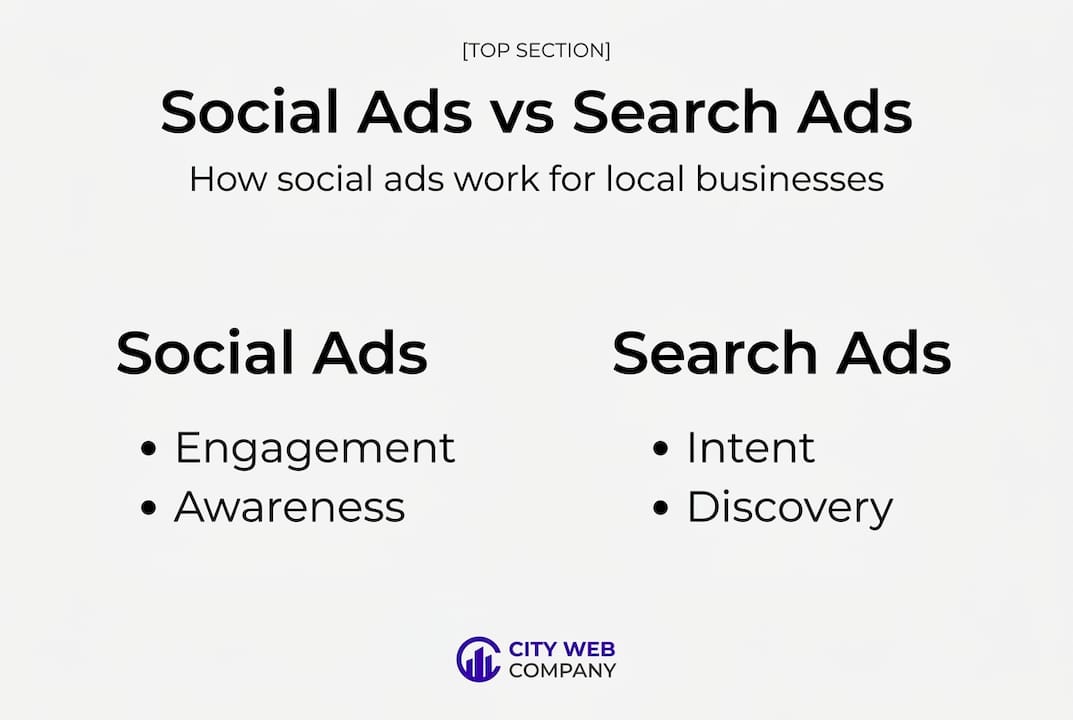
Understanding what social media advertising is helps clarify why the approach differs for local services. On social platforms, you’re placing your business in front of people who fit your ideal customer profile before they’re actively searching. Done right, this means you’re the first company they think of when the AC breaks down or the basement floods.
Why local service businesses are uniquely positioned to win on social ads
The biggest strength social ads give local service businesses is geo-targeting. You can put your message in front of homeowners within five miles of your service area, filter by age and household income, and even exclude renters if your service mostly applies to homeowners. That level of precision is something billboard advertising never offered.
Here’s what sets local social ads for service brands apart from generic campaigns:
- Instant-need services like HVAC repair and emergency plumbing benefit from urgency-based creative and retargeting. Someone who visited your website last week and now sees your ad is much warmer than a cold prospect.
- Considered-purchase services like landscaping, remodels, and exterior painting require longer nurturing. These buyers research, compare, and take weeks or months to decide. A sequence of social ads keeps you visible throughout that window.
- Trust signals matter enormously. Local homeowners want to see real team photos, job-site videos, reviews, and familiar neighborhood context. Generic stock photo ads barely get a second glance.
- Retargeting is where local service ads earn their money. Most first-time visitors to your website won’t call. Retargeting lets you show them ads repeatedly until they’re ready to book.
Industry benchmarks: what “good” actually looks like
Before you judge your results, you need to know what to compare them against. Here are the numbers that matter, based on current platform data:
Benchmark metrics for local service social ads (2026):
Meta (Facebook/Instagram) cost per lead (CPL): $18 to $60. This category has lower purchase intent but strong nurturing potential. Google Local Service Ads (LSA) CPL: $50 to $110, with close rates of 35 to 65% for emergency calls. Click-through rate (CTR): 0.72% to 2.59%. Cost per click (CPC): $1 to $3. Return on ad spend (ROAS): 2.5x to 5x is a healthy range.
These benchmarks tell you something important: Meta ads are cheaper per lead but require follow-up. Google LSA costs more but converts faster because the intent is already there. For most local service businesses, a combination of both platforms is the smartest long-term play. But for this guide, we’re focused on social media, which is often the more accessible and underutilized channel.
One more thing before you start: social media ads are not a set-it-and-forget-it tool. They require active management, creative refreshes, and a willingness to learn from what the data tells you. Businesses that treat their first campaign as a long-term experiment, not a one-time gamble, are the ones that consistently win.
Gather your tools: What you need before launching your first campaign
With the strategy in mind, you’ll need the right tools. Just like showing up to a job with all the right equipment, running social ads without proper setup leads to wasted time and wasted budget.
Before you create a single ad, there are legal, technical, and creative pieces you need in place. Skipping this step is one of the most common reasons first campaigns fail. Think of this as your pre-job checklist.
Technical and account setup requirements
You’ll need a Facebook Business Page that is fully filled out: profile photo, cover image, business category, contact information, and your website URL. From there, you’ll create a Meta Ads Manager account and connect it to your Business Page. You’ll also need to add a valid payment method and set your ad account’s time zone and currency before running anything.
The most critical technical step is installing the Meta Pixel on your website. This small piece of code tracks what visitors do after they click your ad, whether they filled out a form, called your number, or simply visited your service page. Without the Pixel, you’re flying blind. Your web developer or platform (like WordPress) can usually add this in under 10 minutes.

Creative assets you’ll actually need
Here’s where many businesses are underprepared. You don’t need a Hollywood production budget, but you do need more than a low-quality cell phone photo from three years ago.
- Short video clips (15 to 30 seconds) of your team on the job. Real work, real people.
- Before-and-after images. These are incredibly effective for landscaping, HVAC installs, and plumbing repairs.
- Customer review screenshots or short testimonial videos. Real customers speaking to camera are gold.
- Your logo in high resolution, and your brand colors in hex code for consistency.
Post-iOS 14, the data landscape for targeting changed dramatically. Apple’s privacy update limited how much platforms could track individual user behavior, which made hyper-narrow audience targeting much less reliable. The good news is that broad targeting with strong creative now outperforms detailed micro-targeting in most cases. You’re better off putting energy into compelling visuals and messages than obsessing over audience filters.
Pro Tip: Retarget website visitors and people who have engaged with your Facebook Page. These audiences are already warm and convert at a much lower cost per lead than cold audiences.
Tools and assets: what’s required versus optional
| Asset or tool | Required | Optional |
|---|---|---|
| Facebook Business Page | Yes | |
| Meta Ads Manager account | Yes | |
| Meta Pixel on website | Yes | |
| Payment method on file | Yes | |
| High-quality images or video | Yes | |
| Customer testimonial video | Strongly recommended | |
| Landing page for the campaign | Strongly recommended | |
| Canva or design tool | Yes | |
| Video editing software | Yes | |
| CRM for lead tracking | Yes |
Following a clear ad workflow for local leads keeps you from missing steps and ensures every campaign starts on solid footing. Make this checklist a standard part of your process every time you launch something new, not just the first time.
Step-by-step walkthrough: Creating, launching, and optimizing your first campaign
Well-prepared, you’re ready for the real action. Here’s a no-nonsense, step-by-step path anyone can follow.
Step 1: Choose your campaign objective
In Meta Ads Manager, your campaign objective determines how the platform optimizes your ads. For local service businesses trying to generate leads, choose either “Leads” (to collect form submissions inside Facebook/Instagram) or “Traffic” (to drive people to your website or landing page). For most service businesses, “Leads” is the better starting point because it keeps users on the platform and reduces friction.
Step 2: Set up your targeting and location
Define your geographic area first. Set a radius around your city or service zip codes. For most local service businesses, 10 to 30 miles is appropriate. Keep your demographic targeting broad: homeowners aged 30 to 65 generally covers most service customers. Avoid stacking too many interest filters. Remember, creative is now primary targeting, meaning the quality of your ad itself signals to the platform who to show it to.
Step 3: Build 3 to 5 creative variants
This is the most important part. Create multiple versions of your ad with different headlines, images, or video clips. Don’t change everything at once. Swap one element per variant so you can see what’s actually driving results. A few examples:
- Variant A: Before-and-after photo with headline “We fixed this HVAC system in 2 hours”
- Variant B: Short team video with headline “Local. Licensed. Available today.”
- Variant C: Customer testimonial screenshot with headline “Our neighbors trust us. Here’s why.”
Step 4: Set your budget and schedule
Start with a daily budget of $15 to $25 per day for testing. Run your initial campaign for at least two full weeks before drawing conclusions. This gives the algorithm time to learn and optimize. Avoid editing the campaign during the first five to seven days; changes reset the learning phase and slow results.
Step 5: Upload and launch
Follow the ads tutorial for local leads to walk through the Ads Manager interface step by step. Upload your creatives, write your ad copy, add your call-to-action button, and double-check your Pixel connection before hitting publish.
Step 6: Monitor and refresh creatives
Check performance after seven days. Look at CTR and CPL first. If one variant is outperforming the others, shift more budget toward it. Plan to refresh creatives every 7,000 impressions to prevent ad fatigue, which is when your audience has seen the same ad so many times that engagement drops and costs rise.
Pro Tip: Mobile-first creative consistently delivers lower cost per lead. Shoot your video vertically (9:16 ratio), keep text minimal, and lead with motion in the first two seconds to stop the scroll.
Sample campaign overview: what to expect
| Campaign type | Daily budget | Expected CTR | Expected CPL | Best for |
|---|---|---|---|---|
| Cold audience, video ad | $20/day | 1.0 to 1.8% | $25 to $50 | Brand awareness, new markets |
| Retargeting, image ad | $10/day | 1.8 to 2.5% | $15 to $30 | Warm visitors, past engagers |
| Lead form, UGC creative | $20/day | 1.2 to 2.0% | $18 to $40 | Direct lead capture |
Watching current AI creative trends can also give you an edge. AI tools are making it faster and cheaper to produce ad variations, though for local service businesses, authenticity still beats polish every time.
Test, analyze, and troubleshoot: Maximizing results from your ads
Launching your campaign is just the beginning. Real success comes from paying attention to the numbers and refining your approach.
Many business owners check their ad dashboard once a week, see confusing numbers, and either panic or ignore everything. Neither works. Here’s how to read what your data is telling you and respond intelligently.
Key performance indicators (KPIs) explained simply
- CTR (click-through rate): What percentage of people who saw your ad clicked it. Higher is better. Below 0.5% means your creative or copy isn’t grabbing attention.
- CPC (cost per click): How much you pay every time someone clicks. Lower is better, but only if those clicks become leads.
- CPL (cost per lead): The total cost divided by the number of leads generated. This is your most important metric for local service businesses.
- ROAS (return on ad spend): Revenue generated divided by ad spend. A 3x ROAS means for every $1 spent, you earned $3 in revenue.
How to analyze creative and audience performance
Inside Ads Manager, use the Breakdown menu to split results by placement, age, gender, and device. You’ll quickly see patterns. Maybe your ads perform twice as well on mobile versus desktop, or 45- to 54-year-olds respond more than younger users. Use these insights to refine future campaigns.
When testing creative variants, give each one enough data before judging it. A minimum of 500 to 1,000 impressions per variant is a fair starting point. Cutting creatives too early is one of the most common mistakes. Be patient but disciplined.
Pro Tip: Once someone clicks your ad but doesn’t convert, retarget them with a different creative. Show social proof, a special offer, or a specific service benefit they haven’t seen yet. Tracking ad ROI accurately requires connecting your ad data to your actual leads and jobs closed, not just clicks.
Common troubleshooting scenarios
- High spend, low leads: Your creative or offer isn’t resonating. Test a new headline or switch from a static image to a short video. Also check that your landing page loads fast on mobile.
- Low delivery: Your audience might be too small or your bid too low. Broaden your targeting or slightly increase your daily budget.
- Good CTR but no conversions: The problem is likely your landing page, not your ad. Simplify the form, reduce load time, and make the call to action clear.
- Creatives performing inconsistently: This is normal. Not every creative wins. Keep testing and let data, not gut feeling, decide what scales.
When to pause, update, or scale
Pause a campaign if your CPL is more than three times the industry benchmark after two weeks of consistent delivery. Update creatives the moment you see CTR dropping below 0.8% or frequency climbing above three views per user. Scale a campaign by increasing the daily budget by 20% every five days rather than doubling it overnight. Sudden budget jumps reset the learning phase and often cause costs to spike.
On AI creative in 2026: AI tools are making it faster and cheaper to produce UGC-style videos and ad variations, reducing production time significantly. But for local service brands, there are real risks. An AI-generated spokesperson who looks perfect but says nothing authentic about your team or community can actually reduce trust with local buyers. The smarter move is to use AI for scripting, editing, and ideation, then let your real technicians or crew be the face of the ad.
Our perspective: What most small businesses miss—and how to win with local social ads
After seeing hundreds of local service businesses try social media ads, a pattern becomes clear. The ones who struggle aren’t failing because of bad targeting. They’re failing because they copy what big national brands do, run one campaign for a few weeks, decide it “doesn’t work,” and walk away.
Big brands have the budget to test dozens of audiences and creative concepts over months. Local service businesses need a tighter loop: launch, observe, learn, adjust, and repeat. The businesses that win are the ones who treat every campaign as a data collection exercise, not a lottery ticket.
The most underestimated insight in local service advertising right now is this: creative is targeting. Post-iOS 14, the Meta algorithm relies on your ad’s content to figure out who to show it to. A video of your real plumber fixing a burst pipe in a recognizable neighborhood will naturally find its way to the right local homeowners because the platform recognizes content signals. A polished stock photo ad tells the algorithm almost nothing.
What does this mean practically? Stop spending hours trying to build the perfect audience. Start spending those hours on better video, more authentic testimonials, and more specific before-and-after imagery. The importance for local service brands of real, recognizable content cannot be overstated. A customer talking to camera in their driveway about how fast you showed up will outperform a professionally designed graphic nine times out of ten.
The other mistake we see constantly: giving up after one round of testing. Real results usually emerge after the second or third cycle of creative testing. The businesses that stick with it and keep refining are the ones filling their schedules from social ads alone.
Ready to take your local ads to the next level?
With a proven process and expert tips, you’re equipped to get results. But you don’t have to go it alone.
Running social ads the right way takes time, creative energy, and ongoing attention. Many local service businesses see the biggest gains when they pair a solid strategy with professional support for creative production, campaign management, and performance tracking. Understanding digital marketing for local leads can help you see how social ads connect to your broader online presence.
At City Web Company, we specialize in helping HVAC companies, plumbers, landscapers, and other local service businesses build and manage social ad campaigns that actually generate calls and booked appointments. From ad creative and strategy to full campaign management and lead tracking, our team handles the details so you can focus on running your business. Visit our digital marketing services page to learn how we build results-driven ad programs tailored to local service businesses like yours.
Frequently asked questions
How much should a local service business budget for its first social media ad campaign?
Start with $300 to $600 monthly for testing; Meta CPL runs $18 to $60 for home service businesses, so this range gives you enough data to evaluate real performance.
What’s more important for successful local service ads: targeting or creative?
Strong creative now outweighs hyper-targeting; broad targeting outperforms narrow audience stacking post-iOS 14, so put your energy into compelling visuals and specific, relevant messaging.
How do I know if my social ad campaign is working?
Track cost per lead, click-through rate, and return on ad spend consistently; benchmarks of CTR 0.72 to 2.59% and ROAS of 2.5x to 5x indicate a healthy campaign for local service businesses.
Should I use user-generated content (UGC) in my ads?
Yes, UGC performs 3.2x better than standard polished creative, especially for local service brands where trust and authenticity directly influence whether a prospect picks up the phone.
How often should I refresh my ad creatives to avoid fatigue?
Rotate or update creatives every 7,000 impressions to prevent audience fatigue, which causes engagement to drop and cost per lead to climb steadily over time.
Recommended
These articles were popular with other readers too: