Use website DNI, connect call reports to Google Ads and your Google Business Profile, then tie calls to booked jobs. City Web Company can handle setup.
Social media ads tutorial: boost local leads in 2026
Most local service businesses are leaving serious money on the table by relying on word-of-mouth and organic social posts to generate leads. The problem? Organic reach for local businesses has dropped to under 2%, meaning almost nobody sees your posts unless you pay to promote them. Paid social media advertising is no longer optional if you want predictable, consistent lead flow. This guide walks you through every step, from setup to optimization, so you can start attracting new local customers with confidence.
Table of Contents
Table of Contents
- What you need before running social media ads
- Planning your social media ad campaign for local services
- Setting up and launching your first social media ad
- Tracking results and optimizing your social media ads
- Integrating social media ads with your overall marketing
- Level up your local marketing with expert support
- Frequently asked questions
Key Takeaways
| Point | Details |
|---|---|
| Social ads boost leads | Paid campaigns deliver reliable local leads far beyond what free posts can achieve. |
| Track everything | Using tools like Facebook Pixel is essential to measure and improve your ad results. |
| Start small, test often | Begin with a modest budget and continuously test ad variations for best performance. |
| Combine channels | Mix social ads with SEO and Google Ads for broader reach and more conversions. |
What you need before running social media ads
Before you spend a single dollar on ads, you need the right foundation in place. Skipping this step is the number one reason local businesses waste their ad budget without seeing results. Think of it like building a house: no foundation, no structure.
Here is what you need to have ready before launching:
- A business page on Facebook, Instagram, or whichever platform your audience uses most
- Facebook Pixel installed on your website to track conversions like calls and forms
- Clear campaign goals such as phone calls, contact form submissions, or direct bookings
- A defined service area so your ads only show to people in your target geography
- A starting budget of $500 to $1,000 per month to gather enough data for optimization
Setting up your ad workflow for lead generation correctly from the start saves you from costly mistakes later. You also want to make sure you can track ads ROI from day one, not as an afterthought.
| Prerequisite | Why it matters |
|---|---|
| Business page | Required to run ads on the platform |
| Facebook Pixel | Tracks which ads generate real leads |
| Campaign goal | Keeps your spend focused on results |
| Service area defined | Prevents wasted spend outside your market |
| Monthly budget set | Ensures consistent data for optimization |
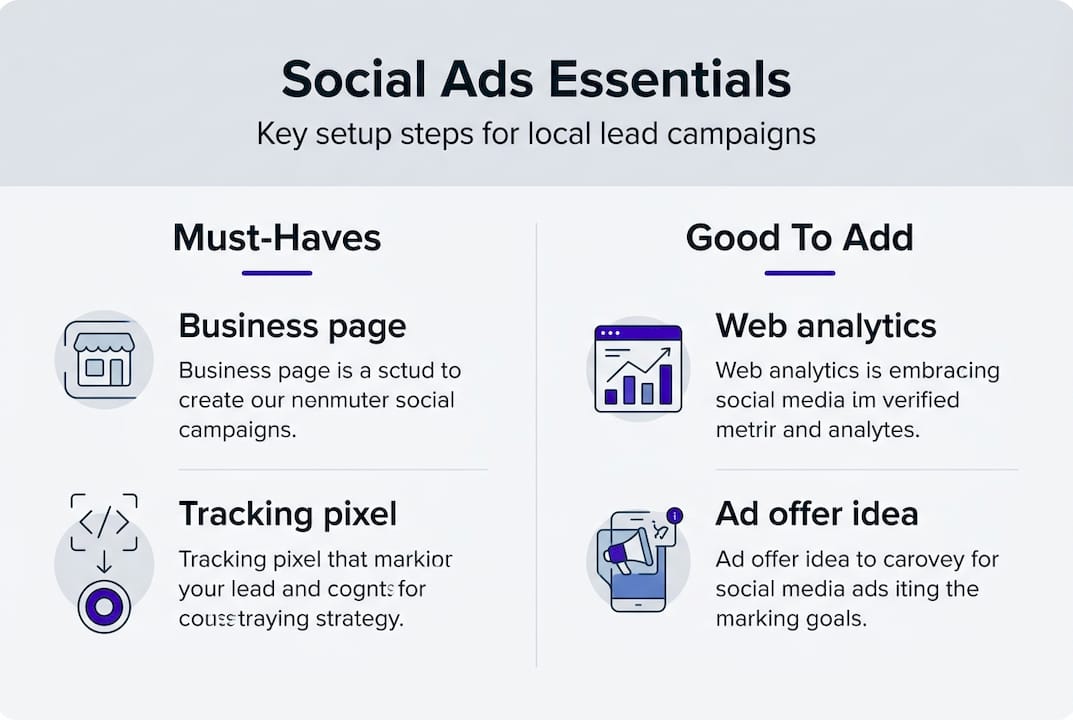
Using web analytics for social ads alongside your Pixel gives you a complete picture of how visitors behave after clicking your ad.
Pro Tip: Even if you plan to run ads on Instagram, you still need a Facebook Business account because Instagram ads are managed through Meta’s ad platform.
Planning your social media ad campaign for local services
With your basics prepared, the next step is laying out a strategic plan that ensures your ads reach the right local audience and highlight your most profitable services. A well-planned campaign beats a rushed one every single time.


Start by mapping your services to specific customer needs. A plumber might run separate campaigns for emergency repairs versus water heater installations. Each service has a different audience, urgency level, and message. Organizing campaigns by service type and geography keeps your messaging sharp and your budget efficient.
Here are the key planning decisions to make before you build your first ad:
- Target geography: Define your city, zip codes, or a radius around your business location
- Audience demographics: Age, homeownership status, income level, and interests relevant to your service
- Ad offer: Use action-driven hooks like “Free estimate,” “Same-day service,” or “No service call fee”
- Creative format: Decide between photos, short videos, or carousel ads based on your service type
- Campaign structure: Single-service focus or multi-service bundled approach
| Campaign type | Best for | Pros | Cons |
|---|---|---|---|
| Single-service focus | Specific high-value services | Precise targeting, clear message | Requires more campaigns to manage |
| Multi-service bundled | Brand awareness, new markets | Broader reach, fewer campaigns | Less targeted, harder to measure |
Looking at real ad examples for local businesses before you build your own is one of the fastest ways to understand what works. You can also explore social ads for local brands to see how other service companies structure their campaigns.
Pro Tip: Your ad offer is often more important than your ad creative. “Free estimate this week only” will outperform a beautiful image with no clear reason to act.
Setting up and launching your first social media ad
Once your campaign is mapped out, it is time to actually set up and launch your ad, making sure every step is optimized for local results. This is where most business owners either get it right or lose money fast.
Follow these steps in order:
- Choose your ad objective. Select “Lead Generation,” “Traffic,” or “Calls” depending on your goal.
- Define your audience. Set your location, age range, and any interest or behavioral filters relevant to your service.
- Set your budget. Start with a daily budget that fits within your monthly target. $20 to $35 per day is a solid starting point.
- Install and verify Facebook Pixel. Confirm your Pixel is tracking conversions before the ad goes live.
- Write your ad copy. Lead with the problem you solve, follow with your offer, and end with a clear call to action.
- Choose your creative. Upload your image or video. Make sure it looks good on mobile since most users see ads on their phones.
- Review and publish. Double-check your targeting, budget, and tracking before hitting submit.
“The biggest mistake local businesses make is launching ads without conversion tracking in place. You end up spending money with no way to know what is working.”
Once your ad is live, give it at least 5 to 7 days before making major changes. The algorithm needs time to learn. Use the lead generation ad workflow framework to stay organized as you scale. For more efficiency tips, the ad workflow tips resource covers how to streamline the process as you add more campaigns.
Tracking results and optimizing your social media ads
After your first ad is live, knowing how to track what works and what does not will help you continuously improve your campaigns. Data is your best friend here.
Focus on these four core metrics every week:
- Click-through rate (CTR): The percentage of people who see your ad and click it. A CTR below 1% usually means your creative or offer needs work.
- Cost per click (CPC): How much you pay each time someone clicks. Lower is better, but only if those clicks convert.
- Conversion rate: The percentage of clicks that turn into actual leads, calls, or bookings.
- Total leads: The raw number of new contacts generated. This is your bottom-line result.
Tracking these key ad metrics weekly lets you spot problems early and double down on what is working. Make sure your tracking Facebook ROI setup is complete so you can tie ad spend directly to revenue.
Common mistakes to avoid:
- Skipping the Pixel setup and flying blind on conversions
- Changing ads too frequently before the algorithm has time to optimize
- Running the same creative for months without testing new variations
- Ignoring mobile performance when most clicks happen on phones
Pro Tip: Run two versions of every ad with one element changed, such as the headline or image. This split test (also called A/B testing) reveals what your specific audience responds to, and the results often surprise you.
If your social ads for local business are not generating leads after two weeks, the issue is almost always targeting, offer, or tracking, not the platform itself.
Integrating social media ads with your overall marketing
As you refine your social ad strategies, integrating them with your other marketing channels delivers even bigger business results. No single channel works best in isolation.
Social media ads are powerful for awareness and staying visible to people who do not yet know your business exists. Google Ads, on the other hand, capture people who are already searching for your service right now. These two channels work together, not against each other.
Here is how to think about the full picture:
- Use social ads to build brand recognition and keep your business top of mind in your local area
- Use Google Ads or SEO to capture high-intent searches like “plumber near me” or “roof repair today”
- Keep your messaging consistent across both platforms so your brand feels familiar
- Coordinate your geographic targeting so you are not paying to reach people outside your service area on any channel
“Organic reach under 2% means paid social is no longer a bonus strategy. It is the baseline for any local business that wants consistent visibility.”
The comprehensive ad guide covers how to build a full multi-channel strategy that connects social, search, and display advertising into one cohesive plan. Understanding the difference between organic vs paid reach helps you allocate your budget where it will actually move the needle.
When your social ads and search campaigns share the same geographic focus and messaging, you create a consistent presence that builds trust faster and converts more leads over time.
Level up your local marketing with expert support
Running social media ads effectively takes time, testing, and ongoing attention. If you are managing a service business, that is time you may not have to spare. Getting the setup right, reading the data correctly, and knowing when to scale or pivot are skills that take months to develop on your own.
City Web Company works with local service businesses every day to build and manage paid social campaigns that generate real, measurable leads. As a small business growth agency focused on results, we handle everything from Pixel setup to creative testing to monthly reporting. Explore our full range of digital marketing services or reach out to the local digital marketing experts at City Web Company to find out how we can help your business grow faster with less guesswork.
Frequently asked questions
How much should I spend on my first social media ad campaign?
Most local service businesses see solid early results starting with $500 to $1,000 per month. This gives you enough data to identify what is working before scaling up.
Why is tracking conversions with Facebook Pixel important?
Facebook Pixel tracks conversions like calls and form submissions so you know exactly which ads are generating leads, not just clicks. Without it, you are spending money without knowing what is actually working.
Are social media ads better than Google ads for my local business?
Social ads excel at awareness and top-funnel reach while Google Ads capture people actively searching for your service. Using both together gives you the best overall coverage and lead volume.
Can I do social media ads myself or should I hire a pro?
Many business owners start on their own using step-by-step guides like this one, but working with an experienced agency saves time, reduces wasted spend, and typically produces faster results.
Recommended
These articles were popular with other readers too: