See how plumbers can turn Facebook scrollers into booked jobs with clear offers, local targeting, a 30 day test budget, fast follow up, and a path to scale.
Call Tracking for Small Businesses: Start With DNI This Week
Yes, call tracking pays off for most small businesses that win customers by phone. Your first move this week: turn on dynamic number insertion (DNI) on your website, then connect call reporting to Google Ads and your Google Business Profile. If you would rather hand off the setup, our team at City Web Company can run it for you.
TL;DR:
- Use dynamic number insertion on websites and fixed numbers for listings and offline ads; test one campaign through connected systems before expanding.
- Attribution captures calls made to tracked numbers, not callers who remember your main line; confirm numbers can transfer before changing providers.
- Google Ads counts every call, but a conversion must meet your chosen duration threshold; reports use ad click dates, so compare results over weeks.
- When call volume is already high, prioritize qualified call rate and record booked, quoted, or lost outcomes in your CRM to compare campaign revenue.
- Call recording is optional; if enabled, disclose it at the start, preserve the notice in the saved audio, and check applicable state rules.
Table of Contents
Table of Contents
- What does call tracking capture, and how does it work?
- How does call tracking improve your return on ad spend?
- How do you set up call tracking step by step?
- How do you read call reports and reconcile them with conversions?
- What are the legal rules for recording calls?
- Which integrations matter, and what does a simple lead workflow look like?
- What does call tracking cost, and how should you budget a pilot?
- How do you choose the right call tracking approach or vendor?
- Our take: start small and tie calls to booked jobs
- How City Web Company can help you track and win more phone leads
- FAQ
- Sources
What does call tracking capture, and how does it work?
Call tracking gives each marketing source its own phone number, so every call can be traced back to the click, listing or flyer that produced it. The tracking number forwards to your real phone line, so customers notice nothing different and you keep your existing phones.
There are two main approaches, and most small businesses end up using both.
Static tracking numbers are fixed numbers you assign to one asset: a Google Business Profile listing, a print ad, a truck wrap, a direct-mail piece. Every call to that number counts for that asset. They are simple, reliable and ideal for offline media.
Dynamic number insertion (DNI) uses a small script on your website that swaps the phone number a visitor sees depending on how they arrived. Someone who came from a paid search ad sees one number, someone from organic search sees another, and a visitor from a social post sees a third. DNI is what lets you tie a call to a specific campaign, keyword or landing page without cluttering your site with a dozen numbers.
Here is what a typical call record includes:
- Call date, time and duration
- The caller’s area code and location
- The tracking number dialed, which maps to the source
- The landing page the caller viewed before dialing (with DNI)
- The campaign, ad group or keyword (when linked to ad platforms)
- A recording or transcript, if you turn recording on
Attribution works by matching the number shown to the number dialed. Click an ad, see Number A, call Number A, and the call is credited to that ad. Print a postcard with Number B, and every call to Number B is credited to the postcard.
Know the limits before you rely on the data. A visitor who sees your site on a laptop and then dials your main line from memory will not be attributed to anything. Someone who saves your number and calls a week later may land on a different number than the one they originally saw. And if you ever switch providers, check that your tracking numbers can be ported, because customers may have saved or printed them. None of this makes the data useless. It means the numbers show a reliable floor of attributed calls, not every call you receive.
How does call tracking improve your return on ad spend?
The core benefit is simple: you stop guessing which marketing produces phone leads. Without tracking, a phone ringing is a mystery. With it, you can see that a certain campaign generates plenty of calls that turn into booked jobs while another generates calls that never convert.
Four metrics matter most for a small business:
- Total calls: the raw volume, split by source.
- Call conversions: calls that meet a rule you set, such as lasting longer than a set number of seconds, or being marked as a qualified lead after review of a recording.
- Phone-through rate (PTR): the share of people who saw an ad or listing and then called. It shows which placements prompt action.
- Qualified-call rate: the share of calls that were real prospects in your service area asking about work you do.
Consider an illustrative example, not market data. Say you spend equal amounts on two campaigns. Campaign A drive many calls, but most are price shoppers outside your service area or wrong numbers. Campaign B drives fewer calls, but most are homeowners ready to book. Without tracking, A looks like the winner. With tracking, you move budget toward B and your booked jobs rise even though total calls fall.
Which metric first? If you are a new business that needs volume to keep the schedule full, start with total calls and PTR. If your phone already rings often but too many calls are dead ends, go straight to qualified-call rate. Most established service businesses should lean toward the second.
Google’s own help documentation makes the volume-versus-quality distinction explicit:
Google Ads counts calls regardless of duration, but only records a call conversion when the call meets the duration threshold you set. That gap between a call and a conversion is where your lead quality shows up.
To see how this connects to revenue, our guide on tracking calls to booked jobs walks through mapping call data to closed work.
How do you set up call tracking step by step?
A lean, test-first setup beats a big rollout. Get one campaign and one number working, verify it, then expand.
- Decide where tracking numbers go. Use DNI on your website, and static numbers for your Google Business Profile, print, vehicles and other offline assets.
- Set up call reporting in Google Ads. Add call assets or call-only ads, enable call reporting, and create a call conversion action. Choose a duration threshold that fits your business (a quick-answer service might use a short threshold, a consultation-based service a longer one).
- Add a tracking number to your Google Business Profile. Keep your main number listed as an additional number so your listing stays consistent. Our walkthrough of three Google Business Profile call-tracking tools covers options to test.
- Place tracking numbers on key landing pages. Put the number high on the page, in the header and near the main button, and make sure it is tap-to-call on mobile.
- Route calls to your existing phones. Confirm forwarding works during business hours, after hours and when lines are busy, so no lead goes to a dead end.
- Run test calls. Dial each number from a phone, once as an ad click and once as an organic visitor, then confirm each appears in Google Ads, your analytics and your CRM as expected.
- Document everything. Write down which number maps to which source, who has access, how long recordings are kept and who reviews the reports.
Pro Tip: Test from a mobile phone on cellular data, not office Wi-Fi, and clear your browser first. Many “DNI isn’t working” problems are cached pages showing the old number.
If you want a partner checklist for connecting follow-up to these calls, this marketing automation checklist for SMBs covers sequencing the steps after a lead comes in.
Plan enough time for a single location to configure the setup, run test calls, and watch for anything odd. If you run several branches, give each its own number pool so reports stay clean. Our piece on multi-location local SEO explains why each branch deserves its own tracked presence.
How do you read call reports and reconcile them with conversions?
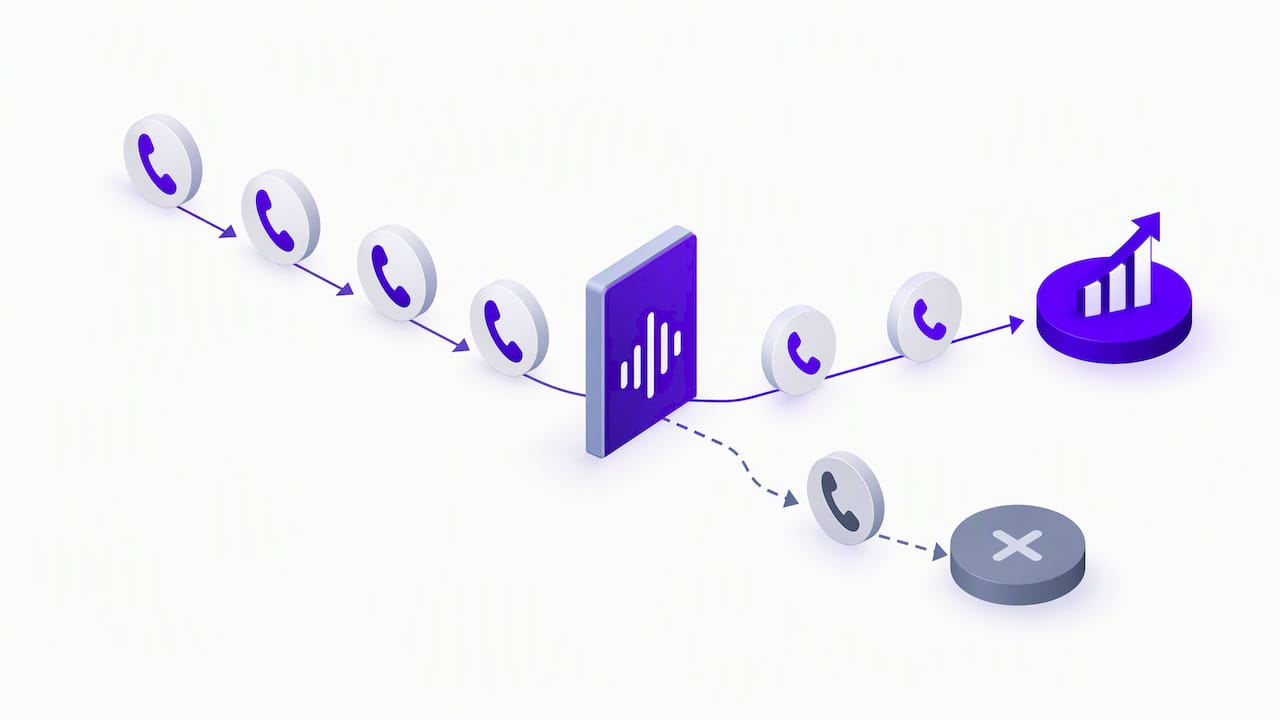
The first thing to get straight is the difference between a call and a call conversion. Google Ads explains that a conversion is measured only when a call meets the duration you set, for example longer than 60 seconds, while calls are counted regardless of length. Setting a threshold filters out hang-ups, wrong numbers and spam so your conversion count reflects real conversations.
The second thing is a date quirk that confuses many owners:
Google Ads reports phone call conversions by the date of the ad click, not the date the call happened. A call on Friday from a click on Monday shows up under Monday.
That is why your call log and your conversion report can look like they disagree. Neither is wrong. They are dated differently.
A few habits keep your numbers trustworthy:
- Judge conversions over weeks, not single days, so the click-date shift evens out.
- Pick a duration threshold, apply it consistently and note any change in your documentation so trends stay comparable.
- Review a sample of recordings each month to confirm the threshold matches reality, since a long call is not always a good lead and a short one can be a booked appointment.
- When recordings are available, add AI-based call analysis or manual scoring on top of the threshold to flag qualified leads.
To reconcile the data, run this check once a month:
- Export your call log from your tracking provider.
- Match each call to the ad-click timestamp and campaign where available.
- Match calls to CRM outcomes: booked, quoted, lost or spam.
- Compare the share of threshold-based conversions against actual booked jobs.
- Adjust the threshold or campaign targeting where the two diverge.
If a large number of “conversions” never turn into jobs, your threshold is probably too low. If booked jobs come from calls your threshold excluded, it is too high. This monthly loop is the highest-value habit in the whole setup, because it turns a pile of call data into a decision about where the next dollar goes.
What are the legal rules for recording calls?
Recording is optional with call tracking, and you can track and attribute calls without recording a word. If you do record, consent rules apply, and they vary by state. Calls involving people in different states can raise additional questions. Because you often cannot know where a caller is, consider using an all-party consent notification on every recorded call and check the rules that apply to your situation.
Compliance summaries recommend a recorded disclosure played at the start of the call, and they stress that you must be able to produce that audio later. As one legal guide puts it, evidentiary proof of the disclosure is critical, so the notice should be captured inside the audio file itself, not just played to the caller. The same guide notes that a universal all-party consent notice on every recorded call is the most secure practice for multi-state calling.
Practical controls for a small business:
- Automated disclosure at the start of every recorded call, such as “This call may be recorded for quality and training.”
- A written retention policy that sets how long recordings are kept and when they are deleted.
- Role-based access so only the people who need recordings can hear them.
- Audit logs that show who accessed or exported a recording.
- Vendor contract terms covering any third party that stores, transcribes or analyzes your recordings, including how they protect and delete the data.
If you want a fallback design for sensitive calls, let the caller continue unrecorded, or ask for a simple verbal or keypad acknowledgment before recording begins.
Pro Tip: Listen to your own disclosure on a test recording. If the notice is not audible in the saved file, you do not have the proof you think you have.
This is general information, not legal advice. Check your state’s rules and talk to an attorney before turning on recording at scale.
Which integrations matter, and what does a simple lead workflow look like?
Call tracking is only as useful as the systems it feeds. Four connections matter most:
- Google Ads call reporting: sends call conversions back to your campaigns so bidding and budgets reflect real phone leads.
- Google Business Profile call history: shows calls from your listing, so your local presence has numbers behind it.
- Your CRM: creates a lead record for each call, routes it to the right person and stores the outcome.
- Your analytics platform: ties phone calls to the same website sessions and campaigns you already review.
A sample workflow looks like this. A homeowner clicks your ad, lands on a page showing a campaign-specific number and taps to call. The tracking platform logs the call with source, landing page and duration. A lead is created in your CRM with that source attached. Your office books the job or marks the call lost, and the CRM records the outcome and, eventually, the revenue. The attribution lives in the call log, the conversion lives in Google Ads and the dollar value lives in the CRM.
After the initial setup, check integration health on a schedule. Place a test call monthly, confirm it shows in each system, and watch for gaps such as calls logged without a CRM record. Most broken setups fail quietly, and a monthly test call is the cheapest insurance you can buy.
The step that separates useful data from decoration is tying outcomes back to revenue. Mark each call in your CRM as booked, quoted or lost, and attach the job value when it closes. Once that is in place, you can compare campaigns by revenue per call instead of calls alone.
What does call tracking cost, and how should you budget a pilot?
Prices vary widely by provider and plan, so no single number fits everyone. Here is what usually drives the bill:
- Pricing models: monthly tiers, per-number fees, per-minute or per-call charges, and add-ons for extra seats or features.
- Number pool size: DNI needs enough numbers to cover your simultaneous website visitors, and bigger pools cost more.
- Retention period: keeping recordings longer costs more.
- AI transcription and analysis: usually a premium feature.
- Multi-seat access: more users, higher plan.
To estimate your spend, count your expected monthly calls, then match that volume to a plan that includes the integrations you need. Do not pay for features you will not use during the pilot.
Start with a pilot. Run a pilot for a practical period, then compare what you paid against the value of the qualified calls it produced. If a handful of booked jobs covers the cost, expand. If not, you have learned that cheaply.
How do you choose the right call tracking approach or vendor?
Judge any option against the same criteria: integrations with Google Ads, Google Business Profile and your CRM; attribution accuracy; compliance controls; retention and security; reporting flexibility; and the quality of support and onboarding.
Priorities shift by situation. A single-location service business needs simple setup, solid DNI and a clean Google Ads connection. A multi-location business needs number pools per branch and roll-up reporting. A high-ad-spend business needs keyword-level attribution and AI call scoring.
Questions to ask during a demo:
- How accurate is your DNI when visitors arrive from different sources and devices?
- Can you show a working example with Google Business Profile?
- How does the recording disclosure get captured inside the audio file?
- What role-based access and audit logging do you offer?
- What retention options are available, and what happens to my data if I leave?
Set acceptance criteria before the pilot starts:
- Test calls from each source appear correctly in every connected system.
- The CRM receives a lead record for every tracked call.
- Attributed calls match your manual spot checks within an agreed tolerance.
- The cost per qualified call is lower than your current baseline or hits your target.
If a vendor cannot meet these during the pilot, you have your answer.
Our take: start small and tie calls to booked jobs
Here is the stance I hold after looking at how small businesses use this: most owners overspend on features and underspend on follow-through. A fancy dashboard does nothing if nobody marks which calls became jobs. The winning setup is boring: one tracked campaign, a sensible duration threshold, a monthly test call and a CRM that records outcomes.
An agency like ours typically stages the work in three steps. Discovery maps your current phone leads, ad accounts and CRM. A pilot connects one campaign or location and verifies every number. Scale rolls the setup to the rest of your marketing once the data checks out. In our service-business case studies, we share examples of our work.
Reach out when you are spending on ads without knowing which ones produce phone work, or when you have a tracking tool installed that nobody trusts. A discovery call covers your phone flow.
— Matt
How City Web Company can help you track and win more phone leads
If you want call tracking running without learning every setting yourself, we handle it end to end. That includes Google Ads management with call conversions configured correctly, local SEO and Google Business Profile setup, website updates so tracking numbers sit where customers look, and reporting you can read at a glance.


A pilot with us starts with a short discovery call, then a single tracked campaign, test calls on every number and a plain-language report tying calls to booked jobs. Current pricing details are on our website. See what we offer on our services page, or get started here and we will map out your first pilot.
FAQ
How much does call tracking cost for a small business?
Cost depends on your call volume, number pool size and extras like recording retention and AI analysis. Most providers charge a monthly tier, per-number fees or per-minute rates. Run a pilot on one campaign to see what it costs against the value of qualified calls.
What should I look for in call tracking software?
Look for solid dynamic number insertion, a clean Google Ads and Google Business Profile connection, CRM integration and clear compliance controls. Ask how the recording disclosure is saved inside the audio file. Support and onboarding quality matter as much as features for a small team.
What is a phone call conversion in Google Ads?
A call conversion is a call that lasts at least as long as the duration threshold you set, while a plain call is counted regardless of length. Setting a threshold filters out hang-ups and wrong numbers. Choose one that matches how long a real inquiry takes in your business.
Why don’t my call dates match my Google Ads conversion dates?
Google Ads attributes call conversions to the date of the ad click, not the date of the call. A call placed days after the click is dated back to the click. Compare weekly totals instead of single days.
Do I need to record calls to use call tracking?
No. You can attribute and measure calls without recording anything. Record only if you want to review lead quality or train staff, and if you do, play a disclosure at the start of every call and keep proof of it in the audio file.
Sources
- Measure calls from ads – Google Ads Help
- Call Recording Laws: What Businesses Need to Know | Landis Technologies
Recommended
These articles were popular with other readers too: