
Use website DNI, connect call reports to Google Ads and your Google Business Profile, then tie calls to booked jobs. City Web Company can handle setup.
Social Media Strategies for Clinics: A Practical Playbook
The best social media strategies for clinics combine a consistent, HIPAA-safe education-first content system with modest paid amplification targeted to local patients. Clinics that commit to this approach see measurable gains in profile visits, appointment clicks, and patient trust within 90 days, without the legal exposure that comes from improvised posting.
Start here. These five moves drive the most results:
-
Pick two platforms. Facebook and Instagram reach the widest adult patient demographic for most clinic types. Add a third only when you have the staff to sustain it.
-
Post on four content pillars. Patient education, team and facility humanization, specialty proof (before/after with consent, procedure explainers), and logistics (hours, booking, insurance updates).
-
Hold a 3x-per-week cadence. Consistency outperforms volume. Three well-reviewed posts beat seven rushed ones every time.
-
Run a small paid amplification budget. A modest monthly budget in boosted posts and local awareness ads extends your organic reach to prospective patients who have never heard of your clinic.
-
Build a compliance workflow before you publish anything. Every post needs a PHI check and a clinical review sign-off. No exceptions.
90-day benchmarks to track:
- Days 1–30: accounts fully set up, first content batch scheduled, baseline metrics recorded
- Days 31–60: engagement rate climbing, first paid campaign live, appointment-click tracking confirmed
- Days 61–90: measurable increase in profile visits, at least one inbound appointment attributed to social, monthly report template in use
According to peer-reviewed analysis on social media in health education, clinical organizations that establish governance frameworks for social media protect patient privacy while capturing the patient education benefits the channel delivers.
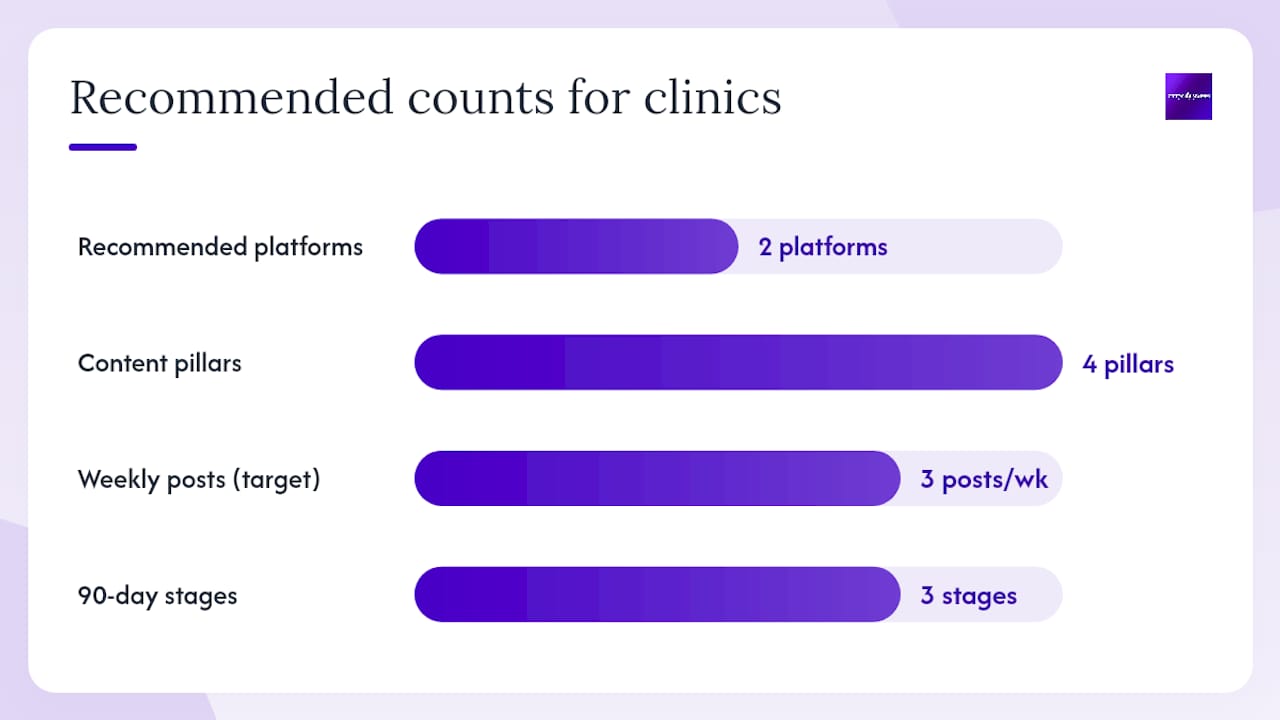
Table of Contents
Key Takeaways
The most effective social media strategies for clinics combine a consistent, HIPAA-safe education-first content system with targeted paid amplification, a documented compliance workflow, and KPI tracking tied directly to appointment conversions.
| Point | Details |
|---|---|
| Start with two platforms | Facebook and Instagram cover the widest adult patient demographic and share one ad account through Meta Business Suite. |
| Use the four-pillar framework | Rotate posts across patient education, team humanization, specialty proof, and logistics to maintain variety and relevance. |
| Build a compliance workflow first | Every post needs a PHI check and clinical sign-off before publishing; document approvals for at least six years per HIPAA requirements. |
| Pair organic with paid at $300+ per month | A starter paid budget at a modest level per month extends reach to local patients who have not yet found your clinic. |
| City Web Company manages the full workflow | From content creation and clinical review coordination to paid social and monthly reporting, City Web Company structures retainers around clinic-specific compliance and conversion goals. |
Table of Contents
- Why Does Social Media Matter for Your Clinic?
- What Are the Core Social Media Strategies Clinics Can Start This Week?
- Which Platforms Should Your Clinic Use, and What Works on Each?
- Content Templates, Caption Examples, and a 30/60/90-Day Calendar
- HIPAA, Patient Privacy, and Legal Compliance for Social Media
- Dos and Don’ts for Clinic Social Media Accounts
- Paid Social for Clinics: Ad Types, Sample Budgets, and Compliance Guardrails
- What KPIs Should Clinics Track, and Which Tools Help?
- What Does a 30/60/90-Day Launch Plan Look Like, and What Does It Cost?
- How Should Clinics Handle Negative Reviews and Social Media Crises?
- What City Web Company Sees Working for Clinics Right Now
- City Web Company Helps Clinics Build Social Media That Actually Converts
- Sources
- FAQ
Why Does Social Media Matter for Your Clinic?
Patients check your Facebook page before they call. They scroll your Instagram before they book. Social media has become the trust-check that precedes nearly every new patient relationship, and clinics that treat it as optional are handing that first impression to whoever does show up online.
The business case goes beyond brand awareness:
- Patient education and retention. Consistent educational content keeps existing patients engaged between visits and positions your clinic as a reliable source of health information rather than just a billing address.
- Local visibility and appointment funnel support. Posts that include booking links, hours, and service updates shorten the path from discovery to appointment. Education-first content outperforms promotional content for healthcare organizations, and consistent posting builds trust more reliably than chasing viral moments.
- Reputation signaling. A well-maintained, active profile signals that the practice is current, responsive, and trustworthy. A dormant one raises doubt.
- Staff recruiting. Humanized content showing your team culture attracts clinical and administrative candidates who want to see where they are applying before they send a resume.
- Community reach. Seasonal health campaigns, vaccination reminders, and public health updates tied to CDC guidance give your clinic a reason to post that patients genuinely appreciate.
The Mayo Clinic’s documented social media approach demonstrates what happens when institutional social programs run with clinical governance and centralized workflows: patient engagement increases and the organization becomes a trusted health information source in its community. The same principle scales down to a two-provider family practice.
One caution worth naming early: social media contributes to self-diagnosis and health misinformation, which means your clinic’s presence is not just a marketing asset. It is also a responsibility. Content that clarifies when to seek care, rather than content that attempts to diagnose, is the right frame.
What Are the Core Social Media Strategies Clinics Can Start This Week?
The four-pillar content framework is the most practical structure for clinic social media: patient education, team and facility life, specialty proof, and logistics. Build your weekly posting plan around these four categories and you will never stare at a blank content calendar again.
Content pillars in practice
Patient education covers condition explainers, seasonal health tips, medication reminders, and links to authoritative sources like the CDC. Keep the language at a 6th-to-8th grade reading level and always include a “talk to your provider” disclaimer on any clinical topic.
Team and facility posts humanize your practice. A photo of your front desk team on a Monday morning, a short video of your provider explaining what they love about their specialty, or a tour of a newly renovated exam room all build the kind of familiarity that makes a first appointment feel less intimidating.
Specialty proof includes before/after content (with written patient consent and a signed image release), procedure explainers, and outcome statistics where appropriate. This pillar does the most work for converting prospective patients who are comparison-shopping.
Logistics posts are underrated. Hours changes, new insurance accepted, online booking reminders, and parking updates get high engagement because they answer questions patients actually have.
Cadence and staffing
Three posts per week is the realistic floor for most clinic social managers working alongside other duties. Batch-create content in two-hour blocks once a week rather than posting day-by-day. Assign one person as the social manager, one clinical reviewer (a provider or compliance officer), and one final approver. That three-step review takes under 15 minutes per post when the workflow is documented.
Weekly mini-checklist for the clinic social manager
- Draft the week’s three posts using approved templates and pillar rotation.
- Submit drafts to the clinical reviewer for accuracy and PHI check.
- Schedule approved posts using Meta Business Suite, Hootsuite, or Buffer.
- Monitor comments and messages daily; flag anything requiring a clinical or legal response.
- Pull weekly metrics (reach, engagement, appointment clicks) and log them in the monthly dashboard.
Pro Tip: Before any post goes live, run a quick PHI scan: does the post identify a specific patient by name, photo, condition, or appointment date? If yes, you need written authorization before publishing. De-identify all patient references by default and document your review sign-off for every post.
Which Platforms Should Your Clinic Use, and What Works on Each?
Not every platform deserves your attention. Match the platform to your patient demographics and your team’s capacity, then go deep on two or three rather than thin across five.
| Platform | Best for (patient demographics/goals) | Content types that perform | Ad options and targeting | Recommended frequency |
|---|---|---|---|---|
| Adults 35+, community awareness, appointment booking, local reach | Educational posts, staff spotlights, event announcements, video explainers, patient reviews | Local awareness ads, traffic-to-booking, lead forms; detailed demographic and ZIP-code targeting | 4–5x per week | |
| Adults 25–44, visual specialties (dermatology, dental, med spa), brand humanization | Reels (15–60 sec), before/after (with consent), Stories for polls and Q&A, carousel education | Same Meta ad account as Facebook; strong visual targeting; Reels ads for reach | 3–4x per week | |
| TikTok | Adults 18–34, health education, provider personality, specialty awareness | Short educational videos, day-in-the-life, myth-busting, trending audio with clinical context | TikTok for Business ads; note that health-related ad categories face additional review; check current TikTok ad policies before launching | 2–3x per week |
| YouTube | All ages, long-form patient education, procedure walkthroughs, FAQ videos | 3–10 minute explainer videos, provider Q&As, facility tours | Pre-roll and in-feed video ads; strong for retargeting website visitors | 1–2x per week |
| Providers, referral partners, staff recruiting, B2B health services | Thought leadership articles, staff announcements, practice milestones, research summaries | Sponsored content and InMail for professional audiences; less useful for direct patient acquisition | 2–3x per week |
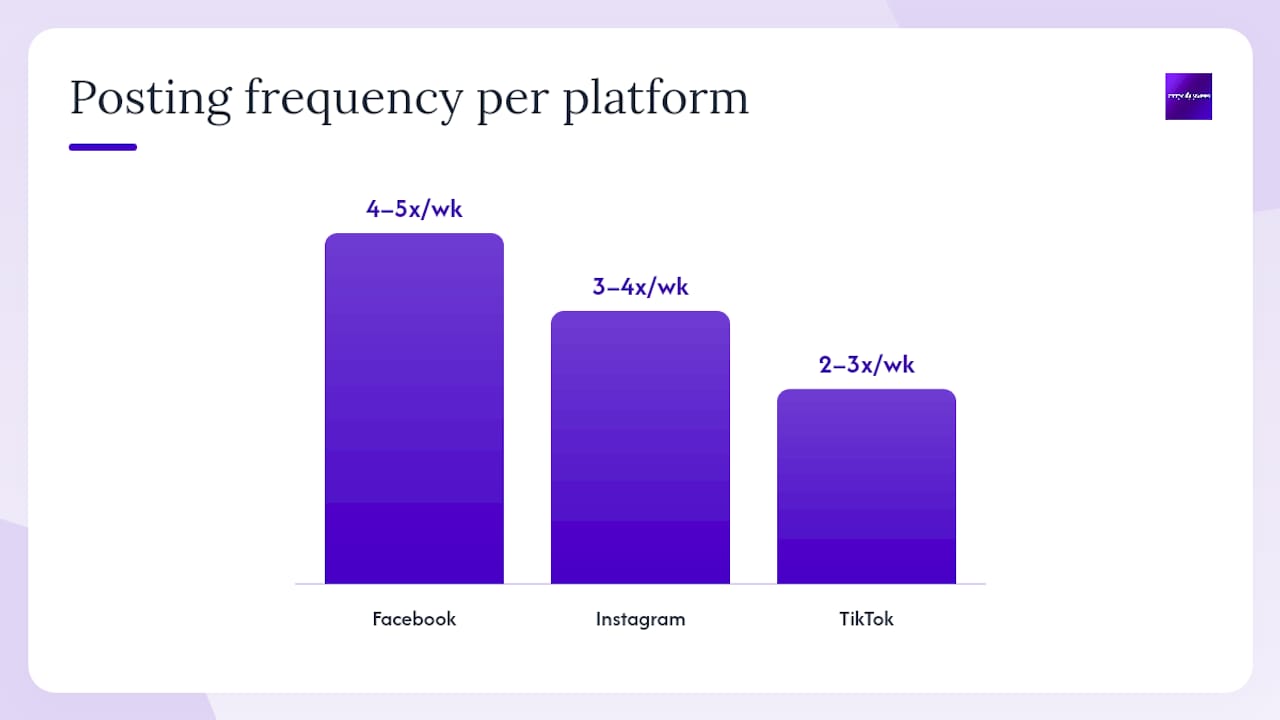

How to pick your primary platforms: If your clinic serves adults 30 and older and your goal is appointment volume, start with Facebook and Instagram. They share one ad account through Meta Business Suite, which cuts your management overhead in half. Add YouTube when you have a provider willing to record a 5-minute video once a month. Hold TikTok until you have a team member comfortable on camera and a compliance workflow that can handle faster content cycles. LinkedIn is worth maintaining for referral relationships and recruiting, but rarely drives direct patient bookings for most clinic types.
Pro Tip: Use Instagram Reels for humanization content. A 30-second clip of your provider answering “What should I bring to my first appointment?” gets more organic reach than a static post and costs nothing extra to produce. Pair it with a Facebook post of the same content and you have covered both platforms in one shoot.
Content Templates, Caption Examples, and a 30/60/90-Day Calendar
30/60/90-day content calendar framework
Days 1–30: Foundation month
- Week 1: Account setup, profile optimization, first staff spotlight post
- Week 2: Patient education post (condition explainer), logistics post (hours and booking link)
- Week 3: Specialty proof post (procedure explainer, no patient identifiers), team culture video
- Week 4: Seasonal health tip linked to CDC guidance, appointment reminder post
Days 31–60: Momentum month
- Continue 3x-per-week cadence with pillar rotation
- Introduce first paid boost ($50–$100 on a high-performing educational post)
- Add one Instagram Reel per week
- Test one lead-form ad on Facebook targeting local ZIP codes
Days 61–90: Optimization month
- Review top-performing posts and replicate the format
- Increase paid budget based on cost-per-click data
- Add patient testimonial post (written consent on file, no PHI)
- Build a content batch for the next 30 days using Canva templates
20+ post prompt ideas by pillar
Patient education (link to CDC or HHS where applicable):
- “Three signs it’s time to see a provider about [symptom]”
- “What happens at a [specialty] appointment? Here’s what to expect.”
- “Myth vs. fact: [common misconception about your specialty]”
- “Seasonal health tip: [flu, allergy, skin, etc.] season is here.”
- “When should you go to urgent care vs. your primary care provider?”
Team and facility:
6. “Meet [first name only], our [role] who has been with us for [X] years.”
7. “A look inside our newly updated [room or equipment].”
8. “What our team does to stay healthy. [Provider tip]”
9. “Behind the scenes: how we prepare for a busy clinic day.”
10. “We’re hiring! [Role] position open. Link in bio.”
Specialty proof:
11. “Before and after: [procedure] results. Patient shared with permission.” (written consent required)
12. “How [procedure] works, step by step.”
13. “Frequently asked questions about [specialty service], answered.”
14. “Why we recommend [treatment approach] for [condition].”
15. “What sets our [specialty] team apart.”
Logistics:
16. “We now accept [insurance plan]. Call to confirm your coverage.”
17. “Book online in under two minutes. Link in bio.”
18. “Our hours this holiday week: [hours].”
19. “New patient? Here’s what to bring to your first visit.”
20. “We’ve moved! Our new address is [address].”
Caption templates
Patient education post:
“[Condition or topic] affects millions of Americans every year. Here’s what you need to know: [2–3 bullet points]. Questions? Book a visit with our team. [Booking link]. This post is for general information only and is not a substitute for professional medical advice.”
Staff spotlight:
“Meet [First Name], our [Role]. [One sentence about their background or what they love about their work]. We’re proud to have them on our team. [Clinic name] [City].”
Appointment reminder:
“Reminder: [seasonal service, e.g., annual wellness visit] season is here. Don’t wait until you’re sick to schedule. Book online at [link] or call us at [phone].”
Pro Tip: Use Canva’s healthcare template library to build a branded post kit: one template per content pillar, with your logo, brand colors, and font locked in. Batch-create four weeks of graphics in a single two-hour session. This is the single fastest way to sustain cadence without burning out your social manager. Per guidance from Apaya’s practice framework, batching and automation are what separate clinics that sustain their social presence from those that go dark after six weeks.
HIPAA, Patient Privacy, and Legal Compliance for Social Media
This section is general information, not legal advice. Consult your compliance officer or healthcare attorney for guidance specific to your practice.
The short answer: if a social post, ad, or comment could identify a specific patient, you need written authorization before it goes live. HHS OCR guidance is explicit that marketing communications involving protected health information (PHI) require prior patient authorization. A post that names a patient, shows an identifiable photo, or references a specific appointment or diagnosis is a potential HIPAA violation, regardless of intent.
“The HIPAA Privacy Rule gives patients important controls over their health information, including the right to authorize uses and disclosures of their PHI for marketing purposes. Covered entities must obtain valid authorization before using PHI in marketing communications, including social media posts, testimonials, and before/after imagery.” HHS OCR, HIPAA Marketing Guidance
Social post compliance checklist
- Does the post name, photo, or describe a specific patient? If yes, written authorization is required.
- Does the post reference a condition, treatment, or appointment tied to an identifiable individual? Same rule.
- Is the image release signed, dated, and stored in the patient record? Required for any patient photo.
- Does the caption include a general health disclaimer (“not a substitute for professional medical advice”)?
- Has a clinical reviewer signed off on any medical claims in the post?
- Is the post archived with its approval documentation for at least six years?
Ad-specific compliance
Avoid using custom audience uploads that include patient data. Meta’s ad platform allows email list targeting, but uploading a patient email list without explicit authorization is a HIPAA risk. Use geographic and demographic targeting instead. Never respond to a comment or message in a way that confirms someone is a patient of your clinic. A reply like “We’re glad your appointment went well!” publicly confirms a patient relationship and can constitute a PHI disclosure.
Peer-reviewed governance research confirms that clinics need formal social media policies, not just informal guidelines, to manage these risks consistently across staff. Per Adpicto’s HIPAA guide for medical practices, AI tools used for content drafting must never receive PHI as input, and all AI-generated medical content requires clinical review before publishing.
Dos and Don’ts for Clinic Social Media Accounts
Do these
- Post educational content that helps patients understand when to seek care.
- Humanize your staff with first-name-only spotlights and team photos (with staff consent).
- Include a booking link or phone number in every logistics post.
- Respond to positive comments with a warm, generic acknowledgment (“Thank you for the kind words!”).
- Direct patients with clinical questions to call the office or book an appointment.
- Archive every post with its approval documentation.
- Solicit Google reviews from satisfied patients through post-visit follow-up (not in exchange for discounts or gifts, which violates FTC guidelines).
Don’t do these
- Never confirm that a commenter is a patient of your clinic in a public reply.
- Never post identifiable patient information without written authorization.
- Never offer a diagnosis or specific medical advice in comments or direct messages.
- Never delete a negative review on Google or Yelp (you cannot, but do not attempt to manipulate review platforms).
- Never use patient email lists for ad targeting without explicit authorization.
- Never let a staff member post from the clinic account without going through the review workflow.
Correct vs. incorrect reply examples
Scenario: A commenter writes, “I came in last Tuesday with a terrible rash and Dr. Smith fixed it right away!”
- Incorrect reply: “So glad Dr. Smith was able to treat your rash! We hope you’re feeling better.”
- Correct reply: “Thank you for sharing your experience! We’re happy to hear you’re feeling well. We’d love to see you again.”
The incorrect reply confirms a patient visit and a condition, both PHI disclosures. The correct reply is warm without confirming any clinical detail.
Comment moderation policy
- Spam or irrelevant commercial comments: delete immediately.
- Threats or abusive language: hide the comment, document it, and report to the platform.
- Misinformation about health topics: respond with a factual correction and a link to a credible source (CDC, HHS), then flag for clinical review.
- Negative patient experience claims: respond with a brief, empathetic public reply and invite the person to call the office. Never address clinical details publicly.
Hopkins Medicine’s reporting on self-diagnosis via social media underscores why clinics must avoid diagnostic back-and-forth in comments. The risk of reinforcing a wrong self-diagnosis is real, and the liability exposure is significant.
Paid Social for Clinics: Ad Types, Sample Budgets, and Compliance Guardrails
Paid social amplifies what your organic content already does well. The goal is not to replace organic posting but to push your best educational and booking-focused content in front of local patients who have not yet found your clinic.
Ad formats that work for clinics
- Awareness boosts: Take a high-performing educational post and boost it to a local radius (5–15 miles) for $50–$100. This is the lowest-risk entry point and builds brand recognition fast.
- Traffic-to-booking ads: Link directly to your online booking page. Use a clear call to action (“Book your annual wellness visit”) and a photo of your team or facility, not stock imagery.
- Lead form ads: Meta’s native lead forms let patients submit their name and phone number without leaving the app. Useful for new patient acquisition campaigns. Ensure your form language and data handling comply with your privacy policy.
- Local service ads: Available through Google for certain healthcare categories. These appear at the top of search results and charge per lead rather than per click. Check current eligibility for your specialty.
For detailed guidance on running social media advertising for healthcare, including campaign structures and targeting setups, City Web Company has a dedicated local guide.
Sample monthly budget tiers
| Tier | Monthly ad spend | Expected reach | Realistic outcome |
|---|---|---|---|
| Starter | a modest monthly ad spend | thousands of local impressions | dozens of profile visits, some appointment clicks |
| Growth | a higher monthly ad spend | more local impressions | more profile visits, more appointment clicks |
| Accelerate | the highest monthly ad spend | the largest local impressions | a higher number of profile visits and appointment clicks |
These ranges reflect typical performance for local clinic campaigns on Meta. Actual results vary by specialty, creative quality, and local competition.
Ad compliance checklist
- Ad copy must not imply a specific patient relationship or outcome guarantee.
- Landing pages must include a privacy policy link and a general health disclaimer.
- Never include PHI in ad creative, targeting lists, or retargeting audiences built from patient data.
- Review Meta’s health and wellness advertising policies before launching any campaign involving medical services. Certain categories (addiction treatment, weight loss) face additional restrictions.
- Document ad approvals alongside organic post approvals.
Pair every paid campaign with the organic content it amplifies. An ad driving traffic to a booking page performs better when the clinic’s organic feed already shows a warm, credible practice. Patients click ads from clinics they recognize. Healthcare social media strategy synthesis consistently recommends combining community-focused organic content with targeted paid promotion for local patient acquisition.
For a broader look at online advertising strategies for healthcare growth, including how paid social fits alongside Google Ads and streaming TV, City Web Company’s healthcare advertising guide covers the full channel mix.
What KPIs Should Clinics Track, and Which Tools Help?
Tracking the right metrics separates clinics that improve from those that just post and hope. Focus on leading indicators (what predicts future appointments) and lagging indicators (what confirms past results).
| KPI | Why it matters | How to track it |
|---|---|---|
| Profile visits | Signals brand discovery; a leading indicator of appointment intent | Meta Business Suite Insights, Google Business Profile dashboard |
| Appointment clicks | Direct measure of social-to-booking conversion | UTM parameters on booking links, Google Analytics 4 goals |
| Engagement rate | Shows whether content resonates; low engagement means wrong content or wrong audience | Meta Business Suite, Sprout Social, Hootsuite |
| New followers | Indicates audience growth and local reach expansion | Native platform analytics |
| Ad CTR | Measures paid creative effectiveness; benchmark 1–3% for healthcare | Meta Ads Manager |
| Cost per appointment click | Ties ad spend to booking intent; target varies by specialty and market | Meta Ads Manager with UTM tracking in Google Analytics |
Recommended tools
Meta Business Suite is the starting point for any clinic running Facebook and Instagram. It handles scheduling, inbox management, and basic analytics in one place, at no cost.
Google Analytics 4 tracks what happens after a patient clicks from social to your website. Set up a goal for appointment page visits or form completions and you will know exactly how many social visitors convert.
Hootsuite and Sprout Social both offer multi-platform scheduling, team approval workflows, and reporting dashboards. Sprout Social’s approval workflow feature is particularly useful for clinics that need a documented clinical review step before posts go live. Hootsuite’s lower entry price makes it the better fit for smaller practices.
Buffer is the lightest-weight option: simple scheduling, basic analytics, and a clean interface. Good for a solo social manager who does not need team approval features.
Canva is not an analytics tool, but it belongs in every clinic’s toolkit for consistent, on-brand visual content. Its healthcare template library and brand kit feature cut graphic design time significantly.
Reporting cadence
Pull a monthly report covering the six KPIs above. Compare month-over-month trends, not just raw numbers. Share the report with your clinical and administrative leadership so social media performance stays connected to practice revenue goals.
What Does a 30/60/90-Day Launch Plan Look Like, and What Does It Cost?
Milestone timeline
Days 1–30: Setup and first batch
- Audit existing social profiles: update bios, profile photos, contact info, and booking links.
- Draft and get approval for the first 12 posts (four per week for three weeks).
- Set up Meta Business Suite, connect Facebook and Instagram, and configure basic analytics.
- Establish the three-step review workflow (social manager, clinical reviewer, approver).
- Record baseline metrics: current followers, profile visits, and any existing engagement rate.
Days 31–60: Paid test and cadence lock
- Launch first paid campaign: a $50–$100 boost on the best-performing organic post.
- Set up UTM tracking on all booking links.
- Add Instagram Reels to the content mix (one per week).
- Review first month’s metrics and adjust content mix based on what performed.
- Produce the second content batch for days 31–60.
Days 61–90: Optimization and reporting
- Scale paid budget based on cost-per-click data from the first campaign.
- Produce first formal monthly report using the KPI dashboard.
- Add a patient testimonial post (confirm written consent is on file).
- Evaluate whether a third platform (YouTube or LinkedIn) is worth adding.
- Decide: continue in-house or bring in an agency for the next quarter.
Staffing and time estimates
- Social manager: 5–8 hours per week (drafting, scheduling, monitoring, reporting)
- Clinical reviewer: 1–2 hours per week (PHI check and medical accuracy sign-off)
- Approver (practice manager or provider): 30 minutes per week (final sign-off)
Typical cost ranges
DIY approach:
- Canva Pro: $15/month
- Hootsuite or Buffer: $18–$99/month depending on plan
- Ad spend: $300–$600/month at the starter tier
- Total: roughly $333–$714/month plus internal staff time
Agency retainer:
- Entry-level social media management retainers for clinics typically run $1,000–$2,500/month and include content creation, scheduling, community management, and monthly reporting.
- Full-service retainers that include paid social management, local SEO, and Google Business Profile optimization run $2,500–$5,000/month for most clinic sizes.
When to hire an agency vs. scale in-house:
- Hire an agency if your social manager is also handling front desk, billing, or clinical duties. Split attention produces inconsistent posting and missed compliance steps.
- Hire an agency if you want to run paid campaigns but lack someone with Meta Ads Manager experience.
- Scale in-house if you have a dedicated marketing coordinator with at least 10 hours per week available and a documented compliance workflow already in place.
For clinics evaluating the full picture of digital marketing for local service businesses, including how social fits alongside SEO and paid search, City Web Company’s local lead guide covers the decision framework in detail.
How Should Clinics Handle Negative Reviews and Social Media Crises?
Every clinic will eventually face a negative review, a complaint post, or a misinformation thread. The response process matters more than the incident itself.
Escalation flow
- Monitor: Use Meta Business Suite or a social listening tool to catch mentions, comments, and reviews within 24 hours.
- Triage: Is this a general complaint, a clinical concern, a legal threat, or misinformation? Route accordingly.
- Clinical or legal review: Any comment referencing a specific treatment, outcome, or provider goes to your compliance officer or attorney before you respond publicly.
- Offline resolution: Post a brief public reply, then move the conversation to a private channel (phone or secure message). Never resolve clinical complaints in a public comment thread.
- Public follow-up: Once resolved, a brief follow-up comment (“We’re glad we could connect and address your concerns”) closes the thread without disclosing any clinical detail.
Public response templates
Negative review (general dissatisfaction):
“Thank you for sharing your feedback. We take every patient experience seriously and would like to learn more. Please call our office at [phone] so we can address your concerns directly.”
Misinformation in comments:
“We want to make sure our community has accurate information. [Factual correction in one sentence.] For more details, visit [CDC or HHS link]. Our team is happy to answer questions by phone or at your next visit.”
Threat or abusive comment:
Hide the comment, document it with a screenshot and timestamp, and report it to the platform. Do not engage publicly.
Soliciting positive reviews ethically
Ask satisfied patients to leave a Google review at the end of a visit or in a follow-up message. The request must be unconditional: no discounts, no gifts, and no directing patients only to positive review platforms (a practice the FTC has penalized). A simple “If you had a good experience, we’d appreciate a Google review” is compliant and effective.
HHS OCR guidance applies here too: never respond to a review in a way that confirms the reviewer is a patient or discloses any detail of their care, even to defend the practice.
What City Web Company Sees Working for Clinics Right Now
The clinics that get the most out of social media are not the ones with the biggest budgets. They are the ones with the clearest workflow. A documented three-step review process, a content calendar built four weeks in advance, and a paid amplification budget of even $400 per month consistently outperform clinics that post reactively and boost sporadically.
One anonymized example: a multi-provider specialty clinic that started with zero paid social and a dormant Facebook page ran a 60-day content and paid campaign program. The clinic posted three times per week using the four-pillar framework, boosted two posts per month at $150 each, and set up UTM tracking on their booking link. By day 60, appointment clicks from social had increased measurably, profile visits were up, and the practice had its first documented social-attributed new patient booking. The workflow required roughly six hours per week of staff time, split between a front-desk coordinator and a clinical reviewer.
City Web Company typically structures a clinic social media retainer around three deliverables: a monthly content batch (12–16 posts, reviewed and approved), a paid campaign managed within the client’s ad budget, and a monthly performance report tied to appointment-click and profile-visit KPIs. The compliance workflow, including PHI review and clinical sign-off documentation, is built into the retainer from day one.
City Web Company Helps Clinics Build Social Media That Actually Converts
Running compliant, consistent social media for a clinic is a real operational commitment, and most clinic teams are already stretched. City Web Company handles the full workflow: content creation, clinical review coordination, scheduling, paid social management, and monthly reporting, so your team focuses on patients, not post approvals.
Services relevant to clinics include social media management (Facebook, Instagram, TikTok), paid social campaigns with HIPAA-aware targeting, local SEO and Google Business Profile optimization, and website updates that support online booking and appointment conversion. Every campaign includes a compliance review step and documentation that your practice can keep on file.
Ready to see what a clinic-specific social media program looks like for your practice? Request a quote or audit and City Web Company will map out a 90-day plan built around your specialty, your patient demographics, and your current online presence.
Sources
These primary sources and industry guides are the references your clinic’s compliance team and marketing staff should keep on hand:
- Hhs
- Ncbi
- Cdc
- Hopkinsmedicine
- Social Media for Healthcare: How to Keep Patients Engaged
- Mayo Clinic’s Prescription for Social Media Success – TTEC
- Social Media for Healthcare Practices: What Works by Specialty – Apaya
FAQ
What social media platforms work best for clinic marketing?
Facebook and Instagram are the highest-priority platforms for most clinics because they reach adults 25 and older, share one ad account through Meta Business Suite, and support both organic education content and paid local targeting. Add YouTube for long-form patient education and LinkedIn for referral relationships and recruiting.
How do clinics stay HIPAA-compliant on social media?
Never post content that identifies a specific patient by name, photo, condition, or appointment detail without written authorization. Per HHS OCR guidance, marketing communications involving PHI require prior patient authorization. Build a three-step review workflow (draft, PHI check, clinical sign-off) and document every approval.
How much should a clinic spend on social media ads per month?
A starter budget of $300–$600 per month on Meta (Facebook and Instagram) is enough to run local awareness and traffic-to-booking campaigns for most clinic types. Growth-stage programs typically run higher monthly budgets, with cost-per-appointment-click as the primary efficiency metric.
How long before social media produces measurable results for a clinic?
Most clinics see measurable increases in profile visits and appointment clicks within 60–90 days of consistent posting and modest paid amplification.
Can City Web Company manage social media for a clinic?
Yes. City Web Company structures clinic social media retainers to include content creation, clinical review coordination, paid social management, and monthly KPI reporting. The compliance workflow, including PHI review and sign-off documentation, is built into every retainer. Request a quote or audit to get a 90-day plan specific to your practice.
Recommended
These articles were popular with other readers too: