
Use website DNI, connect call reports to Google Ads and your Google Business Profile, then tie calls to booked jobs. City Web Company can handle setup.
The Lead Generation Checklist Every Small Team Needs
Use this prioritized lead generation checklist to capture higher-quality leads this week. The seven must-do actions are: define your goals and ICP; optimize every capture point; publish one high-value lead magnet; pick and test two channels; wire forms to your CRM with proper routing; implement simple lead scoring and a response SLA; then measure and iterate weekly.
Your 7 must-do actions:
- Define revenue goals and map them to MQL/SQL targets
- Audit and optimize all capture points (forms, CTAs, landing pages)
- Create and publish one lead magnet your buyers want in under 60 seconds
- Select two primary traffic channels and set up UTM tracking
- Connect every form to your CRM with field mapping and routing rules
- Score leads with a simple point model and assign SLA ownership
- Track CPL, lead-to-SQL rate, and response time weekly
A minimal sprint takes roughly one week and costs little beyond staff time if you already have a CRM and website. A full 90-day program with light agency support runs $1,500–$5,000/month depending on channel mix and scope. HubSpot offers a downloadable lead generation checklist PDF that covers technology platform, forms, and follow-up emails. City Web Company’s team uses a similar phased approach for local service businesses, and the templates in this article mirror that process.
Table of Contents
Key Takeaways
A working lead generation system requires clear goals, fast follow-up, and at least three complementary channels to stay resilient when one source underperforms.
| Point | Details |
|---|---|
| Start with the math | Map your revenue goal to MQL and SQL targets before touching any channel or form. |
| Fix capture before adding traffic | Audit forms, CRM mapping, and UTM tracking in week one; broken capture wastes every dollar spent on traffic. |
| Use multiple channels | Top-performing teams combine complementary channels to stabilize pipeline and avoid single-source dependence. |
| Respond within five minutes | Automating an immediate acknowledgment preserves high-intent leads before a faster competitor reaches them. |
| Track six KPIs weekly | Monitor CPL, traffic-to-lead rate, lead-to-SQL rate, response time, SQL-to-customer rate, and CAC to connect leads to revenue. |
Table of Contents
- What does a lead generation checklist cover by funnel stage?
- How do you set goals and define your ideal customer profile?
- What should every landing page and website capture point include?
- Which lead magnet formats actually convert?
- How do you pick and prioritize traffic channels?
- How do you connect lead capture to your CRM without losing data?
- How do you score leads without overcomplicating it?
- What does a good nurture sequence look like?
- Which KPIs should you track after launch?
- How do you run A/B tests that actually improve results?
- What does a realistic implementation timeline look like?
- Where can you find the templates and tools to get started?
- Why channel diversification and speed-to-lead are your two highest-leverage priorities
- A local agency’s perspective on what actually works
- Sources
- FAQ
What does a lead generation checklist cover by funnel stage?
A stage-by-stage view prevents teams from skipping the unglamorous middle work (qualification, routing, SLAs) and jumping straight to traffic. The table below organizes every major task by funnel stage, assigns a priority level, and shows who typically owns it.
Quick prioritization rule: tackle every High-priority item in the first two weeks before touching Medium items. Low-priority tasks are refinements, not foundations.
How do you set goals and define your ideal customer profile?
Every lead generation plan that fails does so at this step. Teams skip the math, pick a vague goal like “get more leads,” and then wonder why the pipeline looks full but revenue stays flat.
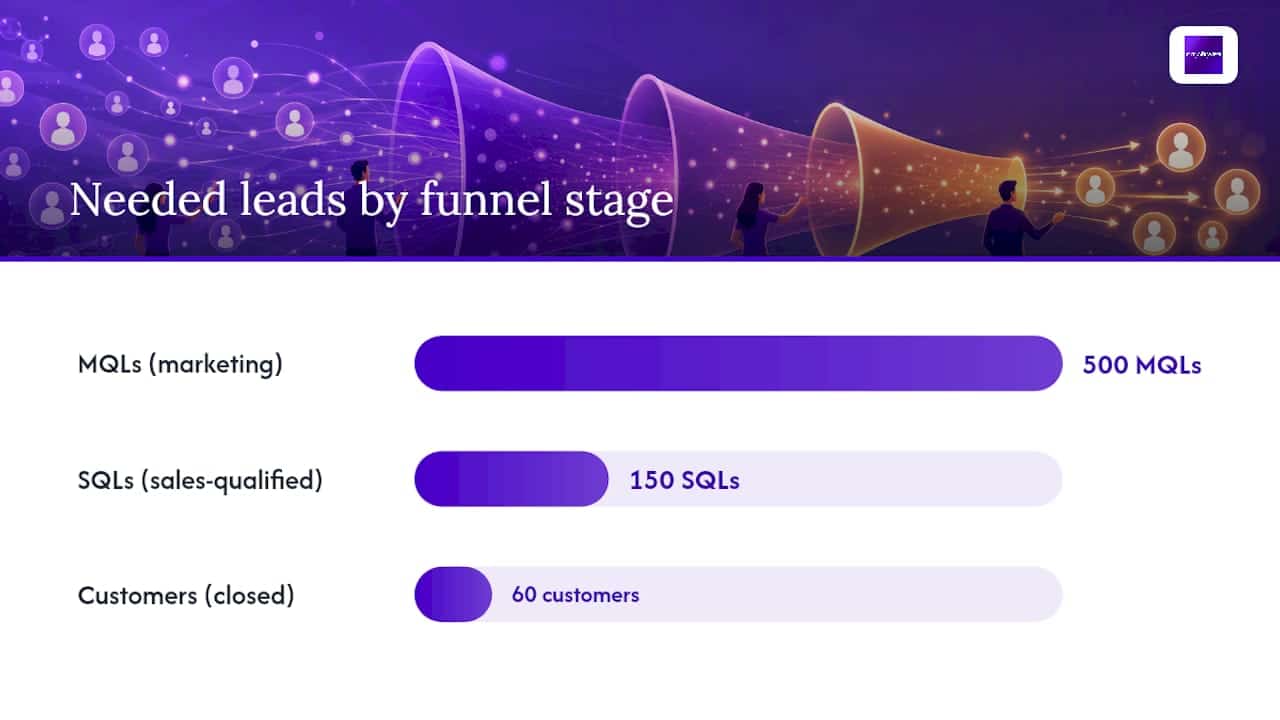
Start with a concrete revenue target. If you need $240,000 in new revenue this year and your average deal is $4,000, you need 60 new customers. If your SQL-to-customer close rate is 40%, you need 150 SQLs. If your MQL-to-SQL rate is 30%, you need 500 MQLs. That math tells you exactly how many leads to generate per month and what your maximum cost-per-lead can be.
MQL, PQL, and SQL: why the distinction matters
- MQL (Marketing Qualified Lead): Meets ICP criteria and has engaged with content or a form. Marketing owns this stage.
- PQL (Product Qualified Lead): Has used a free tool, trial, or assessment and shown intent through product behavior. Relevant for SaaS or tool-based businesses.
- SQL (Sales Qualified Lead): Has been contacted, confirmed budget/authority/need/timeline, and is ready for a sales conversation. Sales owns this stage.
Mixing these up is how leads get lost. A form submission is not an SQL. Treating it like one wastes sales time and inflates your close-rate denominator.
A simple ICP template:
- Company size (employees or revenue band)
- Industry or vertical
- Decision-maker role and title
- Primary pain point your service solves
- Buying timeline (immediate, 30–90 days, 6+ months)
- Geographic market (critical for local service businesses)
Example goal-to-metric mapping:
- Goal: 5 new HVAC contracts per month
- Required SQLs: 13 (at 38% close rate)
- Required MQLs: 43 (at 30% MQL-to-SQL rate)
- Max CPL at $150 average acquisition cost: roughly $17
Map your marketing funnel stages to these numbers before you touch a single form or ad.
What should every landing page and website capture point include?
Traffic without conversion is just a bill. A landing page that converts at 2% versus 5% on the same traffic budget produces 2.5x the leads for the same spend. These are the elements that move that number.
Critical page elements and recommended minimums:
| Page Element | Recommended Minimum | Why It Matters |
|---|---|---|
| Headline | Matches the ad or search intent exactly | Mismatched headlines kill conversions immediately |
| Primary CTA | One per page, above the fold | Multiple CTAs split attention and reduce clicks |
| Trust signals | 2–3 reviews, a logo, or a credential | Reduces friction for first-time visitors |
| Form placement | Visible without scrolling on desktop and mobile | Buried forms lose completions |
| Page load speed | Under 3 seconds on mobile | Slow pages lose visitors before they read anything |
| Mobile layout | Single-column, tap-friendly buttons | Over 60% of local service searches happen on mobile |
Form design deserves its own focus. OrbitForms research shows that reducing visible field count, ordering questions for momentum, and using conditional logic significantly improves form completion and data quality. Ask only what your team will act on in the next 48 hours. Everything else gets collected later through progressive profiling.
Form design priorities:
- Start with the lowest-friction field (usually name or email, not phone)
- Use conditional logic to show follow-up fields only when relevant
- Label every field clearly; avoid placeholder text as the only label
- Show a progress indicator on multi-step forms
- Confirm submission immediately with a thank-you message or redirect
Pro Tip: Add an inline validation message that fires as the user types, not after they hit submit. That single change reduces form abandonment on mobile by catching errors before frustration sets in.
For local service businesses, a well-designed website is the single highest-leverage conversion asset you control.
Which lead magnet formats actually convert?
The best lead magnet is the one that delivers a result in under 60 seconds. Long eBooks sit unread in download folders. A one-page checklist, a quick ROI calculator, or a short assessment that gives an instant score gets used, shared, and remembered.
High-impact magnet types by buyer stage:
- Awareness stage: Short checklist, quick-start guide, or industry stat sheet
- Consideration stage: ROI calculator, comparison guide, or short video walkthrough
- Decision stage: Free audit, live demo, or consultation offer
For local service businesses, a free estimate or a “what’s your [service] costing you?” calculator tends to outperform any content download. Buyers at this stage want a number, not a PDF.
A 30-day magnet test plan:
- Choose one magnet format based on your most common buyer question
- Build a dedicated landing page with a single CTA
- Promote it on two channels (for example, a blog CTA and one paid ad set)
- Track landing page conversion rate, form completions, and SQL yield at day 30
- If SQL yield is below 10%, adjust the offer or the audience before scaling spend
Promotion placements that work:
- Blog post CTAs placed mid-article, not just at the bottom
- Exit-intent popups on high-traffic pages (use sparingly)
- Email signature links for ongoing low-cost exposure
- Social posts with a direct link, not a “link in bio” redirect
- Paid ads driving to the dedicated landing page only
Salesforce’s lead generation guidance emphasizes short-form content and personalized outreach as two of the highest-yield tactics for small businesses, which aligns with the checklist-and-calculator approach above.
How do you pick and prioritize traffic channels?
Picking too many channels at once is how small teams burn budget and learn nothing. Two primary channels tested properly for 30 days teaches you more than six channels tested poorly for a quarter.


Channel priority matrix:
| Channel | Expected Impact | Effort to Start | Best For |
|---|---|---|---|
| Local SEO and Google Business Profile | High (compounding) | Medium | Service businesses with a geographic market |
| Paid search (Google Ads) | High (immediate) | Medium–High | High-intent buyers ready to act now |
| Organic content and SEO | Medium (slow build) | Medium | Teams with 3+ months of runway |
| Social ads (Facebook, Instagram) | Medium | Medium | Awareness and retargeting for visual services |
| Referral and partnership programs | High (low cost) | Low | Businesses with existing customer relationships |
| Events and webinars | Medium | High | B2B and professional services |
Pick your two primary channels based on where your ICP already looks for your service. A plumber’s customers search Google; a med spa’s customers scroll Instagram. Local SEO and paid search are the right starting pair for most local service businesses.
30-day channel test template:
- Hypothesis: “Running Google Ads targeting [service] + [city] will generate MQLs at under $X CPL.”
- Audience: Define geography, device, and keyword match type
- Creative: Write two ad variants with different headlines
- Budget: Set a daily cap you can sustain for 30 days without anxiety
- Tracking: Add UTM parameters to every URL (utm_source, utm_medium, utm_campaign, utm_content)
- Success criteria: Define minimum MQL count and maximum CPL before you start
For paid search setup specifics, City Web Company’s Google Ads setup guide walks through campaign structure, match types, and conversion tracking for local lead generation.
Budget guidance for small teams:
- Paid search test: $500–$1,500/month minimum to get statistically useful data
- Social ads test: $300–$800/month for awareness and lead form campaigns
- Shift 70% of budget to the channel producing the lower CPL after 30 days
How do you connect lead capture to your CRM without losing data?
A form that submits to a spreadsheet is not a lead generation system. It is a liability. Leads get missed, sources get lost, and follow-up becomes a manual scramble. The integration checklist below closes the most common gaps.
CRM integration checklist:
- Every form field maps to a named CRM property (no free-text dumps)
- UTM parameters captured on every submission and stored as lead source fields
- Standard dropdown values match across forms, CRM, and reports (no “HVAC” vs “hvac” mismatches)
- Duplicate detection rules set before launch (match on email, then phone)
- Notification emails or Slack alerts fire to the right owner within 2 minutes of submission
- Thank-you page or email confirms receipt and sets next-step expectations
- Lead source and campaign fields populate automatically from UTM data
Pro Tip: Capture UTM data server-side or via a hidden form field populated by JavaScript on page load. Browser privacy settings and ad blockers increasingly strip UTM parameters from referrer data, so tag-based capture is the only reliable way to preserve attribution.
Lead ownership and SLA examples:
| Lead Score | Owner | SLA |
|---|---|---|
| High (SQL-ready) | Sales rep (named) | Contact within 5–15 minutes |
| Medium (MQL) | Marketing automation | Immediate email, sales follow-up within 4 hours |
| Low (early stage) | Nurture sequence | Automated sequence, no manual contact yet |
OrbitForms’ capture strategy guidance reinforces that CRM field mapping, conditional routing, and automated follow-up are what separate a capture system from a capture form. Document every ownership rule in writing so there is no ambiguity when a high-value lead comes in at 7 PM on a Friday.
How do you score leads without overcomplicating it?
Lead scoring fails when it becomes a 40-field spreadsheet that nobody maintains. A working model has four dimensions, a clear threshold, and a recalibration meeting every 90 days.
Sample scoring model:
Score thresholds and workflows:
- 65+ points: Immediate sales notification; SLA is 5–15 minutes
- 35–64 points: Enter MQL nurture sequence; sales follow-up within 4 hours if score rises
- Under 35 points: Long-term education sequence; no manual sales contact until re-engagement
Recalibrating your model:
- Ask sales monthly: “Which leads we sent were actually worth your time?”
- Compare closed-won deals against their original scores
- Adjust point values for any dimension that consistently mispredicts quality
- Run a 90-day baseline audit to separate high-intent patterns from low-intent volume
A well-calibrated model means your sales team spends time on the leads most likely to close, not the ones who downloaded a free checklist at 11 PM and never replied to email.
What does a good nurture sequence look like?
Most nurture sequences fail because they start with a pitch. The first message should deliver value and set a clear next step, not ask for a meeting.
Sample 3-touch nurture sequence:
- Day 0 (immediate): Automated confirmation email. Deliver the promised asset or confirm the inquiry. One sentence on what happens next. No pitch.
- Day 2: Short value email. One specific tip or insight relevant to their pain point. Soft CTA: “Reply if you have questions” or a link to a relevant resource.
- Day 7: Direct follow-up. Reference their original inquiry. Ask one qualifying question. Offer a specific next step (call, audit, estimate).
For high-score leads, compress the sequence. Day 0 is the automated acknowledgment; a human follows up by phone or personalized email within 15 minutes.
CUFinder’s lead capture research documents the 5-minute rule: contacting a new lead within five minutes significantly increases the odds of qualifying and converting them. Automation makes that possible without requiring a sales rep to stare at a notification screen all day.
Zendesk’s lead generation guidance reinforces the same point: automating an immediate acknowledgment reduces the chance that high-intent prospects go to a faster responder. The acknowledgment buys you time to qualify without losing the contact.
Personalization without manual effort:
Use insertion tokens for first name, company name, and the specific service or page they engaged with. A message that reads “Hi Sarah, I saw you downloaded our HVAC maintenance checklist” converts better than a generic “Hi there, thanks for your interest.”
Pro Tip: Keep the first human contact focused on one question: “What’s the main thing you’re trying to solve?” That answer tells you more than any form field and sets a collaborative tone before any pricing conversation.
Which KPIs should you track after launch?
Tracking 20 metrics is the same as tracking none. Pick the six that connect directly to revenue and review them on a fixed cadence.
Core KPIs and how to calculate them:
| KPI | Formula | Why It Matters |
|---|---|---|
| Traffic-to-lead conversion rate | Leads / Sessions x 100 | Shows whether your capture points are working |
| Cost per lead (CPL) | Total spend / Total leads | Benchmarks channel efficiency |
| Lead-to-SQL rate | SQLs / Total leads x 100 | Reveals qualification and scoring accuracy |
| Response time | Average minutes from submission to first contact | Directly tied to conversion odds |
| SQL-to-customer rate | Customers / SQLs x 100 | Measures sales effectiveness |
| Customer acquisition cost (CAC) | Total sales + marketing spend / New customers | Ties the whole funnel to revenue |
Reporting cadence:
- Weekly: Traffic, leads, CPL, response time. Ops and marketing review. Fix anything broken.
- Monthly: Lead-to-SQL rate, SQL-to-customer rate, CAC, pipeline value. Marketing and sales review together. Adjust scoring, SLAs, or channel mix.
Attribution for small teams:
First-touch attribution tells you which channel created awareness. Last-touch tells you which channel closed the loop. For most small teams, a pragmatic hybrid works best: credit the first-touch channel for creating the lead and the last-touch channel for converting it. Track both in your CRM using the UTM fields you set up in the capture step.
How do you run A/B tests that actually improve results?
Most small teams either never test or test the wrong things. A headline test on a page with 50 visitors per month will never reach statistical significance. Test where you have volume, and test one variable at a time.
Simple test plan template:
- Hypothesis: “Changing the CTA from ‘Submit’ to ‘Get My Free Estimate’ will increase form completions by at least 15%.”
- Variant: One change only (CTA copy, headline, form length, or button color)
- Sample size: Minimum 100 conversions per variant before reading results
- Metric to move: Form completion rate (primary), bounce rate (secondary)
- Test duration: Minimum two weeks, regardless of traffic volume
Prioritization matrix for experiments:
| Test Idea | Expected Impact | Effort | Run First? |
|---|---|---|---|
| CTA button copy | High | Low | Yes |
| Headline on landing page | High | Low | Yes |
| Form length (3 fields vs. 6 fields) | High | Medium | Yes |
| Lead magnet format (checklist vs. guide) | Medium | Medium | After quick wins |
| Ad creative (image vs. video) | Medium | High | After quick wins |
| Page layout restructure | Low | High | Last |
Rolling out winners:
- Declare a winner only after reaching your minimum sample size
- Roll the winning variant to 100% of traffic
- Document the result and the date in a shared test log
- Start the next test within one week of closing the previous one
The teams that improve fastest are not the ones with the biggest budgets. They are the ones with the shortest test cycles.
What does a realistic implementation timeline look like?
Here is a practical timeline with cost ranges for three implementation paths: a one-week quick sprint, a 30-day minimum rollout, and a 90-day stabilization program.
Role assignments by phase:
- Week 1: Marketing owns ICP, audit, and UTM setup. Ops owns CRM field mapping.
- Days 8–30: Marketing owns magnet and channel launch. Sales owns SLA documentation and scoring input.
- Days 31–90: Marketing owns testing and reporting. Sales owns scoring recalibration feedback. Agency (if engaged) owns channel optimization and reporting.
For small teams with limited bandwidth, City Web Company’s digital marketing services cover the agency-support column across SEO, paid media, web design, and CRM-connected lead capture.
Where can you find the templates and tools to get started?
The assets below map directly to the checklist steps above. Use them in order.
Downloadable assets:
- PDF checklist: The HubSpot lead generation checklist PDF covers technology platform, CMS, forms, and follow-up emails. Print it and check off items as you complete each sprint task.
- ICP template: A spreadsheet with the six ICP fields from Section 3. Fill it in before touching any channel or form.
- Scoring spreadsheet: A point-based model with the four dimensions from Section 8. Adjust point values after your first 90-day review.
- 30-day test sheet: Tracks hypothesis, variant, metric, sample size, and result for each experiment.
Tool recommendations by budget:
- CRM: HubSpot Free or CRM Starter for teams under 10 users; Salesforce Essentials for teams that need deeper pipeline reporting
- Forms with conditional logic: HubSpot Forms, Typeform, or Gravity Forms (WordPress)
- Email automation: Mailchimp, ActiveCampaign, or HubSpot Marketing Hub
- Analytics: Google Analytics 4 for traffic and conversion tracking; Google Search Console for organic performance
- Lead intelligence: Leadfeeder (now Dealfront) identifies companies visiting your site by IP, useful for B2B follow-up before a form is submitted
Where each template fits in the funnel:
| Template | Funnel Stage | Who Uses It |
|---|---|---|
| ICP template | Goals and planning | Marketing lead |
| PDF checklist | Audit and capture | Marketing + Ops |
| Scoring spreadsheet | Qualification and routing | Marketing + Sales |
| 30-day test sheet | Optimization | Marketing |
For local service businesses, lead generation strategies tailored to your sector show how these templates adapt for HVAC, pest control, law firms, and home services.
Why channel diversification and speed-to-lead are your two highest-leverage priorities
Two variables consistently separate teams that hit pipeline targets from those that miss them: how many complementary channels they use, and how fast they respond to new leads.
Monday finds that top-performing teams combine three to four complementary channels to stabilize lead pipelines rather than relying on a single source. A team running only paid search is one algorithm change away from a pipeline collapse. Adding local SEO and a referral program creates redundancy that keeps leads flowing even when one channel underperforms.
Speed-to-lead is the second lever. Zendesk’s guidance shows that automating immediate acknowledgments improves responsiveness and reduces the likelihood that high-intent prospects go to a faster responder. The CUFinder 5-minute rule reinforces this: reaching a new lead within five minutes strongly correlates with qualifying and converting them.
Implementation checklist for both priorities:
- Audit your current channel mix. If more than 60% of leads come from one source, add a second channel this month.
- Set up an automated acknowledgment email that fires within 60 seconds of any form submission.
- Assign a named owner to every high-score lead with a documented SLA.
- Review channel mix quarterly and shift budget toward the two lowest-CPL sources.
- Track response time as a KPI in your weekly dashboard, not just conversion rate.
City Web Company works with local service businesses across home services, legal, med spas, and HVAC to build exactly this kind of diversified, fast-response lead generation system. The combination of local SEO, paid search, and conversion-optimized web design is the channel mix that consistently produces the lowest CPL for service businesses in competitive local markets.
A local agency’s perspective on what actually works
The checklist in this article is not theoretical. It reflects the same process City Web Company uses when onboarding a new local service client.
The typical engagement starts with a two-day audit: we review the client’s existing capture points, CRM setup, and channel mix. For a law firm client, that audit often reveals three or four broken form-to-CRM connections, no UTM tracking on paid ads, and a response SLA that exists only in someone’s head. The quick-win sprint fixes those gaps before any new spend goes out the door.
From there, the 30-day rollout focuses on two channels (almost always local SEO and Google Ads for service businesses), one lead magnet, and a simple scoring model. By day 30, the client has a working dashboard, a documented SLA, and enough data to make a real budget decision.
The 90-day stabilization phase is where the compounding starts. Scoring gets recalibrated with sales feedback. A/B tests run on the highest-traffic pages. Nurture sequences get segmented by lead tier. At that point, the system runs largely on its own, and the team’s job shifts from building to optimizing.
If you want to skip the audit phase and get straight to execution, City Web Company’s digital marketing services cover every step in this checklist, from web design and local SEO to paid media and CRM-connected lead capture.
Ready to build your lead generation system? Get started with City Web Company and have your first quick-win sprint running this week.
Sources
- Lead generation • Zendesk blog
- Monday
- Lead capture strategy for websites • OrbitForms
- Lead generation tips for small businesses • Salesforce blog
- What Is Lead Capture? Complete Strategy Guide for 2026 • CUFinder
FAQ
What is a lead generation checklist?
A lead generation checklist is a prioritized list of tasks covering goal-setting, capture, qualification, nurturing, and measurement that helps marketing teams build or audit a lead generation system. It ensures no critical step gets skipped between a visitor arriving on your site and a sales conversation starting.
How many channels should a small business use for lead generation?
Research from monday.com recommends combining several complementary channels (such as local SEO, paid search, and referrals) to keep the pipeline stable and avoid dependence on a single source.
How fast should you follow up with a new lead?
CUFinder’s lead capture research documents the 5-minute rule: contacting a new lead within five minutes significantly increases qualifying and conversion odds. Automating an immediate acknowledgment email covers the gap until a human can follow up.
What is the difference between an MQL and an SQL?
An MQL (Marketing Qualified Lead) meets your ICP criteria and has engaged with marketing content or a form. An SQL (Sales Qualified Lead) has been contacted, confirmed budget, authority, need, and timeline, and is ready for a sales conversation. Marketing owns MQLs; sales owns SQLs.
What KPIs matter most in the first 30 days after launch?
Track cost per lead (CPL), traffic-to-lead conversion rate, and response time in the first 30 days. These three metrics tell you whether your capture points are working, whether your spend is efficient, and whether your follow-up process is fast enough to compete.
Recommended
These articles were popular with other readers too: