

Use our SEO checklist for home services to boost your local rankings and attract more customers. Learn key steps for 2026 success!
How to design service websites that attract local leads
Your website might look clean, load fast, and even rank on the first page of Google, but if visitors aren’t picking up the phone or filling out your contact form, it isn’t doing its job. A surprising number of local service businesses pour money into beautiful websites that produce almost no real inquiries. The problem isn’t usually the design itself. It’s the strategy behind it. This guide walks you through a field-tested, step-by-step framework for building or rebuilding a service website that consistently converts local visitors into paying customers.
Table of Contents
Table of Contents
- What you need before you start
- The step-by-step service website design process
- Common service website mistakes and how to avoid them
- Tracking success: How to measure and optimize your website
- Why most local service websites miss the mark—and what actually works
- Expert help for your next service website project
- Frequently asked questions
Key Takeaways
| Point | Details |
|---|---|
| Start with strategy | Laying the right foundations makes every design decision easier and more effective. |
| Follow a proven process | A repeatable, phased approach gets better results than winging it each time. |
| Avoid common pitfalls | Watch for the classic mistakes that kill lead flow and user trust. |
| Measure and improve | Success comes from tracking performance and making regular improvements. |
| Expert help accelerates growth | Experienced web and marketing partners can help you get results faster and dodge costly errors. |
What you need before you start
Now that you understand the importance of your website, let’s make sure you have the essentials in place before diving into the design process.
Jumping straight into colors, fonts, and page layouts is the fastest way to waste time and money. The businesses that build high-performing service websites do their homework first. They know exactly who they’re trying to reach, what those people want to hear, and what action they want them to take. Before a single pixel gets placed, you need a clear picture of your goals, your audience, and your brand.
Start by auditing your current website if you have one. Look at what pages exist, which ones get traffic, and where visitors drop off. Tools like Google Analytics and Google Search Console are free and show you exactly where your site is losing people. If you don’t have a website yet, this is your opportunity to start fresh with a strategy built in from day one.
Here’s a checklist of the critical prerequisites to have ready before you begin:
- Clear business goals: Are you trying to generate phone calls, form submissions, estimate requests, or appointment bookings?
- Defined target audience: Who are your local customers? Homeowners? Property managers? Small businesses?
- Competitor research: What are local competitors doing well? What gaps can you fill?
- Branding materials: Logo files, color codes, fonts, and any existing marketing materials.
- Written content: Service descriptions, an “About” blurb, testimonials, and photos of your work.
- Assigned roles: Who will manage updates, respond to inquiries, and track performance going forward?
The table below shows each prerequisite and why it matters:
| Prerequisite | What it accomplishes |
|---|---|
| Business goal clarity | Drives every design and copy decision |
| Audience research | Ensures messaging resonates with real buyers |
| Competitor analysis | Reveals gaps and opportunities in your market |
| Branding materials | Creates visual consistency and professionalism |
| Written content | Prevents delays and keeps the project on schedule |
| Assigned roles | Ensures accountability after launch |
Good service website design tips always emphasize preparation over speed. Skipping this phase almost always leads to redesigns six months later, which costs far more than doing it right the first time.
Pro Tip: If you plan to manage your own site after launch, choose a modern website builder with a drag-and-drop editor. As website management for small businesses involves planning, implementation, maintenance, and continuous improvement, a builder that also unifies your lead-generation and CRM workflows saves you significant time and money down the road.
For a broader look at what goes into building an effective online presence, the guide to website design is a strong starting point. And when you’re ready to understand the full sequence of events, the website design process steps breaks it down phase by phase.
The step-by-step service website design process
Once you’ve assembled the essentials, you’re ready for the actual design process, which follows a logical sequence for best results.
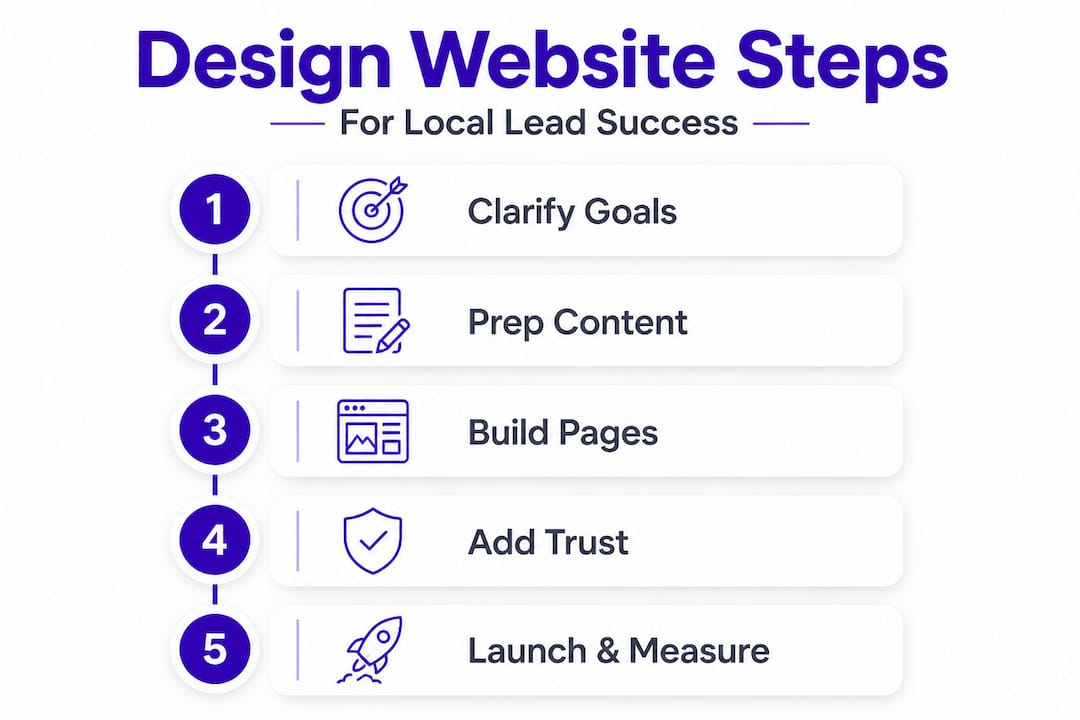
Treating website design as a one-time event is a mindset that costs local businesses leads every single year. The businesses that consistently win online treat their website as a living tool that improves over time. Think of it less like painting a house and more like tuning an engine. Here’s the process that works:
-
Audit your current situation. If you have an existing site, document what’s working and what isn’t. Record your current rankings, traffic levels, and conversion rates so you have a baseline to beat.
-
Define specific, measurable goals. “Get more leads” isn’t a goal. “Increase contact form submissions by 30% in 90 days” is a goal. Specific targets shape every design decision that follows.
-
Research your local audience deeply. Talk to your best current customers. Find out how they searched for you, what made them call, and what hesitations they had before reaching out. This information is pure gold for your website copy.
-
Map out your site structure. Decide which pages you need before building anything. Most service sites need a homepage, individual service pages, a service area page, an “About” page, a blog or resources section, and a contact page.
-
Apply UX and UI best practices. UX stands for user experience, meaning how easy and logical it is to navigate your site. UI stands for user interface, meaning how it looks. Both matter. Make your most important action (call, form, booking) visible on every page without the visitor having to scroll.
-
Lay the SEO foundation. SEO stands for search engine optimization. Before launch, every page should have a targeted title tag, a meta description, heading tags, and location-specific keywords woven naturally into the copy.
-
Stage and test before going live. Build on a staging environment (a private version of the site) and test every button, form, link, and page on both desktop and mobile before switching over.
-
Launch and announce. Switch over your live site and notify your existing customers, Google Business Profile, and social media channels.
-
Monitor and optimize continuously. Check your analytics weekly for the first month. Look for pages where visitors leave quickly and forms that aren’t being completed.
The importance of website design goes well beyond aesthetics. A growth-driven redesign strategy works best as a process: audit, define goals, research audience, structure the site, apply UX best practices, build in SEO, stage and test, switch over, then monitor and optimize. This approach consistently outperforms one-time redesigns.
Here’s a comparison of DIY versus professional design so you can decide what fits your situation:
| Factor | DIY website builder | Professional design agency |
|---|---|---|
| Upfront cost | Low | Higher |
| Time investment | High (you do the work) | Low (agency handles it) |
| Local SEO capability | Basic | Advanced |
| Custom features | Limited | Fully custom |
| Ongoing support | Self-managed | Included or available |
| Speed to launch | Varies | Faster with clear process |
| Long-term lead results | Depends on your skill | Higher with expert strategy |
Pro Tip: Don’t pick a designer based on their portfolio aesthetics alone. Ask to see their clients’ before-and-after traffic and lead data. A beautiful site that doesn’t rank or convert is a decoration, not a business tool.
One important concept worth highlighting is boosting trust with design. Visitors decide within seconds whether a site feels credible. Trust signals, including reviews, certifications, real team photos, and clear contact information, need to be built into the design from day one, not added as an afterthought.


Common service website mistakes and how to avoid them
Designing your site well is essential, but knowing what not to do is just as important. Address these common pitfalls to maximize your site’s value.
Most local service websites don’t fail because of bad design taste. They fail because of predictable, avoidable mistakes that quietly drain leads every single day. Here’s what to watch for and how to fix each one before it costs you customers.
-
Unclear or buried calls to action. A call to action (CTA) tells visitors exactly what to do next. If your phone number is small, gray, and buried in the footer, you’re losing calls. Every page should have a prominent, easy-to-tap phone number and a visible “Request a Quote” or “Schedule Service” button above the fold (meaning visible without scrolling).
-
Slow page load speed. Studies consistently show that most users abandon a site that takes more than three seconds to load. Large uncompressed images are the most common culprit. Compress every image before uploading, use a fast hosting provider, and run your site through Google’s PageSpeed Insights regularly.
-
Ignoring mobile users. More than half of local service searches happen on smartphones. If your site is hard to navigate on a phone, pinch-to-zoom is required, or the contact form is tiny, you’re pushing away your most ready-to-hire visitors. Mobile-first design isn’t optional anymore.
-
Hiding contact information. Some businesses bury their phone number two clicks deep because they’re worried about spam calls. The tradeoff isn’t worth it. Your phone number, email, and service area should appear in the header of every single page.
-
No social proof or trust signals. Visitors who don’t know you need a reason to trust you before they call. Genuine customer reviews, star ratings, licensing information, photos of completed jobs, and industry certifications all do this work quietly in the background.
-
Writing for search engines instead of people. Keyword-stuffed pages that repeat “best plumber in [city]” fifteen times don’t just read badly. They actually hurt your rankings because search engines have gotten very good at identifying low-quality content. Write naturally, answer real questions your customers ask, and weave keywords in organically.
“Website management is not a one-time event. Continuous improvement is what separates the sites that generate leads month after month from the ones that slowly decay into irrelevance.” This is the mindset shift most local businesses need to make.
The website optimization guide breaks down how consistent small improvements, rather than infrequent total redesigns, compound into significant lead growth over time. Think of your website the same way you think of your equipment: you maintain it regularly so it doesn’t break down at the worst possible moment.
Pro Tip: Schedule a website review reminder every 90 days. Check your bounce rate (the percentage of people who leave without clicking anything), your contact form completion rate, and your mobile usability score. Even one improvement per quarter adds up to a dramatically better-performing site within a year.
Tracking success: How to measure and optimize your website
Avoiding mistakes is the foundation. Now here’s how you track whether your new website actually brings results and continuously improves.
A website that launched successfully last quarter can quietly start underperforming this quarter without any obvious warning signs. Rankings shift, competitors improve their sites, Google updates its algorithm, and customer behavior changes. The only way to stay ahead is to track meaningful metrics and act on what you find. Here are the five most important numbers to watch:
-
Organic website visits. This is the number of people finding your site through search engines. Growing organic traffic means your SEO strategy is working. Declining traffic is an early signal that something needs attention.
-
Contact form completions. Every form submission is a potential customer. Track how many you get each week and which page they came from. This tells you which pages are doing the best job of converting interest into action.
-
Phone calls from mobile visitors. If your site has a click-to-call button, you can track how many times it’s tapped each month. This is often the highest-value action for service businesses.
-
Bounce rate by page. If a specific page has a very high bounce rate, visitors are leaving without engaging. This usually means the content doesn’t match what they expected to find or the page loads too slowly.
-
Local search rankings. Track where your site appears in Google when someone searches for your service plus your city. Rankings above position five drive the majority of clicks.
Here’s a simple tracking schedule to follow:
| Metric | Tool to use | How often to review |
|---|---|---|
| Organic website visits | Google Analytics | Weekly |
| Contact form completions | Google Analytics Goals | Weekly |
| Phone calls from mobile | CallRail or Google Ads | Weekly |
| Bounce rate by page | Google Analytics | Monthly |
| Local search rankings | Google Search Console | Monthly |
| Page load speed | Google PageSpeed Insights | Quarterly |
Tracking search rankings at the local level requires looking at rankings in specific cities or zip codes, not just broad national terms. A plumber in Phoenix who ranks third in Phoenix for “emergency plumber” is doing far better than one who ranks first nationally for a term no one in Phoenix searches for.
For ongoing improvement, local SEO strategies like building local citations, getting listed in directories, and earning reviews all support your website’s performance in ways that tracking alone can’t capture. Your website and your off-site presence need to work together.
If you want to automate parts of your follow-up process once leads come in, marketing automation tools can help you respond faster, qualify leads, and book more jobs without adding staff.
Pro Tip: Start with just one conversion goal and track it obsessively before adding more. For most service businesses, that one goal should be appointment requests or estimate form submissions. Once you’ve improved that single metric consistently, you’ll have the confidence and data to start optimizing everything else.
Consistent improvement in these numbers, even small gains each month, compounds into dramatically better lead volume within six to twelve months.
Why most local service websites miss the mark—and what actually works
Here’s a perspective that most articles on this topic won’t share with you: the reason most local service websites fail isn’t technical. It’s a mindset problem.
Business owners treat their website like a business card. You print it, hand it out, and assume it’s doing its job. The reality is that the market around you is constantly moving. A competitor spends two months improving their site. A new Google update rewards businesses with more recent content. Your best-converting page from two years ago now loads slower than your competitors’ pages because you haven’t touched it. None of this shows up as an obvious warning. It just shows up as fewer calls.
We’ve worked with service businesses that had genuinely beautiful websites with professional photography, clean layouts, and clear messaging, and they were still getting almost no leads online. When we dug into the data, the issues were almost always the same. Their contact form was three clicks deep. Their homepage talked about the company’s history instead of the customer’s problem. Their fastest-loading page was their blog, which nobody visited, and their service pages, the ones buyers actually care about, were sluggish on mobile.
The trust-building strategies that actually move the needle are rarely glamorous. They’re things like adding a real team photo to the “About” page, putting a customer review directly next to the quote request button, and displaying your license number in the footer. These small, unglamorous changes consistently outperform expensive redesigns.
The businesses that win local search long-term follow a simple principle: they treat their website like a salesperson who works 24 hours a day, seven days a week, and they give that salesperson regular coaching. That means reading the data, making changes based on what visitors actually do (not what you think they should do), and always making it easier to contact you than it is to leave.
The #1 overlooked factor in local service website success isn’t the design. It’s the relentless commitment to making contact easier every single quarter.
A comprehensive digital marketing guide for local business growth makes one point consistently: the businesses that grow fastest online aren’t the ones with the flashiest sites. They’re the ones who show up reliably, respond quickly, and remove every possible barrier between a visitor and a booked job.
Expert help for your next service website project
If you’ve followed this guide, you now have a clear picture of what a high-performing service website requires. From foundational prep work to tracking and continuous improvement, the path is well defined. But knowing the process and executing it flawlessly are two different things.
City Web Company works exclusively with local service businesses, from HVAC companies and plumbers to landscapers, pest control operators, and disaster restoration firms. Our team handles everything from web design services and local SEO services to paid media management, so your site doesn’t just look good but actually generates the calls and form submissions your business depends on. If you want to skip the trial-and-error phase and get a site built on a proven strategy, explore our digital marketing for local leads to see how we approach it. We’re ready to help you make your website your best-performing marketing tool.
Frequently asked questions
How long does it take to design a service website?
A service business website typically takes three to six weeks from planning to launch when all content, photos, and approvals are ready and waiting. Delays almost always come from missing content or slow feedback on design drafts.
What pages should every service website include?
Every service website needs a homepage, individual service pages, an “About” page, and a contact page with a clear call to action visible on every single page. Adding a service area page and a blog or FAQ section significantly improves your chances of ranking in local searches.
Should I use a site builder or hire a professional?
Site builders simplify updates and reduce ongoing costs, and as website builders can unify lead-generation and CRM workflows, they’re a solid choice for budget-conscious owners. However, a professional agency delivers custom local SEO strategy, faster load speeds, and a user experience specifically engineered to convert local visitors.
How do I make my website show up in local searches?
Use location-specific keywords naturally throughout your page content, claim and fully complete your Google Business Profile, get your business listed in local directories, and consistently ask satisfied customers to leave online reviews. All four of these work together, and skipping any one of them weakens the rest.
Recommended
These articles were popular with other readers too: