
Use website DNI, connect call reports to Google Ads and your Google Business Profile, then tie calls to booked jobs. City Web Company can handle setup.
30-Day Budget-First Google Ads Launch for Moving Companies
Yes, Google Ads works for moving companies, but only if you treat it as a tracked business system, not a spend-and-hope experiment. Start with a moderate test budget over about a month, launch Local Service Ads if your company qualifies, and run a tightly structured Search campaign for your core services. Everything else, from bidding to negative keywords, matters, but the launch budget and campaign type decide whether you get usable data in month one.
TL;DR:
- Effective Google Ads for moving companies require a moderate test budget over at least a month to gather actionable data, focusing on targeted campaigns.
- Prioritize Local Service Ads for low-cost, verified leads and create separate campaigns for local, long-distance, and specialty services to improve ROI.
- Use geo-qualified, high-intent keywords with exact and phrase match to reduce wasteful spend, supplemented by a solid negative keyword list before launch.
- Tracking calls and form submissions through dedicated landing pages and connecting them to CRMs enables optimization based on booked jobs and profit margins.
- Maintaining review quality and regularly analyzing search term reports are crucial, as reputation significantly influences lead costs and conversion rates.
Table of Contents
Table of Contents
- Recommended Campaign Structure for Moving Company PPC
- Budgeting and Expected CPA/CPL Ranges
- Keyword Strategy and Match Types That Cut Wasted Spend
- Ad Copy and Extensions That Convert Real Leads
- Landing Pages and Conversion Tracking Setup
- Bidding and Automation: What to Use and When
- Measurement and Reporting That Ties Ads to Booked Jobs
- A 30-Day Setup Checklist and Campaign Skeleton
- Quick Checklist: Your First 90 Days
- What Actually Moves the Needle in Moving Company PPC
- Get Google Ads Running the Right Way From the Start
- Sources
- FAQ
Recommended Campaign Structure for Moving Company PPC
Two campaign types do almost all the work in Google Ads for moving companies: Local Service Ads (LSAs) and Search Ads. LSAs sit above regular search ads and organic listings, and they run on a pay-per-verified-lead model rather than pay-per-click, which usually makes them cheaper for residential local move searches. Search Ads give you more control and volume, and they matter most for long-distance moves and specialty services where LSAs have thinner coverage.
Build your account around a simple skeleton rather than one sprawling campaign:
- Local Moves campaign: targets in-city and short-distance searches, tightly geo-fenced to your service radius.
- Long-Distance Moves campaign: separate budget and messaging, since these searchers compare quotes and expect different pricing language.
- Specialty Services campaign: piano moving, office relocations, storage, packing-only jobs, anything with distinct margins.
- Branded campaign: captures people already searching your company name, usually your cheapest clicks and highest conversion rate.
Inside each campaign, keep ad groups small. A tight ad group of 5 to 15 closely related keywords with matching ad copy improves Quality Score and lowers your cost per click compared to one bloated “moving services” group trying to cover everything. Split by service and by intent, not just by geography.
Budgeting and Expected CPA/CPL Ranges
Budget by fleet size, not by guesswork. Movers with two to four trucks typically spend around $2,000 to $3,000 a month, while five to ten-truck operations run $5,000 to $7,000 monthly. For your first 30 days, commit a test budget sufficient to produce meaningful data within the first month so Google’s algorithm gets enough clicks and conversions to optimize against; anything lower rarely produces statistically useful data before you have to make a budget decision.
| Market Size | Typical Monthly Budget | Expected CPC Range | Expected CPA (Well-Optimized) |
|---|---|---|---|
| Small market (2-4 trucks) | $2,000-$3,000 | $12-$30 | $40-$100 per lead |
| Mid-size market (5 to 9 trucks) | $5,000-$7,000 | $12-$30 | $50-$120 per lead |
| Major metro | $7,000+ | $15-$45 | $60-$150 per lead |
Pro Tip: Calculate your break-even CPA before you set a target in Google Ads. Take your average job value, multiply by your close rate, then subtract labor and fuel costs. If your average job nets $600 profit and you close 25% of leads, you can afford up to $150 per lead and still turn a profit.
Unoptimized accounts routinely run $150 to $250 or more per lead, often because of weak landing pages, broad match keywords with no negative list, or missing conversion tracking. That gap between $100 and $250 per lead is usually the entire difference between a profitable account and one you should pause.
Keyword Strategy and Match Types That Cut Wasted Spend
Prioritize geo-qualified, high-intent phrases: “movers in [city],” “local moving company near me,” “long distance movers [state to state],” and service-specific terms like “office relocation company [city].” These convert far better than generic terms like “moving help,” which pull in DIY searchers and jobseekers.
Stick to phrase match and exact match in your first 60 to 90 days. Broad match can work later once you have enough negative keywords and conversion data, but early on it burns budget on irrelevant searches. Build your negative list before launch, not after:
- “jobs,” “careers,” “hiring”
- “free,” “cheap,” “DIY”
- “how to move myself”
- “moving truck rental” (unless you rent trucks)
- “boxes,” “supplies” (unless you sell them)
Tools like Ubersuggest or Google Keyword Planner help you check local search volume and estimated CPC before you commit budget to a keyword tier. Group keywords into three intent tiers: ready-to-book (“movers near me today”), researching (“best moving company [city]”), and comparison (“[city] movers cost”). Bid more aggressively on the first tier.
Ad Copy and Extensions That Convert Real Leads
Your headlines need message match: if someone searches “long distance movers,” your headline should say exactly that, not a generic slogan. Structure ad copy around three elements:
- Trust signal headline (“Licensed & Insured Movers Serving [City] Since [Year]”).
- Urgency or availability headline (“Same-Week Moving Slots Available”).
- Price-shopper deterrent in description text (“Free On-Site Estimate, No Hidden Fees”) to filter out searchers hunting for the absolute lowest number.
Extensions do more work than most owners expect. Call extensions and location extensions are non-negotiable for a service business people call in a panic. Structured snippets (“Services: Local Moves, Long-Distance, Packing, Storage”) and callout extensions (“Same-Day Quotes,” “Fully Insured”) fill extra ad real estate and push down competitor listings.
Landing Pages and Conversion Tracking Setup
A dedicated landing page beats your homepage every time in Google Ads for moving companies. Homepages carry navigation clutter and dilute the one action you want: a call or a form submission.
Your landing page needs:
- A short form (name, phone, move date, origin/destination), never more than five fields.
- A click-to-call phone number visible above the fold on mobile.
- Real review counts or star ratings near the form.
- General pricing ranges or a clear “get a free quote” framing, since hiding price entirely increases bounce rate.
Mobile-ready pages matter more than most owners assume. Case data outside the moving industry shows mobile-optimized content lifting sales meaningfully, and most moving searches happen on a phone during a stressful, time-pressured moment.
Pro Tip: Set up call tracking with GCLID passthrough so every phone call ties back to the exact keyword and ad that generated it. Without this, you’re optimizing blind, since Google can’t credit conversions it never sees.
Connect your CRM so booked jobs, not just form fills, flow back into Google Ads as offline conversions. This single step is often the highest-leverage change you can make to Smart Bidding accuracy.
Bidding and Automation: What to Use and When
Don’t hand your account to automated bidding on day one. Follow a progression:
- Days 1 to 30: Manual CPC or Maximize Clicks, so you gather enough conversion volume without Google’s algorithm guessing on thin data.
- Days 30 to 90: Shift to Target CPA or Maximize Conversions once you have at least 30 conversions logged, using your break-even math to set the target.
- After 90 days: Layer in Target ROAS if you’re tracking job value by lead source, not just lead count.
Set guardrails regardless of stage. Cap bids so no single keyword can run away with budget, exclude ZIP codes outside your service radius, and review your negative keyword list weekly for the first two months. Automation without guardrails just automates your waste faster.
Measurement and Reporting That Ties Ads to Booked Jobs
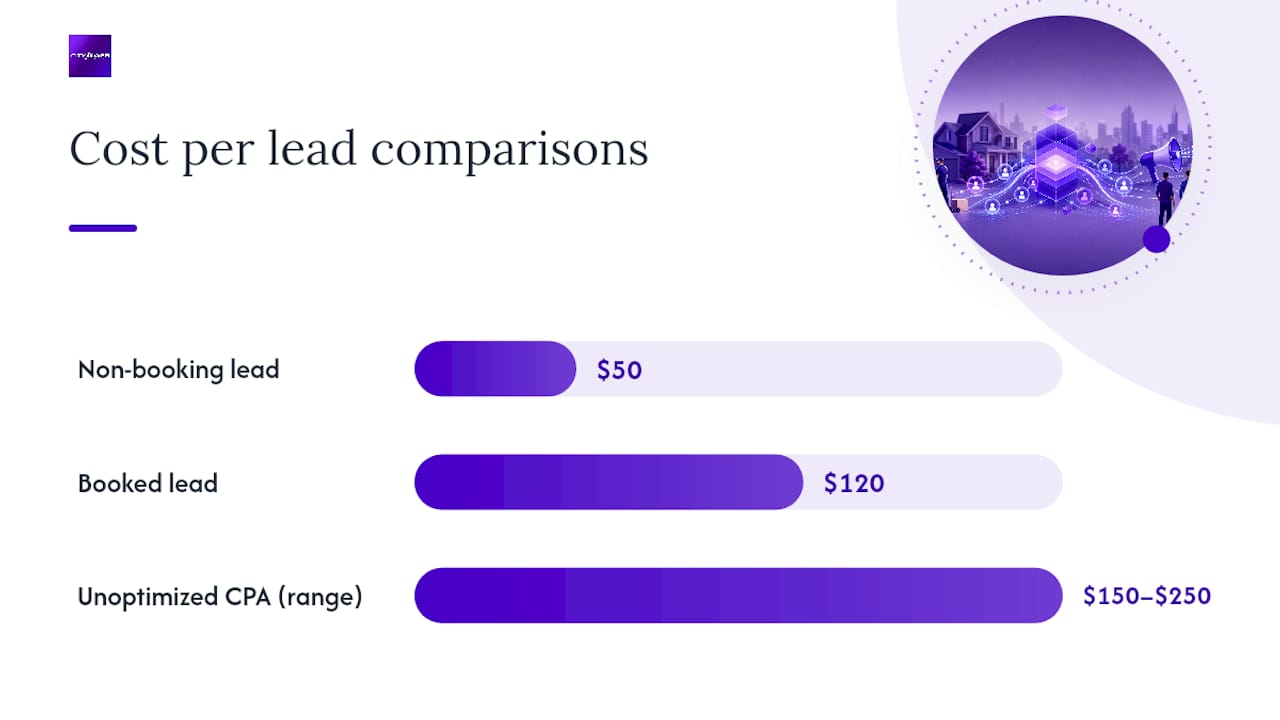
Cost per lead is a vanity metric if you stop there. Track cost per booked job, close rate by keyword or campaign, and job margin by traffic source, since a $50 lead that never closes costs more than a $120 lead that books.
Set a 30/60/90 review cadence:
- Day 30: Kill keywords with zero conversions and high spend; confirm tracking fired correctly.
- Day 60: Test a second landing page variant against your original.
- Day 90: Compare CPA against your break-even number and decide whether to scale budget or restructure campaigns.
Businesses running unoptimized campaigns commonly see CPA drift toward $150 to $250 per lead, which is exactly why the 30-day checkpoint matters. Catching that drift early, before a full quarter of spend, is what separates a profitable account from one that quietly bleeds budget.
A 30-Day Setup Checklist and Campaign Skeleton
City Web Company builds Google Ads accounts for home services and moving companies with the structure described above: Local Service Ads paired with tightly segmented Search campaigns, call and form tracking wired into the CRM, and negative keyword lists built before launch rather than after the first wasted dollars.
The accounts that perform best share one trait: conversion tracking and a dedicated landing page were live before the first dollar of ad spend, not added after month one.
A practical 30-day setup timeline looks like this:
- Week 1: Verify LSA eligibility, build the landing page, install call and form tracking.
- Week 2: Launch Local Moves and Branded campaigns with Manual CPC.
- Week 3: Add Long-Distance and Specialty campaigns; refine negative keywords from search term reports.
- Week 4: Review conversion data, adjust bids, and prepare the switch to Target CPA.
Quick Checklist: Your First 90 Days
The first 30 days are about foundation: verify your Google Business Profile and LSA eligibility, install call and form tracking, launch your core campaigns, and build your initial negative keyword list. Days 30 to 90 shift toward efficiency: move to Target CPA once you have 30-plus conversions, segment budget by job type based on margin, and start retargeting past-site visitors who didn’t convert.
- Pause any keyword with 20-plus clicks and zero conversions.
- Scale budget only after CPA sits below your break-even number for two consecutive weeks.
- Red flag: rising CPA alongside falling close rate usually means a review or reputation problem, not an ads problem.
| Phase | Focus | Key Milestone |
|---|---|---|
| Days 1-30 | Foundation and tracking | Tracking verified, campaigns live |
| Days 30-90 | Automation and segmentation | 30+ conversions logged, Target CPA active |
| Day 90+ | Scale or adjust | CPA below break-even for 2 weeks |
What Actually Moves the Needle in Moving Company PPC
Most guides on this topic bury the real lever: your ads can’t outrun a weak reputation. A moving company with a 3.2 star rating and a dozen reviews will pay more per lead and close fewer jobs than a 4.7 star competitor running the identical campaign, because searchers check reviews before they call, not after. Fix review volume and response quality before you scale ad spend, not alongside it.
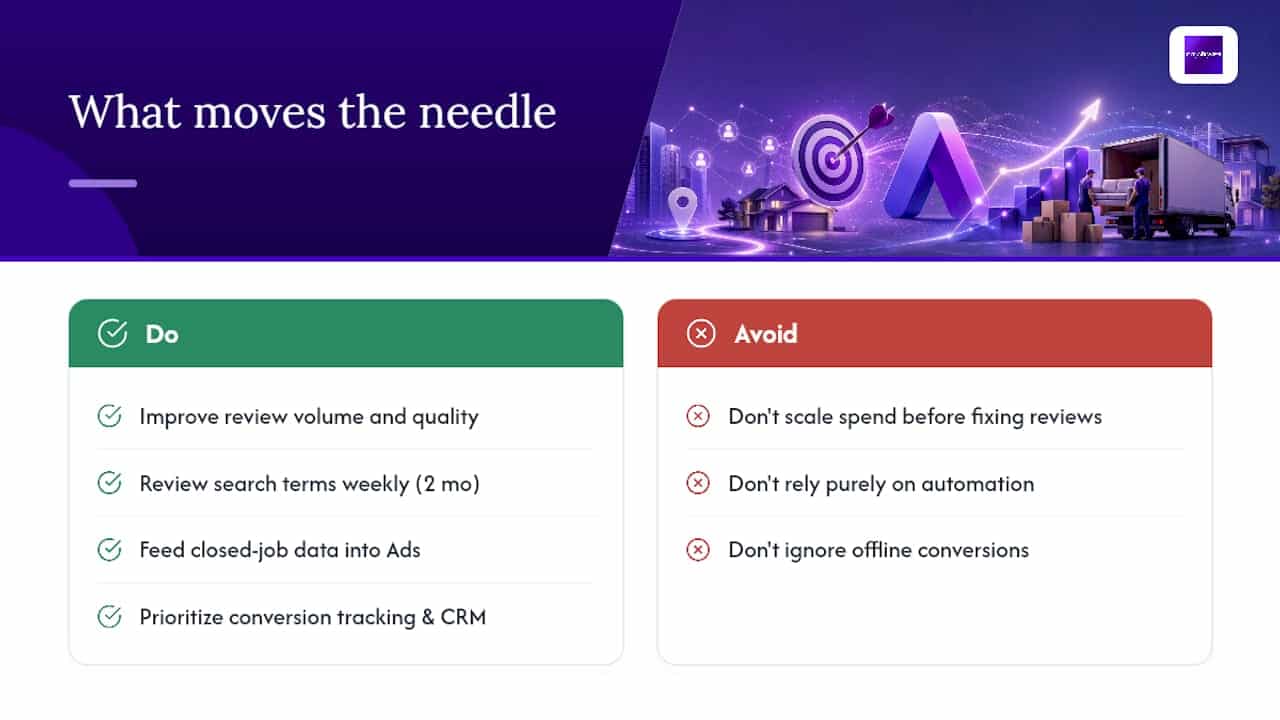

The conventional advice, “just add negative keywords and switch to Target CPA,” treats symptoms, not causes. The accounts that actually perform well share a boring trait: someone reviews search term reports every week for the first two months. Automation is a reward for having clean data, not a substitute for it.
If you take one thing from this guide, prioritize conversion tracking and CRM feedback over campaign structure. A well-built account with no offline conversion data is flying blind. A modest account that feeds closed-job data back into Google Ads will out-optimize a fancier setup within a quarter. Budget matters less than most owners think; measurement discipline matters more.
— Matt
Get Google Ads Running the Right Way From the Start
Some agencies offer an alternative to trial-and-error setup for moving companies that want Google Ads running correctly the first time, not after three months of wasted spend. They build the campaign skeleton, wire up call and form tracking, connect it to CRMs, and manage the bid strategy shift from Manual CPC to Target CPA as data matures.

A discovery call typically covers your current fleet size, service area, and average job value, so we can set a realistic first-month budget and CPA target before a single dollar goes live. Most accounts are structured and launched within two weeks of onboarding. If you’re ready to stop guessing at keywords and negative lists, start with our Google Ads management page and get a specific plan for your market instead of a generic template.
Sources
- Moving Company Advertising: 6 Promotion Platforms
- Are You Spending Too Much on Google Ads? Data from 500 Movers
- Google Ads for Moving Companies: Complete PPC Guide | Network Leads
FAQ
Is $500 a Month Enough for Google Ads for a Moving Company?
Generally no. A modest test budget rarely generates enough clicks or conversions for Google’s algorithm to optimize effectively, and most markets need a sufficient budget in the first 30 days just to gather usable data.
How Do I Advertise a Moving Company on Google?
Start with Local Service Ads if you qualify, pair them with a segmented Search campaign for local, long-distance, and specialty services, and route all traffic to a dedicated landing page with call and form tracking installed before launch.
Is $20 a Day Good for Google Ads?
$20 a day ($600 a month) can work in a small market with lower CPCs, but in mid-size or major metro areas where CPCs run $12 to $45, that budget usually produces too few clicks to judge performance reliably.
Do Google Ads Work for Contractors and Home Service Businesses?
Yes, the same principles apply: geo-qualified keywords, LSAs for local trust-based leads, tight ad groups, and conversion tracking feeding back into bidding all transfer directly from moving companies to other home service categories.
What’s a Realistic Cost Per Lead for a Moving Company?
Well-managed campaigns typically produce leads at $40 to $100 each, while accounts with poor tracking or no negative keywords often run $150 to $250 or more per lead.
Recommended
These articles were popular with other readers too: