
Use website DNI, connect call reports to Google Ads and your Google Business Profile, then tie calls to booked jobs. City Web Company can handle setup.
Google Ads for HVAC: The Playbook That Actually Books Jobs
Run Google Ads for HVAC with three campaign types working together: intent-segmented Search campaigns for installation and maintenance, Local Services Ads for emergency capture, and job-level offline conversion tracking feeding every bid decision. Expect a blended cost per lead somewhere between $50 and $110 depending on channel mix, with branded and LSA leads on the cheaper end. Your first move this week: verify or activate your Local Services Ads profile, then split any existing broad HVAC campaign into separate emergency, installation, and maintenance campaigns before you spend another dollar.
TL;DR:
- Running Local Services Ads alongside segmented Search campaigns improves emergency lead capture and lowers overall cost per lead, especially for urgent repairs.
- Structuring campaigns into separate emergency, installation, maintenance, and brand protection groups enhances Quality Scores and reduces cost-per-click.
- Prioritizing call tracking, dedicated landing pages, and offline conversion import helps optimize bids based on booked jobs rather than just clicks or leads.
- A typical blended cost per lead ranges from $50 to $110, with branded and LSA leads on the cheaper end, but budgets generally need to be several thousand dollars per month for effective results.
- Seasonal adjustments and proactive campaign prep before weather changes are crucial to capitalize on HVAC demand peaks and avoid missing high-value opportunities.
Table of Contents
Table of Contents
- How Do Search, Local Services Ads, and Performance Max Compare for HVAC?
- What Account Structure Actually Works for HVAC Advertisers?
- Which HVAC Keywords and Match Types Actually Drive Calls?
- What Ad Copy and Extensions Increase Click-to-Call Rates?
- What Must an HVAC Landing Page Do to Convert Clicks Into Calls?
- How Do You Track Calls and Import Booked Jobs Into Google Ads?
- What Should You Budget, and How Should You Bid?
- How Should HVAC Ad Spend Change With the Seasons?
- What Proof Should You Look for Before Trusting an HVAC Google Ads Provider?
- What Mistakes Kill HVAC Google Ads Performance, and What’s the 90-Day Fix?
- Should You Run HVAC Google Ads In-House or Hire an Agency?
- Get Your HVAC Google Ads Account Built to Convert, Not Just Click
- Sources
- FAQ
How Do Search, Local Services Ads, and Performance Max Compare for HVAC?
Each channel does a different job, and treating them as interchangeable is the fastest way to burn budget. Google Search campaigns give you the most control: you pick keywords, write the ad copy, and set the landing page. Local Services Ads (LSAs) work differently. Google verifies your business, screens for insurance and licensing, and shows a “Google Guaranteed” badge, then charges per lead rather than per click. Performance Max automates placement across Search, Display, YouTube, and Maps using Google’s own bidding models, but it needs solid conversion data to perform well.
Match the channel to the moment in the buyer’s decision:
- Emergency repair searches (no heat, no AC, water leak) respond best to LSAs and call-only Search ads because urgency beats browsing.
- Installation and replacement searches favor standard Search campaigns where you can control messaging around financing and system comparisons.
- Maintenance plan and tune-up searches work well in Search with lower bids, since these buyers comparison shop more.
- Performance Max earns its place only after you have offline conversion data flowing in, since it optimizes toward whatever signal you feed it.
The strongest setups run Local Services Ads alongside Search rather than picking one. LSAs occupy the very top of the results page above traditional ads, which matters most for someone standing in a flooded basement at 11 p.m. Search campaigns then pick up the higher-value, more deliberate searches where your ad copy and landing page actually influence the decision.
What Account Structure Actually Works for HVAC Advertisers?
Most underperforming HVAC accounts share one problem: everything lives in one bloated campaign chasing every keyword at once. Campaign structure needs to mirror buyer intent, not your org chart or your service list. Here’s the taxonomy that consistently produces better Quality Scores and lower costs per click:
- Emergency Repair — no heat, no cooling, gas smell, water leak. Highest bids, tightest keyword match, call-only ads prioritized.
- Installation / Replacement — new system, unit replacement, financing searches. Standard Search ads driving to comparison-focused landing pages.
- Maintenance / Tune-Up — seasonal check-ups, filter service, membership plans. Lower bids, broader funnel, often the cheapest leads you’ll get.
- Brand Protection — your company name plus variants and misspellings. Nearly free clicks that stop competitors from bidding on your name.
Inside each campaign, keep ad groups narrow: one service per ad group, five to fifteen tightly related keywords, and a landing page built for that specific service rather than your homepage. An “AC repair” ad group should never share a landing page with “furnace installation.”
That weighting shifts seasonally, which the seasonal playbook below covers in detail.
Pro Tip: Duplicate your top-performing ad group before making major edits. If a change tanks performance, you can pause the new version and revert instantly instead of rebuilding from memory.
This structure also makes reporting sane. When a client asks why cost per lead jumped, you can point to one campaign instead of untangling a single account with 40 mixed keywords.
Which HVAC Keywords and Match Types Actually Drive Calls?
Keyword selection for HVAC breaks into four clear intent buckets, and mixing them in one ad group is where most wasted spend originates. Keyword research focused on call-generating terms consistently points to a few patterns worth stealing directly.
- Emergency terms: “AC repair near me,” “no heat emergency,” “furnace won’t turn on,” “24 hour HVAC repair.”
- Installation terms: “new AC unit cost,” “furnace replacement,” “HVAC installation financing,” “central air installation.”
- Maintenance terms: “AC tune up,” “furnace maintenance plan,” “duct cleaning service.”
- Branded terms: your company name, common misspellings, and “[your city] + your brand name.”
For match types, start conservative and expand deliberately. Use phrase match on your core service keywords so you keep some control over which searches trigger your ads, and reserve exact match for your highest-converting, most specific terms once you have data showing they convert. Broad match can work, but only with strong negative keyword lists in place and automated bidding tuned to real conversion signals, otherwise it becomes an expensive experiment.
Negative keywords are where most HVAC accounts leak money. Build four standing negative lists:
- DIY terms: “how to fix,” “DIY,” “troubleshoot,” “replace myself.”
- Job seeker terms: “HVAC jobs,” “technician salary,” “apprenticeship.”
- Parts and retail terms: “furnace filter Amazon,” “AC parts store,” “thermostat Best Buy.”
- Irrelevant verticals: appliance brands you don’t service, unrelated industries that share vocabulary.
Pro Tip: Pull your search terms report every week during peak season and monthly off-season. A recurring negative keyword audit catches new junk queries before they eat a meaningful slice of your budget.
What Ad Copy and Extensions Increase Click-to-Call Rates?
Ad copy needs to match the emotional state of the searcher, and HVAC gives you two very different buyers to write for. Someone searching “AC not cooling” at 2 p.m. in July wants speed and a phone number. Someone searching “new furnace cost” wants reassurance and a payment plan.
Call-only ad templates for emergency campaigns should lead with availability, not your brand story:
- “No Heat? We’re Open Now. Call [Phone Number].”
- “Same-Day AC Repair. Licensed Techs Available.”
- “Emergency HVAC Service. Call Now, No Wait.”
Installation and replacement ads perform better when they lead with the financial hook:
- “New AC Systems From $[X]/Month. Free Estimate.”
- “0% Financing Available. Compare System Options.”
On extensions, enable everything relevant: call extensions, sitelinks, callouts, and structured snippets are official Google Ads assets that expand your ad’s footprint on the results page without extra bidding. Location extensions matter especially for HVAC since proximity influences trust. A partner breakdown of extension performance makes the case that extensions do more than decorate an ad. They give Google more surface area to match intent, which tends to lift click-through rate directly.
What Must an HVAC Landing Page Do to Convert Clicks Into Calls?
A landing page for HVAC ads has one job: get the visitor to call before they scroll past the fold. Every design decision should serve that single goal.
For emergency campaigns, the checklist is short and strict:
- One offer, one headline, no menu of services competing for attention.
- One phone number, displayed as a tap-to-call button, not buried in a footer.
- A response-time promise (“We answer 24/7” or “Techs dispatched within 60 minutes”).
- Zero long forms. If you must collect information, ask for a name and phone number only.
For installation and replacement pages, the job shifts slightly toward building trust before the click-to-call moment:
- Financing terms stated plainly, not hidden behind a “contact us to learn more” link.
- A simple system comparison (efficiency ratings, price tiers) so the visitor feels informed rather than sold to.
- Licensing, insurance, and review counts visible near the top, not scrolled past.
Benchmark to know: blended HVAC cost per lead runs roughly $100 to $110, while a slow, cluttered landing page is one of the fastest ways to push your number well above that range regardless of how tight your keywords are.
Mobile load speed matters more than most HVAC advertisers assume, since the majority of emergency searches happen on a phone. Aim for a page that loads in under three seconds and keep any form to two fields at most. If your existing site can’t meet that bar, a dedicated landing page built specifically for Google Ads traffic will outperform sending clicks to your homepage almost every time.
How Do You Track Calls and Import Booked Jobs Into Google Ads?
Google Ads can only optimize toward what it can see, and a raw click means nothing if you can’t tie it to a paid invoice. Setting up tracking correctly is the difference between guessing and knowing which keywords make money.
- Install call tracking with dynamic number insertion so every ad click gets a trackable number, and set a minimum call duration (often 60 to 90 seconds) so hang-ups and wrong numbers don’t count as conversions.
- Capture the GCLID (Google Click Identifier) on every form submission and call, storing it alongside the lead record in your CRM.
- Mark leads as booked jobs once a technician completes the work, not just when the call comes in, so your data reflects revenue rather than interest.
- Import offline conversions back into Google Ads using the GCLID match, which Google’s own conversion import process supports directly.
- Feed at least 30 to 50 conversions into a campaign before trusting automated bidding to make smart decisions with that data.
Once booked-job data flows back consistently, you can shift bidding goals from a rough target cost per acquisition to value-based bidding, where Google weighs bids by actual job value rather than treating every lead the same. A $200 tune-up and an $8,000 system replacement should never carry equal bid pressure, and offline conversion import is what makes that distinction possible.
- Set up call tracking before you spend on emergency campaigns, not after.
- Review CRM-to-Ads match rates monthly; a low match rate usually means a GCLID capture bug.
What Should You Budget, and How Should You Bid?
Budget conversations for HVAC advertisers tend to go wrong in one direction: setting spend based on what feels affordable rather than what the market requires to generate enough data to optimize. A single-market HVAC company typically needs to budget a few thousand dollars per month in ad spend to run Search and LSAs together with sufficient volume for effective learning and optimization. Multi-truck operators covering several service areas often run $8,000 to $20,000 or more across combined channels.
| Campaign Type | Typical Cost Per Lead | Notes |
|---|---|---|
| Branded Search | Roughly $34 | Cheapest leads available; protect this campaign first |
| Local Services Ads | Roughly $51 | Lower cost, high call volume, less creative control |
| Blended Search (all campaigns) | Roughly $100 to $110 | Varies heavily by market competition and season |
| Non-branded emergency Search | Often above blended average | High intent but high competition drives up cost per click |
These benchmarks come from pooled HVAC account data, and your actual numbers will shift based on your metro area’s competition and the season.
For bidding strategy, start manual or with a modest target CPA per campaign while you build conversion history. Trying to hand automated bidding an account with ten conversions total is asking it to guess. Once offline conversion import is live and stable, migrate toward target ROAS or value-based bidding, letting Google weigh installation leads more heavily than maintenance calls. That migration point is where most HVAC accounts see the real jump in profitability, not before.

How Should HVAC Ad Spend Change With the Seasons?
HVAC demand spikes hard around the first heat wave and first cold snap of the year, and campaigns that aren’t already running miss the surge entirely. Google’s algorithm needs time to relearn a paused campaign’s signals, which costs you the first, most profitable week of any weather event.
Pre-warm your seasonal campaigns two to three weeks before typical seasonal onset in your region:
- Refresh ad copy for the coming season (cooling ads in spring, heating ads in fall) before demand hits, not during it.
- Raise budgets and bids on Emergency Repair campaigns the moment local temperature forecasts cross your trigger threshold, whether that’s a heat advisory or a hard freeze warning.
- Watch call volume and booking rate daily during weather events; a spike in clicks without a matching spike in bookings usually means your landing page or phone response time is the bottleneck, not your targeting.
Pro Tip: Set a calendar reminder tied to your region’s typical first heat wave and first cold front, not the calendar month. A late spring means a later trigger date, and rigid month-based budget changes leave money on the table.
Running campaigns year-round, even at reduced spend during shoulder seasons, compounds account performance over time. Quality Score, negative keyword lists, and conversion history all build cumulatively, so an account that pauses every off-season effectively restarts its own learning curve twice a year. Keep a baseline budget active through slow months instead of shutting off entirely.
What Proof Should You Look for Before Trusting an HVAC Google Ads Provider?
City Web Company manages Google Ads, landing pages, call tracking, and offline conversion setup specifically for home service businesses, which means the segmentation and tracking structure described throughout this guide reflects how these accounts get built and managed in practice, not theory.
A useful way to evaluate any provider, including an in-house effort, is asking for a case snapshot with these fields filled in: monthly ad spend, time period covered, cost-per-lead trend before and after changes, and the percentage increase in booked jobs (not just leads). If a provider can’t produce specific numbers across those four fields for a real account, treat that as a red flag rather than an oversight.
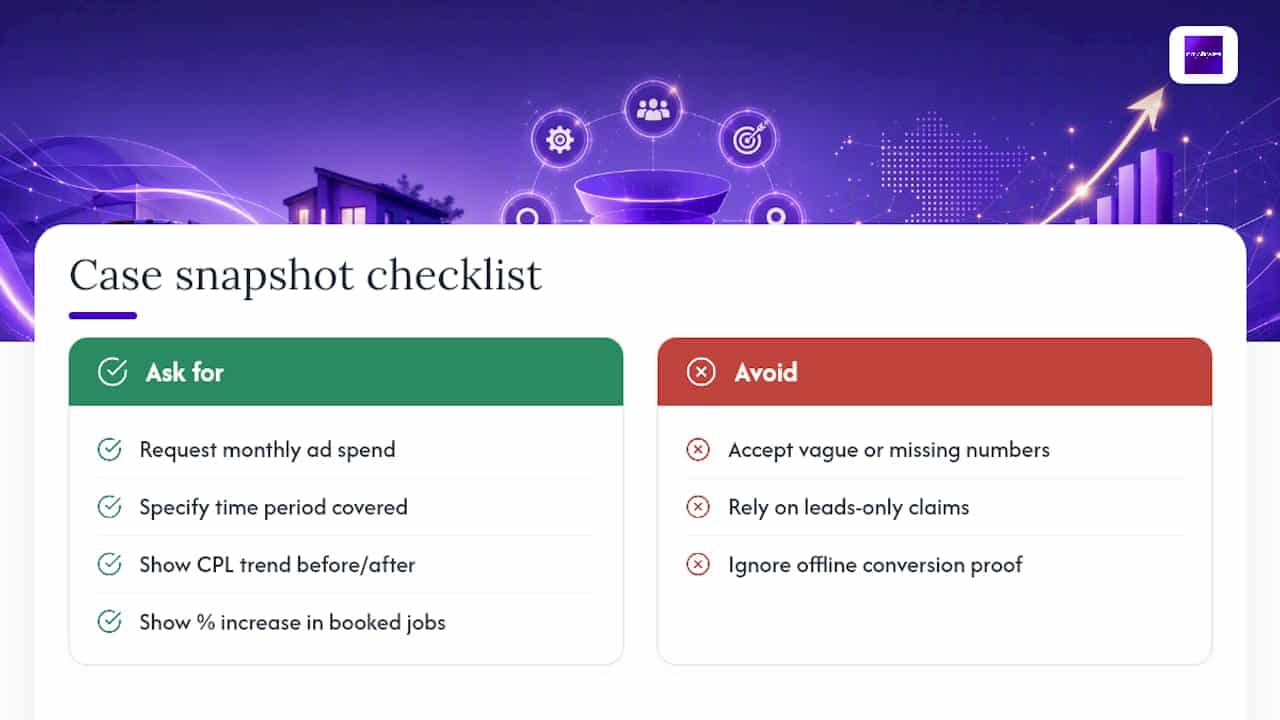

For readers evaluating options, City Web Company’s HVAC marketing services cover this exact structure: segmented campaigns, dedicated landing pages, and CRM-linked conversion tracking built for contractors specifically, not adapted from a generic retail template.
Matt, the author of this guide, draws on years of hands-on paid media management for local service businesses, with particular focus on the call-tracking and offline conversion setups that separate profitable HVAC accounts from ones that just generate clicks.
What Mistakes Kill HVAC Google Ads Performance, and What’s the 90-Day Fix?
The same four mistakes show up in nearly every underperforming HVAC account. Broad match without a negative keyword list turns your Emergency Repair campaign into a magnet for DIY searches and job seekers. Sending all traffic to a homepage instead of service-specific landing pages tanks conversion rate even when the ads themselves are strong. Skipping call-duration minimums inflates your conversion count with wrong numbers and hang-ups, poisoning the data Google uses to optimize. Never importing offline conversions means Google optimizes toward clicks and form fills, not actual booked revenue.
A 90-day launch plan fixes the structural problems in order:
- Weeks 1 to 2: Verify Local Services Ads eligibility, set up call tracking, and audit or rebuild campaign structure into the four-campaign taxonomy.
- Weeks 3 to 4: Build or fix dedicated landing pages for Emergency Repair and Installation campaigns.
- Weeks 5 to 6: Launch tightened keyword lists with phrase match core terms and the four standing negative keyword groups.
- Weeks 7 to 8: Set up GCLID capture and confirm your CRM can flag booked jobs distinct from raw leads.
- Weeks 9 to 10: Begin importing offline conversions and monitor match rates weekly.
- Weeks 11 to 12: Shift bidding toward target CPA per campaign type based on real conversion data collected so far.
Run a monthly audit after launch covering search terms report, negative keyword additions, landing page load speed, and CRM-to-Ads match rate. Skipping this step is how a well-built account quietly degrades over six months.
Should You Run HVAC Google Ads In-House or Hire an Agency?
Running Google Ads in-house works when you have someone who can check the account weekly, a CRM that actually flags booked jobs, and staff who answer calls fast enough to matter, since none of the targeting precision helps if a lead sits on hold for four rings during a heat wave.

Most HVAC owners underestimate how much time proper campaign segmentation, negative keyword audits, and landing page testing actually require on a recurring basis. A managed engagement typically delivers built campaign structure, tracking setup, dedicated landing pages, and ongoing monthly testing, which is the same work outlined throughout this guide, just executed continuously rather than in a single weekend sprint.
If you’re weighing that decision, our guide on choosing an HVAC PPC company breaks down what questions actually separate a competent partner from one that’s just running your budget through default settings.
— Matt
Get Your HVAC Google Ads Account Built to Convert, Not Just Click
City Web Company builds the exact structure this guide describes: segmented campaigns by intent, landing pages designed specifically for call conversion, call tracking with proper duration thresholds, and offline conversion import so your bidding optimizes toward booked jobs instead of raw clicks.

That last piece, connecting your CRM’s booked-job data back into Google Ads, is where most HVAC accounts leave real money on the table because it requires technical setup most in-house teams never get around to finishing. City Web Company handles PPC management, landing page builds, call tracking, and CRM integration as one connected system rather than separate vendors who don’t talk to each other. If your current campaigns are running on broad match with a homepage as the landing page, that’s a fixable structural problem, not a sign the channel doesn’t work for HVAC. Visit City Web Company’s digital marketing services overview to request an account audit and see exactly where your current setup is losing leads before you spend another month guessing.
Sources
FAQ
What Is the Best Way to Advertise HVAC Services?
Run Local Services Ads for emergency capture alongside segmented Google Search campaigns for installation and maintenance, backed by call tracking and dedicated landing pages for each service type.
Is $20 a Day Good for Google Ads in HVAC?
A $20 daily budget is too thin for most competitive HVAC markets, where a single-market operator typically needs a few thousand dollars per month to generate enough conversion data for effective optimization.
Do Google Ads Work for HVAC Contractors?
Yes, when campaigns are segmented by intent and paired with call tracking and offline conversion import, HVAC contractors see blended cost per lead in the $100 to $110 range, with branded and LSA leads costing considerably less.
How Much Do Google Ads Pay Per 1,000 Views?
Google Ads doesn’t pay advertisers for views. HVAC companies pay per click or per lead (with LSAs), and you’re billed for engagement, not impressions viewed.
What’s the Difference Between Search Ads and Local Services Ads for HVAC?
Search ads give you full control over keywords, copy, and landing pages, while Local Services Ads charge per verified lead and display above traditional ads, often producing lower cost per lead for emergency-intent searches specifically.
Recommended
These articles were popular with other readers too: