Use website DNI, connect call reports to Google Ads and your Google Business Profile, then tie calls to booked jobs. City Web Company can handle setup.
Google Ads Call Tracking: 6 Step Setup for SMBs That Feeds Smart Bidding
Enable call reporting at the account level, then set up phone-call conversions through website call conversions or call assets. That single move feeds Smart Bidding real call data and shows exactly which keywords and ad groups drive valuable calls instead of dead-end ones. You need call reporting turned on and an eligible website before the phone snippet can do its job.
TL;DR:
- Using call assets and website call conversions helps track the most valuable calls and link them accurately to specific keywords and ad groups.
- Setting an appropriate minimum call duration, such as 60 seconds, ensures only genuine, quality calls are counted as conversions.
- Proper setup requires verifying eligibility, enabling call reporting, installing tracking tags, and testing the number swap functionality accurately before running campaigns.
- Call details forwarding enriches call data with campaign, ad group, and keyword context, but only for recognized numbers and with explicit provider mapping.
- Accurate call tracking influences Smart Bidding’s effectiveness by providing reliable signals, reducing wasted ad spend, and improving lead attribution.
Table of Contents
Table of Contents
- How Does Google Ads Call Tracking Actually Work?
- Which Call Conversion Type Fits Your Business?
- Step-by-Step Setup for Google Ads Call Conversion Tracking
- Call Details Forwarding and Third-Party Call Analytics Integrations
- Best Practices and Troubleshooting for Call Tracking
- How Call Tracking Data Improves Bidding and Reporting
- DIY or Agency: What Google Ads Call Tracking Setup Actually Requires
- Get Google Ads Call Tracking Set Up Right the First Time
- Official Docs and Quick Resources for Implementation
- Sources
- FAQ
How Does Google Ads Call Tracking Actually Work?
Google Ads call tracking runs on forwarding numbers that Google assigns to your account once call reporting is switched on. These numbers usually match your business area code, and they route incoming calls while quietly logging metadata: duration, start time, and for longer calls, the caller’s area code. That data becomes the raw material for conversion counting and campaign attribution.
There are two distinct paths a call can take, and mixing them up is one of the most common setup mistakes. A call asset or call-only ad lets someone tap a phone number directly from the ad itself, no website visit required. A website call conversion happens when someone clicks your ad, lands on your site, then calls a number displayed there. Google tracks these differently because the mechanics differ: one is a click-to-call from the SERP, the other requires a phone snippet swapping your real number for a forwarding number the moment an ad click lands.
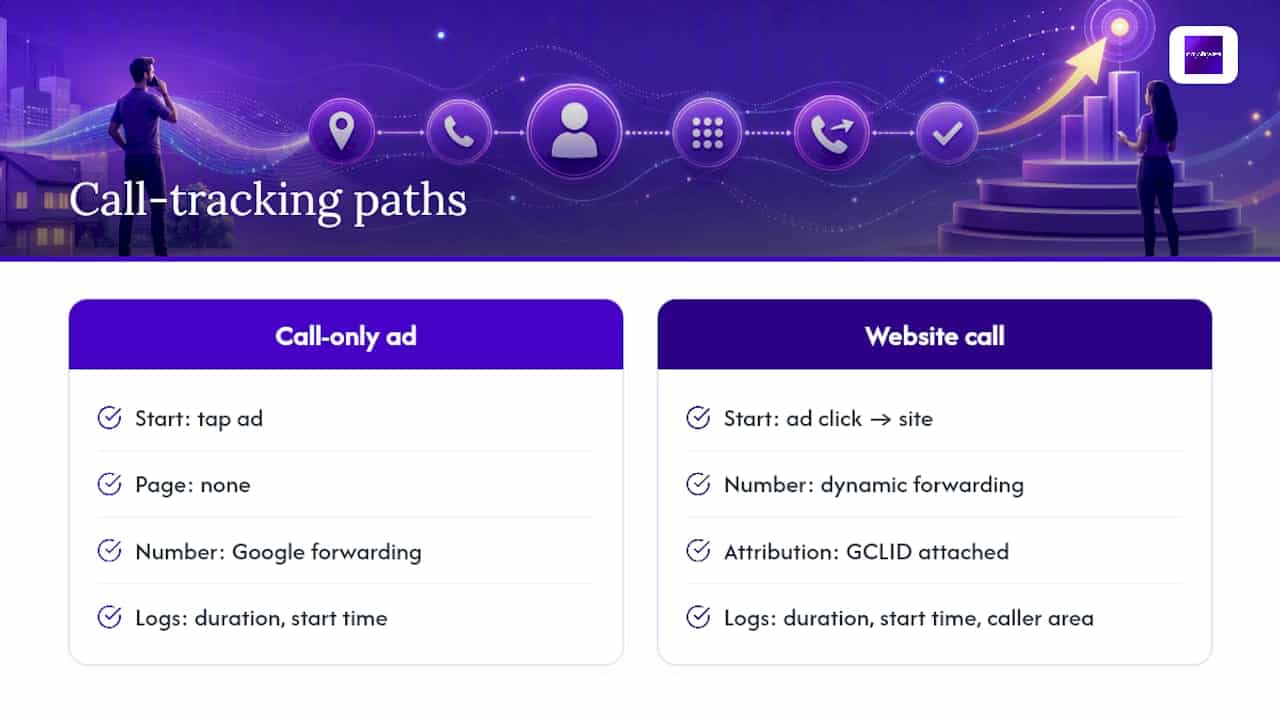
Attribution for both relies on identifiers tied to the click itself. The Google Click ID (GCLID) travels with the visitor and links their session to a specific campaign, ad group, and keyword. For calls routed through third-party call analytics platforms, SIP header data carries that same campaign context in real time, letting a call center or sales team see where the caller came from before they even pick up.
The practical upshot: Google Ads measures calls by exceeding a duration you set, not by the mere act of dialing. A four-second hang-up doesn’t count. A ninety-second conversation with a real prospect does.
Which Call Conversion Type Fits Your Business?
Picking the wrong tracking method is the fastest way to get clean-looking data that means nothing. Here’s how the three options break down:
- Call assets and call-only ads work best for businesses where mobile users tap straight from the search results, no site visit needed. Good for urgent-service categories like locksmiths or emergency plumbers, though Google has been consolidating call-only ad formats into call assets, so build new campaigns around assets rather than legacy call-only ad types.
- Website call conversions suit any business whose funnel runs through a landing page first. The phone snippet swaps your displayed number for a forwarding number after someone clicks your ad, so you can tie the call back to the exact keyword that brought them there.
- Offline or imported call conversions make sense once your call volume justifies a dedicated call analytics provider. These platforms record calls, score lead quality, and push conversion data back into Google Ads on a delay, which works well for businesses with a sales team that needs to qualify leads before crediting a conversion.
Most SMBs start with website call conversions because they require no third-party contract. Businesses with high call volume and multiple locations tend to graduate to a call analytics integration once basic snippet tracking proves the concept.
Step-by-Step Setup for Google Ads Call Conversion Tracking
This is the part that actually determines whether your data is trustworthy six months from now. Follow it in order.
- Confirm eligibility. Call reporting is available for businesses in eligible countries, and forwarding numbers typically use your local area code when one is available, falling back to toll-free numbers otherwise, according to Google’s forwarding number documentation. Confirm your account and website qualify before building anything.
- Turn on call reporting. In your Google Ads account, navigate to Conversions and enable call reporting at the account level. Nothing downstream works until this is on.
- Create the conversion action. Under Conversions, add a new phone-call conversion action. This is where you set the minimum call-duration threshold, the single most consequential setting in the whole process. A moderate threshold is a common starting point for service businesses; shorter thresholds catch more calls but also more voicemail hang-ups and wrong numbers.
- Install the tracking mechanism. For website call conversions, add the Google tag to every page displaying your phone number, then add the phone snippet, or configure the “Google Ads Calls from Website Conversion” tag inside Google Tag Manager. If you’re on GTM, use national number format without a leading plus sign to avoid display bugs when the snippet swaps in a forwarding number.
- Enable call details forwarding, if applicable. If you’re integrating a third-party call analytics platform, turn on call details forwarding and select your provider in account settings so campaign and GCLID data rides along in the call’s SIP headers.
- Test everything before trusting it. Run a live ad, click through, and confirm the displayed number actually changes to a forwarding number. Clear the
gwcccookie between test attempts, since Google uses it to avoid double-counting repeat visitors, and check that a test conversion shows up in both Google Ads and Google Analytics within a few hours.
Pro Tip: Test from a phone on cellular data, not your office Wi-Fi. Some corporate networks cache the original phone number and never trigger the snippet swap, which makes a working setup look broken during testing.
Marketers running local lead-gen campaigns often find the step-by-step Google Ads setup for local businesses a useful companion checklist alongside this call-tracking build, especially when landing pages and phone tracking need to launch together.
Call Details Forwarding and Third-Party Call Analytics Integrations
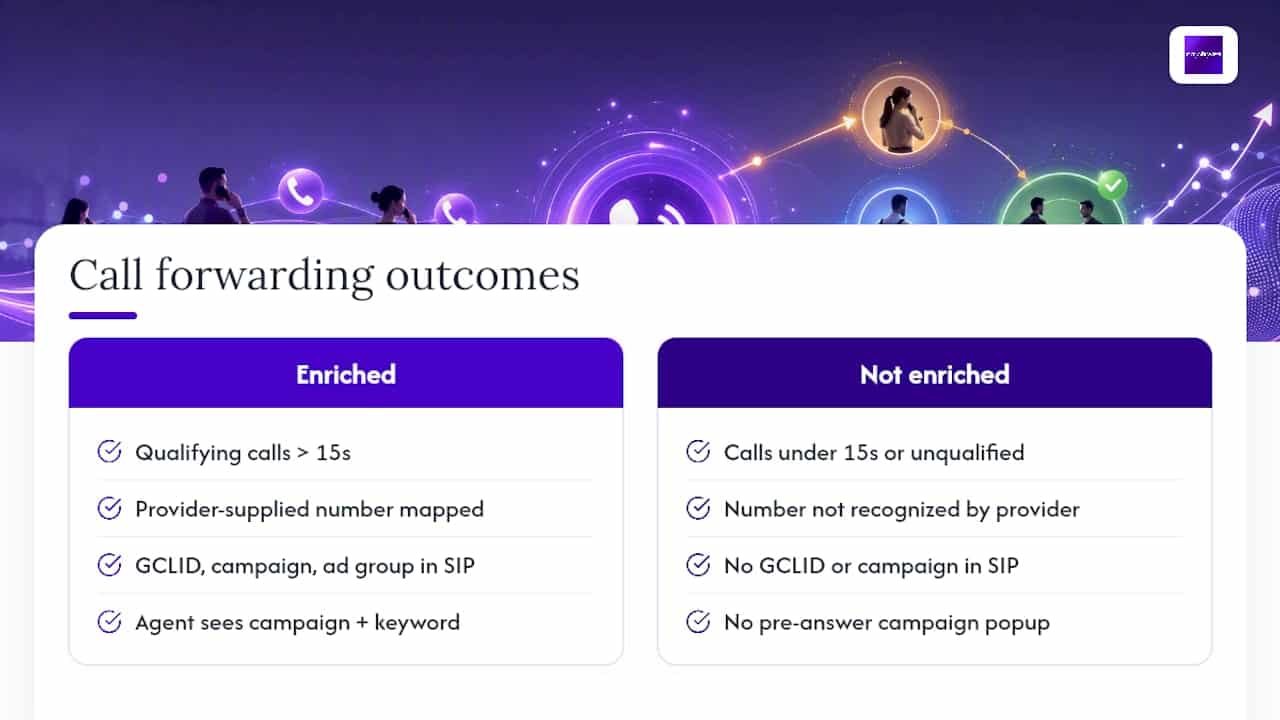
Call details forwarding is the feature that turns a basic duration count into a real-time attribution feed. When enabled, qualifying calls (generally those running past 15 seconds) carry campaign, ad group, and GCLID data inside the SIP headers, according to Google’s call details forwarding documentation. That’s what lets a call center system pop up “this caller came from your Denver plumbing campaign, keyword: emergency drain cleaning” before an agent even answers.
One limitation trips up a lot of setups: only calls to phone numbers your provider has supplied get the full data package. If a call reaches a number your integration doesn’t recognize, it won’t carry those enriched headers no matter how the campaign was configured. Provider mapping has to be exact, matching every tracked number to the right campaign and pool.
Turning this on also triggers an authorization prompt, because you’re granting a third party access to call metadata tied to your ads account. That’s a data-sharing decision, not a checkbox to click without reading. SIP header attribution enables faster lead routing and lead scoring, but it also means your call analytics vendor now holds campaign-level data about your ad spend, which is worth confirming against their own data retention and privacy policies before you flip the switch.

Best Practices and Troubleshooting for Call Tracking
Most call tracking failures trace back to one of a handful of predictable mistakes. Here’s what actually goes wrong in practice:
- Threshold set too low or too high. A 10-second threshold counts hang-ups as conversions; a 180-second threshold might exclude legitimate short calls where the customer just confirms an appointment time. Start around 60 seconds and adjust based on what your sales team says a “real” call actually sounds like.
- Forwarding numbers published where they shouldn’t be. These numbers are Google’s property, not yours, and publishing them outside call reporting or website call conversion systems risks having them reassigned, which breaks your tracking silently.
- The phone snippet can’t find your number. If your website’s phone number sits inside a dynamically loaded widget or uses an unusual CSS class, the snippet may fail to locate and replace it. Check the element with Google’s Tag Assistant before assuming the whole setup is broken.
- Early-media phone systems interfere with tracking. Some phone trees and auto-attendant systems play audio before the call formally connects, and this is incompatible with how forwarding numbers measure duration, leading to missed or misattributed calls. Audit your phone system before deploying dynamic number insertion.
Pro Tip: If conversions stop appearing after a phone system upgrade or a new VoIP provider, check for early-media compatibility first. It’s the single most overlooked cause of call tracking going silent overnight.
How Call Tracking Data Improves Bidding and Reporting
Smart Bidding is only as good as the conversion signal you feed it. When call conversion data is inaccurate or missing, automated bidding has no reliable way to prioritize budget toward the keywords and ad groups actually generating calls that turn into business, so it optimizes toward clicks and form fills instead, even when phone calls are your primary revenue channel.
Feeding offline call outcomes back into Google Ads closes that loop. If your sales team marks a call as a genuine sale days after it happened, importing that outcome lets Smart Bidding learn from real business results, not just call duration.
Three metrics deserve a permanent spot on your dashboard: cost per call conversion, the percentage of calls clearing your duration threshold, and conversion-assisted metrics that show how phone leads interact with other conversion actions on the path to a sale. Watching that last metric prevents the common mistake of undervaluing campaigns that generate calls but get credited elsewhere.
DIY or Agency: What Google Ads Call Tracking Setup Actually Requires
Doing this yourself makes sense if you’re comfortable in Google Tag Manager, have a developer who can troubleshoot CSS selectors, and run a phone system without early-media quirks. Budget a few hours for setup and testing, plus ongoing time to review reports and adjust thresholds as call volume shifts.
Hiring help makes more sense once you’re juggling multiple locations, a legacy phone system, or a call analytics integration that needs provider mapping done right the first time. We build the tag and snippet configuration, set up Google Tag Manager tracking, test forwarding-number behavior across devices, and connect call analytics providers so conversions flow cleanly into Smart Bidding. That kind of hands-on work shows up in results for local service campaigns like the ones detailed in City Web Company’s landscaping Google Ads case study, where call volume and keyword-level attribution were the whole point of the campaign redesign.
— Matt
Get Google Ads Call Tracking Set Up Right the First Time
Getting call tracking wrong costs you more than bad data. It costs you weeks of Smart Bidding optimizing toward the wrong signals while you assume everything’s working. We are the alternative to guessing your way through Tag Manager: our team configures the phone snippet, sets your duration threshold based on real sales-call patterns, and connects call analytics providers so every ringing phone ties back to the exact keyword that earned it.

We build this alongside the Google Ads management work we already do for home services, med spas, and other local businesses, so your phone leads and your click leads get measured on the same terms. If click-to-call buttons on your landing pages need work too, pairing tracking setup with conversion-focused CTA design tends to move the needle further than tracking alone.
Ready to see what’s actually happening with your call-driven campaigns? Request a consultation with City Web Company and get a setup that reports what really matters.
Official Docs and Quick Resources for Implementation
- Measure calls from ads, Google Ads Help
- Set up tracking for calls to a website phone number, Google Ads Help
- Google forwarding number policy, Google Ads Help
- Call details forwarding for call ads, Google Ads Help
- Local SEO and Google Business Profile services, City Web Company
Sources
- Measure calls from ads – Google Ads Help
- Set up Tracking calls to a phone number on a website – Google Ads Help
- Google forwarding number – Google Ads Help
- About call details forwarding for call ads – Google Ads Help
FAQ
Can Google Track Phone Calls From Ads?
Yes. Google Ads uses forwarding numbers to route and measure calls that come from call assets or from numbers displayed on your website after an ad click, capturing duration, start time, and area code for longer calls.
Are Google Call-Only Ads Going Away?
Google has been folding call-only ad formats into call assets across most campaign types, so new campaigns should build around call assets rather than the older standalone call-only ad format.
What Is the Best Call Tracking Setup for Google Ads?
For most SMBs, website call conversions using the Google tag and phone snippet cover the basics well; businesses with higher call volume often add a third-party call analytics provider with call details forwarding enabled for deeper lead scoring.
How Do I Check Call Reporting in Google Ads?
Go to Conversions in your Google Ads account and review the phone-call conversion action you created there. It shows call count, average duration, and how many calls cleared your minimum-duration threshold.
Does Call Tracking Data Feed Into Smart Bidding?
Yes. Accurate phone-call conversions give Smart Bidding a real signal to optimize toward, which is why setting a sensible duration threshold and testing the setup thoroughly matters before you trust the reported numbers.
Recommended
These articles were popular with other readers too: