
Use website DNI, connect call reports to Google Ads and your Google Business Profile, then tie calls to booked jobs. City Web Company can handle setup.
Why Optimize for Mobile: A Business Owner’s Guide
If you skip mobile optimization, you are handing traffic, rankings, and revenue to competitors who did not. A majority of global web traffic now comes from mobile devices (https://www.siteground.com/academy/mobile-seo/), and Google ranks your site based on its mobile version first. A slow or broken mobile experience does not just frustrate visitors; it directly suppresses your search rankings and kills conversions before a customer ever calls.
Three priorities to act on immediately:
- Speed: Get your page loading in under 3 seconds. Roughly 53% of mobile visitors leave if a page takes longer than that.
- Usable CTAs: Make buttons and tap targets large enough to tap without zooming. Anything under 48×48 pixels costs you clicks.
- Local visibility: Confirm your Google Business Profile is complete and your NAP (name, address, phone) is consistent across your site and directories. Most local mobile searches convert to in-person visits within hours.
Table of Contents
Key Takeaways
Mobile optimization directly protects your search rankings, conversion rate, and local lead volume because Google ranks your mobile site first and more than half of your visitors arrive on a phone.
| Point | Details |
|---|---|
| Mobile traffic dominance | A majority of global web traffic is mobile; your site must perform on phones first. |
| Speed is a conversion threshold | Roughly 53% of mobile visitors leave after 3 seconds; sub-3-second load time is the minimum. |
| Mobile-first indexing changes the stakes | Google crawls and ranks your mobile version; missing mobile content means missing rankings. |
| Fix order matters | Address speed and CTA blockers before investing in a full redesign for maximum ROI. |
| City Web Company’s approach | City Web Company audits, fixes, and measures mobile performance for local service businesses end to end. |
Table of Contents
- Why Optimize for Mobile: What It Actually Means
- What Actually Makes a Mobile Experience Work
- How Mobile Optimization Affects Your Revenue
- Concrete Techniques to Optimize for Mobile
- How to Measure Mobile Optimization Success
- Testing and Continuous Optimization
- How City Web Company Executes a Mobile Optimization Engagement
- Common Mistakes That Signal Poor Mobile Optimization
- Typical Timelines and Cost Ranges for Mobile Optimization
- The Part Most Guides Get Wrong About Mobile Optimization
- City Web Company Handles Mobile Optimization for Local Service Businesses
- Sources
- FAQ
Why Optimize for Mobile: What It Actually Means
Mobile optimization is the practice of making sure your website loads fast, looks right, and works properly on smartphones and tablets. It covers layout, performance, navigation, touch interactions, and mobile SEO signals. Responsive design is the most common approach, but it is not the only one.
| Approach | How It Works | Business Tradeoff |
|---|---|---|
| Responsive design | One codebase, CSS adapts layout to screen size | Low maintenance, strong SEO signals, most widely recommended |
| Adaptive design | Server detects device and serves a preset layout | More control over mobile UX, but higher dev cost and complexity |
| Separate mobile site (m.example.com) | Dedicated mobile URL with its own content | Harder to maintain, duplicate content risks, generally discouraged |
| Progressive Web App (PWA) | Web app with offline capability and app-like UX | High engagement potential, significant engineering investment |
Responsive design is the right default for most local service businesses. It keeps your SEO signals consolidated on one URL, requires one codebase to maintain, and satisfies Google’s mobile-first indexing requirements without the overhead of a separate mobile site. PWAs make sense when you have repeat users who benefit from offline access or push notifications, but that is a later-stage investment for most small businesses.
What Actually Makes a Mobile Experience Work
Page speed is the single highest-leverage element. Core Web Vitals, specifically Largest Contentful Paint (LCP), Interaction to Next Paint (INP), and Cumulative Layout Shift (CLS), are the metrics Google uses to grade your mobile performance. Aim for LCP under 2.5 seconds, INP under 200 milliseconds, and CLS under 0.1.
Beyond speed, the W3C Mobile Best Practices identify content adaptation and bandwidth constraints as the two most common failure points. Here is what that looks like in practice:
- Touch targets: Interactive elements should be at least 48×48 pixels. Smaller tap targets cause mis-taps and frustration, especially on checkout flows and contact forms.
- Font size: Keep body text at 16px or above. Text smaller than 16px triggers auto-zoom on iOS, which breaks your layout and annoys users.
- Simplified navigation: Hamburger menus work, but limit depth. Mobile users are often in a “ready-to-act” mindset and will not dig through three menu levels to find your phone number.
- Mobile-friendly forms: Reduce fields to the minimum. Use the correct input types (tel, email, number) so the right keyboard appears automatically.
- Optimized images: Use
srcsetto serve appropriately sized images per device. A 2,000-pixel-wide image served to a 390-pixel screen wastes bandwidth and slows load time. - Structured data: Implement schema markup for local businesses (LocalBusiness, FAQPage, Review). Mobile SERPs have limited real estate, and rich results increase click-through rates when implemented correctly.
Pro Tip: Inline your critical CSS so above-the-fold content renders without waiting for an external stylesheet to download. Pair this with rel=preload for hero images and preconnect for third-party fonts. These two changes alone can shave 0.5 to 1 second off perceived load time without touching your server.
How Mobile Optimization Affects Your Revenue
Mobile optimization is a revenue lever, not a design preference. The business case is direct: more mobile traffic, faster load times, and better UX translate to more leads and more local visits.
According to Think with Google, roughly 53% of mobile visitors abandon a site after just 3 seconds of waiting. That is more than half your potential customers gone before they see your offer. Google also treats mobile performance as a ranking factor, which means a slow mobile site suppresses your organic visibility across all devices, not just phones.
53% of mobile visitors leave if your page takes longer than 3 seconds to load. Speed is not a technical metric; it is a conversion rate.
The direct business benefits of mobile-friendly sites stack up across every stage of the funnel:
- Higher organic rankings: Google’s mobile-first indexing means your mobile site is the version that gets crawled and ranked. Missing content on mobile means missing rankings.
- Better conversion rates: Faster load times and usable CTAs reduce friction at the moment a customer is ready to act.
- Improved local search performance: Local mobile searches drive in-person visits at high rates. A well-optimized mobile site with accurate local data captures that intent.
- Higher ad ROI: Paid traffic sent to a slow or broken mobile page wastes budget. A mobile-optimized landing page improves Quality Score in Google Ads and lowers cost-per-click.
Local businesses feel this most acutely. Mobile searches with local intent frequently convert to store visits or calls within hours. If your site fails on mobile, that customer calls your competitor instead.
Concrete Techniques to Optimize for Mobile
Prioritize by effort and impact. Fix the speed and conversion blockers first; tackle engineering improvements after.
Quick wins (1 to 2 days)
- Compress images using a tool like Squoosh or ShortPixel. Uncompressed images are the most common cause of slow mobile load times.
- Remove or delay large pop-ups. Google penalizes intrusive interstitials on mobile. If you use a pop-up, trigger it after 5 seconds or on exit intent, not on page load.
- Fix tap targets. Run Google PageSpeed Insights and look for the “Tap targets are not sized appropriately” audit. Fix any button or link smaller than 48×48 pixels.
- Add
rel=preloadfor your hero image andpreconnectfor Google Fonts or any third-party resource your page calls on load.
Medium effort (1 to 3 weeks)
- Implement responsive images with
srcsetandsizesattributes so browsers download only the resolution they need. - Lazy-load below-the-fold images with the native
loading="lazy"attribute. This reduces initial page weight without harming above-the-fold speed. - Audit and simplify your navigation. Reduce menu depth, add a sticky click-to-call button, and make your primary CTA visible without scrolling.
Engineering tasks (weeks to months)
- Server-side render critical content. Google’s mobile-first indexing guidance is explicit: content that only loads after user interaction may not be indexed. Render your primary text, headings, and structured data on the server.
- Implement PWA features (service worker, web app manifest) if your business model benefits from repeat visits or offline access.
- Audit Core Web Vitals in the field using the Chrome User Experience Report (CrUX) data in Google Search Console, not just lab data.
Pro Tip: Lazy loading is safe for images below the fold, but never lazy-load your hero image, H1 heading, or primary body text. Search crawlers may not scroll or interact to trigger lazy-loaded content, which means that content may not be indexed.
For CMS-based sites, ask your developer or vendor to confirm that your theme is responsive, that image compression is automated on upload, and that your contact forms use the correct HTML input types. Most WordPress, Shopify, and Squarespace themes handle responsive layout, but performance and structured data still require manual attention.
How to Measure Mobile Optimization Success
Track mobile performance as its own segment, not blended with desktop. In GA4, create a mobile-specific exploration or apply a device category filter to your standard reports. This isolates mobile bounce rate, session duration, and conversion rate so you can see exactly where mobile users drop off.

| Metric | What It Measures | Mobile Benchmark | Tool |
|---|---|---|---|
| Largest Contentful Paint (LCP) | Perceived load speed | Under 2.5 seconds | Google PageSpeed Insights, Lighthouse |
| Cumulative Layout Shift (CLS) | Visual stability | Under 0.1 | Lighthouse, WebPageTest |
| Interaction to Next Paint (INP) | Responsiveness to input | Under 200ms | Lighthouse, CrUX |
| Mobile bounce rate | Engagement quality | Varies by industry; track trend | GA4 |
| Mobile conversion rate | Revenue impact | Varies; compare to desktop baseline | GA4 |
| Page load time (field) | Real-user speed | Under 3 seconds | WebPageTest, CrUX |
Tools and what each one is best for:
- Google PageSpeed Insights / Lighthouse: Combines lab data (simulated) and field data (real users via CrUX). Best for diagnosing specific Core Web Vitals failures and getting a prioritized fix list.
- WebPageTest: Waterfall analysis that shows exactly which resources block rendering. Use it when PageSpeed Insights flags a problem but you need to trace the root cause.
- BrowserStack: Real-device and browser testing across hundreds of device/OS combinations. Use it to catch layout breaks and functional bugs that emulators miss.
- Google Search Console: The Core Web Vitals report shows field data grouped by URL, flagging pages that fail at scale across real users.
Pro Tip: Field data and lab data will often disagree. Lab data (Lighthouse) runs on a controlled connection; field data (CrUX) reflects your actual users’ devices and networks. Always prioritize field data when making business decisions about what to fix first.
Testing and Continuous Optimization
A one-time audit is not enough. Device capabilities, network conditions, and user behavior shift constantly, and a site that passes today can regress after a plugin update or a new image-heavy landing page goes live.
Recommended testing cadence
- Daily: Set up automated performance alerts in Google Search Console or a monitoring tool like SpeedCurve. You want to know within 24 hours if a deploy breaks your LCP.
- Weekly: Do a manual spot check on a real device (not an emulator). Tap through your primary conversion flow, including the contact form and click-to-call button, on both iOS and Android.
- Monthly: Run a full Lighthouse audit, review your GA4 mobile segment for trend changes, and run at least one A/B test on a high-traffic mobile page (headline, CTA placement, or form length).
Common test types
- Real-device functional testing: Catch layout breaks, broken forms, and non-functional CTAs that emulators miss. BrowserStack covers hundreds of device/OS combinations without requiring a physical device lab.
- Performance lab tests: Lighthouse and WebPageTest give you a reproducible baseline. Run these before and after any significant code change.
- Field (RUM) analysis: Real User Monitoring data from CrUX or a tool like Datadog shows how actual visitors experience your site across devices and network conditions.
- A/B testing: Test one variable at a time on mobile-specific layouts. CTA button color, sticky header vs. no sticky header, and form field count are high-impact variables for local service sites.
- Accessibility checks: Run axe DevTools or Lighthouse’s accessibility audit monthly. Accessible design and mobile best practices overlap significantly, particularly around tap target size and color contrast.
Pro Tip: When a performance alert fires, triage in this order: check if a recent deploy caused it, check if a third-party script (chat widget, ad pixel) added load time, then check if a new image was uploaded uncompressed. Most mobile regressions trace back to one of these three causes.
For small teams without a dedicated developer, the most practical split is: the site owner handles weekly spot checks and monthly GA4 reviews, while a developer or agency handles the monthly Lighthouse audits and any A/B test implementation. When performance drops persist for more than two weeks or Core Web Vitals fail at scale in Search Console, that is the signal to bring in outside help.
How City Web Company Executes a Mobile Optimization Engagement
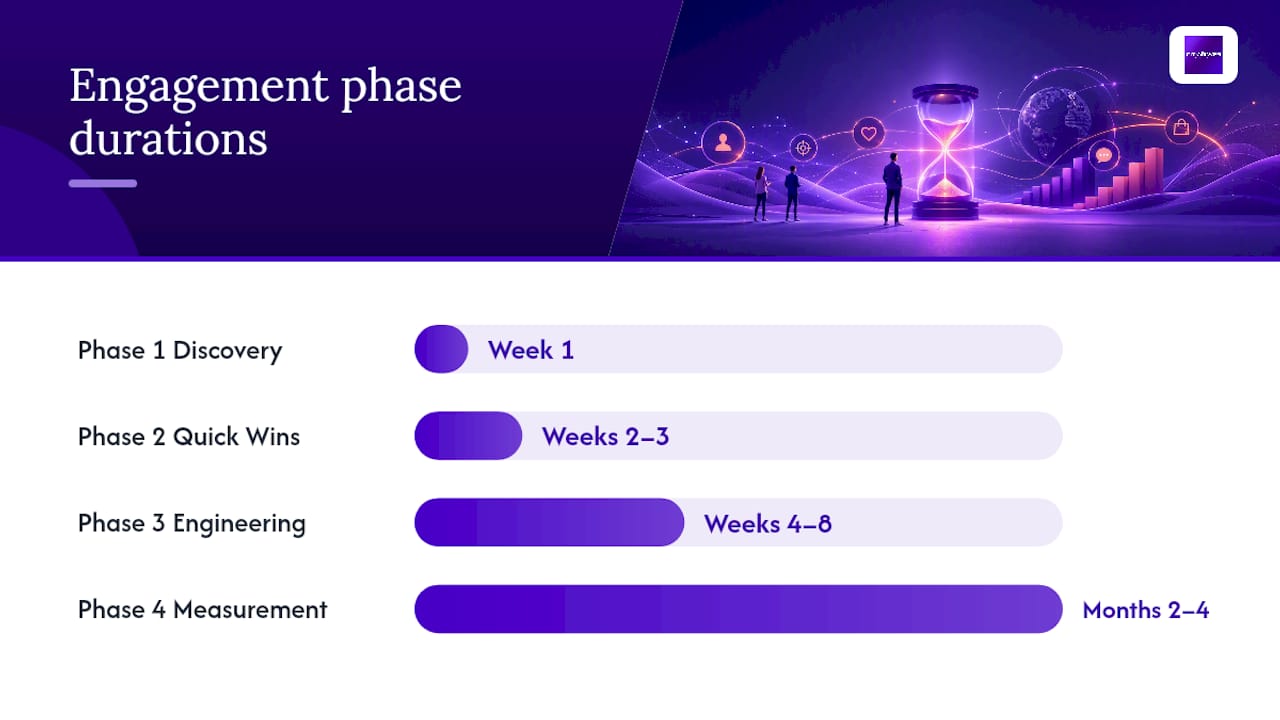

A mobile optimization engagement at City Web Company follows a structured four-phase process designed to deliver measurable improvements within the first 90 days, with ongoing iteration after that.
Phase 1: Discovery and audit (Week 1)
- Run Lighthouse, PageSpeed Insights, and a BrowserStack real-device audit across your top 10 pages.
- Pull GA4 mobile segment data to identify the highest-traffic, lowest-converting mobile pages.
- Document Core Web Vitals field data from Google Search Console.
- Deliverable: a prioritized audit report with issues ranked by business impact.
Phase 2: Quick wins (Weeks 2 to 3)
- Compress and reformat images, fix tap targets, remove intrusive pop-ups, and add
preconnectandpreloadhints. - Verify click-to-call and contact form functionality on iOS and Android.
- Confirm Google Business Profile data matches the site’s NAP exactly.
- Deliverable: a QA checklist confirming each fix, with before/after PageSpeed scores.
Phase 3: Engineering and rollout (Weeks 4 to 8)
- Implement responsive images with
srcset, server-side render critical content, and address any structured data gaps. - Run a full BrowserStack regression test across target device/OS combinations.
- Deliverable: a launch report with updated Core Web Vitals scores and a mobile conversion baseline.
Phase 4: Measurement and iteration (Months 2 to 4)
- Track mobile-specific KPIs weekly: LCP, mobile conversion rate, click-to-call volume, and local search impressions.
- Run monthly A/B tests on high-traffic mobile pages.
- Adjust based on field data, not just lab scores.
- Deliverable: monthly performance reports with trend analysis and a rolling backlog of next improvements.
Pro Tip: The audit report is the most valuable deliverable in Phase 1, not because of what it finds, but because it forces prioritization. Without a ranked backlog, teams fix what is easiest, not what moves revenue. Always tie each issue to a business metric before assigning it to a sprint.
- Start with the audit, even if you plan to do the fixes yourself.
- Fix speed and conversion blockers before any visual redesign.
- Validate every fix on a real device before marking it done.
- Measure mobile KPIs for 30 days before drawing conclusions about impact.
Common Mistakes That Signal Poor Mobile Optimization
Most mobile problems are not subtle. Here is what to look for:
- Blocking mobile indexing: A
noindexorDisallow: /in your robots.txt for mobile crawlers will tank your rankings. Check Google Search Console’s Coverage report for mobile-specific crawl errors. - Intrusive pop-ups on load: Google explicitly penalizes pop-ups that cover content immediately on mobile. If your site shows a full-screen newsletter signup the moment a visitor arrives, expect a ranking penalty.
- Tiny tap targets: Buttons under 48×48 pixels, links packed too close together, and phone numbers that are not click-to-call links all cost you conversions on mobile.
- Serving reduced content on mobile: If your mobile site hides sections, tabs, or product details that appear on desktop, Google may not index that content at all under mobile-first indexing.
- Uncompressed images: A single hero image over 1MB can push your LCP past 4 seconds on a mid-range phone on a 4G connection.
- Missing or broken click-to-call: For local service businesses, a phone number that is not a tappable
tel:link is a direct revenue leak.
Red flag checklist for non-technical site owners:
- Load your site on a real phone using a cellular connection (not Wi-Fi). If it feels slow, it is slow.
- Try tapping your primary CTA button with your thumb. If you mis-tap it, your customers will too.
- Search your business name on Google from your phone. Does your Google Business Profile appear? Is the phone number correct?
- Run your URL through Google PageSpeed Insights. A mobile score below 50 requires immediate attention.
Pro Tip: A clunky mobile experience signals low regard for user time, and that perception sticks. If a customer struggles to find your phone number or your form does not submit correctly on mobile, they do not call back later; they call your competitor.
When should you escalate to an agency or developer?
Typical Timelines and Cost Ranges for Mobile Optimization
Small wins can be done in days. Platform-level engineering takes months. Here is how to set realistic expectations:
- Quick wins (1 to 2 days): Image compression, pop-up removal, tap target fixes, and adding preload/preconnect hints. DIY cost: free if you have basic CMS access. Freelance developer: $150 to $500.
- CMS-level improvements (1 to 3 weeks): Responsive image implementation, form optimization, structured data markup, and navigation simplification. Freelance developer: $500 to $2,000. Small agency: $1,500 to $4,000.
- Full responsive redesign or engineering changes (2 to 3 months or more): New theme or custom build, server-side rendering, PWA implementation, full Core Web Vitals remediation. Small agency: $5,000 to $20,000 or more depending on site complexity.
Spend priority order: fix speed and conversion blockers first. A $300 image compression and tap-target fix will outperform a $15,000 redesign if the redesign does not address the underlying performance issues. Budget for measurement too. Knowing your mobile conversion rate before and after changes is the only way to confirm that the work paid off.
If you are considering offshore marketing talent to reduce implementation costs, it can work well for defined tasks like image optimization, structured data markup, and CMS configuration, provided you have a clear spec and a QA process in place.
The Part Most Guides Get Wrong About Mobile Optimization
Most mobile optimization guides treat speed as the finish line. Fix your LCP, pass Core Web Vitals, and you are done. That framing misses the actual problem.
Speed is table stakes. What separates a mobile site that generates leads from one that just passes a performance audit is whether the experience matches the intent of a mobile visitor. Mobile users are often outside, often in a hurry, and often one thumb away from calling someone. They are not browsing; they are deciding. A site that loads in 2.1 seconds but buries the phone number three scrolls down, or puts the contact form behind a tab, or uses a CTA button that says “Learn More” instead of “Call Now” is still failing that visitor.
The other thing most guides underweight is local. For a plumber, an HVAC company, or a pest control business, mobile optimization and local SEO are the same problem. The customer searching “emergency plumber near me” at 9 PM is on a phone. If your Google Business Profile is incomplete, your site is slow, or your click-to-call link is broken, that search ends with your competitor’s phone ringing, not yours.
Agencies add the most value at the audit and measurement stages, not the implementation stage. Any competent developer can compress images. Fewer can tell you which pages are losing the most mobile revenue, why, and in what order to fix them. That synthesis is where the ROI lives.
City Web Company Handles Mobile Optimization for Local Service Businesses
Local service businesses that fix their mobile experience see more calls, more form submissions, and better rankings, and City Web Company delivers exactly that. Rather than handing you a report and walking away, City Web Company runs the full engagement: mobile audit, prioritized fix list, responsive redesign or speed remediation, Core Web Vitals remediation, and local SEO and Google Business Profile integration so your mobile presence converts searchers into customers.

Services relevant to mobile optimization include mobile performance audits, responsive web design and development, image and asset optimization, structured data implementation, Core Web Vitals remediation, and local SEO tied directly to your mobile search presence.
Ready to see where your mobile site is losing leads? Get a mobile audit from City Web Company and walk away with a ranked list of fixes tied to business outcomes, not just technical scores.
Sources
Run a PageSpeed Insights test and a real-device check on your top landing page before doing anything else. These two checks take under 10 minutes and will surface your highest-priority issues immediately.
- Think with Google – Mobile behavior and performance insights
- Mobile sites and mobile-first indexing – Google Developers
- Mobile Web Best Practices – W3C
- Optimize your website for mobile – Google Ads Help
- What is Mobile Optimization and Why is it important? | BrowserStack
FAQ
What does it mean to optimize for mobile?
Mobile optimization means configuring your website so it loads fast, displays correctly, and functions properly on smartphones and tablets. It covers layout, performance, touch interactions, navigation, and mobile SEO signals like structured data and mobile-first indexing compliance.
Why does mobile optimization matter for search rankings?
Google uses mobile-first indexing, meaning it crawls and ranks your site based on its mobile version. If your mobile site is slow, missing content, or blocks crawlers, your rankings drop across all devices, not just phones.
What is poor mobile optimization?
Poor mobile optimization typically shows up as slow load times (over 3 seconds), tiny tap targets, content that is hidden or missing on mobile, broken forms, and no click-to-call functionality. These issues directly reduce conversions and can trigger Google ranking penalties for intrusive interstitials.
Why do I need to optimize my phone’s web presence?
Because more than half of your potential customers are finding you on a phone. A site that fails on mobile loses those visitors instantly, and Google’s mobile-first indexing means that failure also suppresses your rankings for desktop searchers.
How quickly can mobile optimization improvements show results?
Quick wins like image compression and tap-target fixes can improve load times within days and show up in Core Web Vitals reports with some delay. Ranking improvements from mobile-first indexing changes typically take several weeks to reflect in Search Console data.
Recommended
These articles were popular with other readers too: