
Use website DNI, connect call reports to Google Ads and your Google Business Profile, then tie calls to booked jobs. City Web Company can handle setup.
Website Conversion Rate Explained for Marketers and Business Owners
Your website conversion rate is the percentage of visitors who complete a specific desired action on your site. The formula is simple: divide total conversions by total sessions (or visitors), then multiply by 100. That single number tells you how efficiently your traffic turns into real business outcomes, and it sits at the center of every meaningful digital marketing decision.
A few named benchmarks give this number context right away. Ecommerce sites average roughly 3%, though that figure swings sharply by vertical. Tools like Google Tag Manager make tracking those conversions measurable and repeatable. Research from MECLABS across more than 20,000 tested pages shows that value proposition clarity has roughly three times more impact on conversions than friction reduction alone, which means where you start your optimization work matters as much as the work itself.
Table of Contents
Key Takeaways
Conversion rate is the single most direct measure of how well your website turns traffic into business outcomes, and improving it starts with defining the right goals, measuring them accurately, and fixing value proposition clarity before anything else.
| Point | Details |
|---|---|
| The formula | Conversion rate = (conversions ÷ sessions or visitors) × 100; pick the denominator that fits your business model. |
| Define before you measure | Set macro conversions tied to revenue first; micro conversions are supporting signals, not primary goals. |
| Value proposition wins first | MECLABS research shows messaging clarity delivers roughly 3x more conversion lift than friction reduction. |
| Benchmarks are directional | The ~3% ecommerce average masks wide vertical variation; your own trend line matters more than industry averages. |
| City Web Company | Offers analytics audits, conversion tracking setup, web design, and local SEO to help service businesses improve conversion performance. |
Table of Contents
- What Is a Website Conversion Rate and What Counts as a Conversion?
- How to Calculate Conversion Rate Accurately
- How to Measure Conversions: Tags, Tools, and a Setup Checklist
- What Affects Your Conversion Rate?
- What’s a Good Conversion Rate? Benchmarks and Context
- A Research-Backed CRO Checklist That Actually Prioritizes Correctly
- Common Conversion Tracking Mistakes to Avoid
- How Agencies Approach Conversion Rate Improvement for Local Businesses
- How City Web Company Helps Local Businesses Convert More Traffic
- Sources
- FAQ
What Is a Website Conversion Rate and What Counts as a Conversion?
Not every visitor action is worth tracking. The ones worth tracking are the ones tied directly to revenue or a step that predictably leads to it.
Macro conversions are the primary business goals: a completed purchase, a submitted lead form, a booked consultation, a phone call from a local service page. These move money. Micro conversions matter because they reveal where users are in the decision process, even when they haven’t converted yet.
The distinction between page-level and site-level conversion rates is equally practical. Page-level rates tell you where to act. Site-level rates tell you the overall health of the funnel.
Common conversion goals by business type:
- Lead generation: form submission, phone call, live chat initiation
- Ecommerce: completed purchase, checkout start, add-to-cart
- SaaS: free trial signup, demo request, account creation
- Local services: phone call, directions click, contact form submission
Geckoboard’s KPI library lists downloads, signups, purchases, and demo bookings as the most commonly tracked conversion types, which maps well to the goals above.
Pro Tip: Define your primary conversion as the action most directly tied to revenue, not the one easiest to track. A phone call from a plumber’s service page is worth far more than a newsletter signup, even if the call is harder to instrument.
How to Calculate Conversion Rate Accurately
The standard formula works in two versions depending on how your business handles repeat visits.
Session-based formula: (Conversions ÷ Sessions) × 100
User-based formula: (Conversions ÷ Unique Visitors) × 100
Worked example 1 — ecommerce: An online store records 180 completed orders from 6,000 sessions in a month. Sessions work here because each visit is a fresh purchase opportunity, even from the same person.
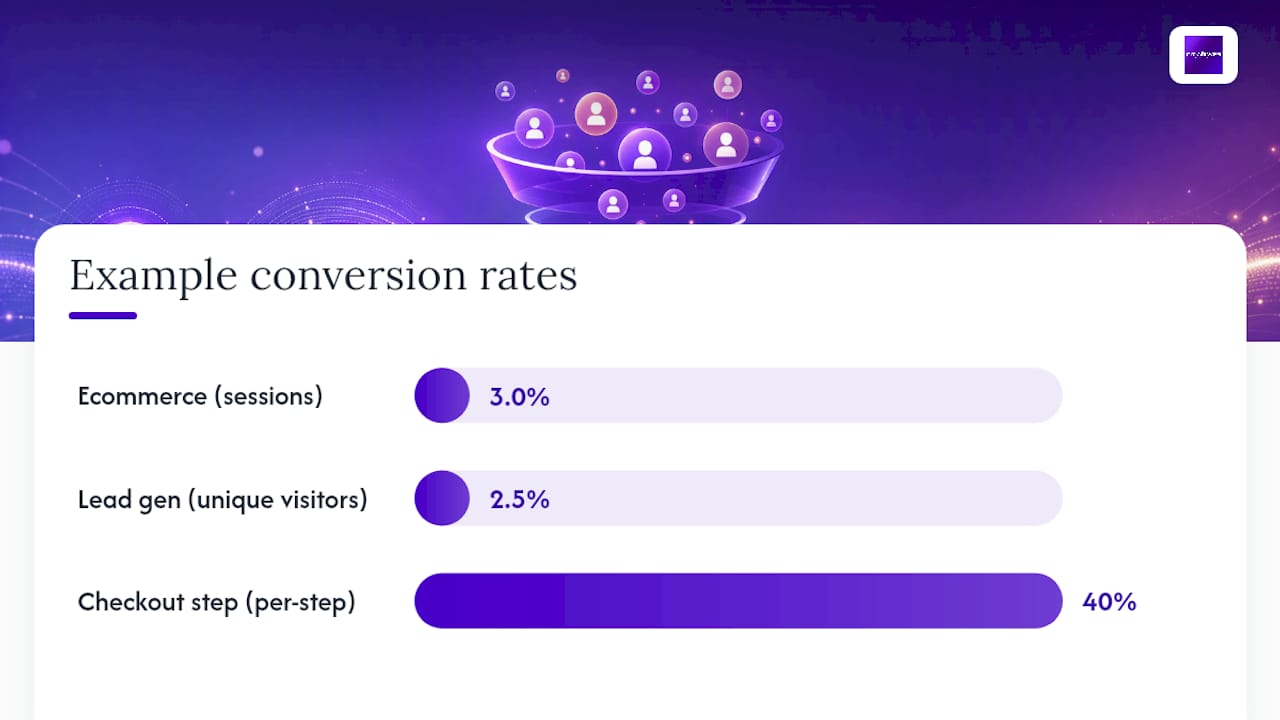
Worked example 2 — lead generation: A home services company receives 40 contact form submissions from 1,600 unique visitors. Unique visitors work better here because a single lead submitting the form twice should count as one conversion, not two.
How to pick your denominator:
- Use sessions when each visit is an independent transaction opportunity (ecommerce, booking engines)
- Use unique visitors when one person converting twice is still one lead (lead gen, SaaS trials)
- Use per-step rates in multi-step funnels: if 1,000 users start checkout and 400 complete it, that step converts at 40%, and that gap is where you focus
Tracking per-step rates through a conversion funnel reveals exactly where users drop off, which is far more useful than a single site-wide number.
Stat to know: A 1% improvement in conversion rate on a page receiving 10,000 monthly sessions means 100 additional conversions per month, compounding across every campaign you run.
How to Measure Conversions: Tags, Tools, and a Setup Checklist
Accurate measurement starts with proper tagging. Without it, you’re optimizing on guesswork.
Essential tools:
- Google tag (formerly Global Site Tag): the base tag installed site-wide, required for Google Ads and GA4 to communicate
- Google Tag Manager (GTM): a container that lets you deploy and manage event tags without touching code for every change
- Event snippets: placed on confirmation pages or tied to click events to fire a conversion signal when the action completes
Google Ads conversion tracking recommends placing the Google tag across every page of your site, then adding event snippets only on the specific pages or triggers that define a conversion, such as a thank-you page after a form submit or a “call now” button click.
Implementation checklist:
- Install the Google tag site-wide via GTM or direct code placement
- Create a conversion action in Google Ads or GA4 for each goal (purchase, form submit, call)
- Place event snippets on confirmation or thank-you pages for form and purchase conversions
- Set up click-event triggers in GTM for phone number clicks and CTA buttons
- Enable cross-device tracking by linking GA4 to Google Ads
- Verify tags are firing using GTM’s Preview mode or the Google Tag Assistant Chrome extension
- Run a test conversion and confirm it appears in your reports within 24 hours
For phone-call tracking specifically, dynamic number insertion tools can swap your displayed number based on traffic source, giving you call attribution by channel without manual tagging.
Pro Tip: Before trusting any conversion report, run a test conversion yourself. Submit the form, complete a test purchase, or click the tracked button, then check whether the conversion fires in GTM’s Preview mode. A tag that looks installed but never fires is the most common source of underreported conversions.
Wondering whether Google Analytics is the right platform for your setup? It depends on your ad spend and reporting needs, but for most small businesses, GA4 paired with Google Ads covers the essentials.
What Affects Your Conversion Rate?
A low conversion rate rarely has one cause. It’s usually a combination of traffic quality, page experience, offer clarity, and technical friction working against each other.


Traffic quality and intent: Paid search traffic from high-intent keywords converts differently than social media traffic from awareness campaigns. Organic visitors who searched “emergency plumber near me” are far closer to calling than someone who clicked a Facebook ad for a seasonal promotion. Mixing these in a single site-wide rate hides the real story.
User experience and UX clarity: Confusing navigation, buried CTAs, and forms with too many fields all reduce conversion. UX design choices directly affect whether a visitor can find what they need and act on it quickly.
Value proposition: If visitors can’t tell within five seconds what you do, who you serve, and why they should choose you, they leave. This is the highest-leverage factor, per MECLABS research.
Trust signals: Reviews, star ratings, certifications, and recognizable payment logos reduce the perceived risk of converting. For local service businesses, a Google Business Profile rating visible on the landing page can move the needle noticeably.
Page speed and mobile performance: A page that loads in under two seconds on mobile gives users no reason to abandon before the CTA appears. Slow pages compound every other problem. Making your site mobile-friendly is a prerequisite, not an upgrade.
Measurement artifacts that distort rates: Internal traffic from your own team, bot traffic inflating session counts, and attribution windows that credit the wrong channel can all make your conversion rate look better or worse than it actually is. Filter internal IPs in GA4 and audit your attribution model before drawing conclusions.
What’s a Good Conversion Rate? Benchmarks and Context
Benchmarks are useful as a starting point and dangerous as a finish line.
Shopify’s conversion rate research cites roughly 3% as a commonly referenced ecommerce benchmark, but that number flattens enormous variation across verticals.
Sources: Shopify, Geckoboard. Ranges are directional; your category, price point, and traffic mix will shift these.
The most useful benchmark is your own historical rate.
A Research-Backed CRO Checklist That Actually Prioritizes Correctly
Most CRO advice tells you to run A/B tests. The better advice is to run them in the right order.
MECLABS research across more than 20,000 tested pages shows value proposition improvements deliver roughly three times the conversion lift of friction reduction. That means fixing your headline and offer clarity before you shorten your form. Nielsen Norman Group frames CRO as a continuous, data-driven cycle, not a one-time project, which aligns with how compounding gains actually work in practice.
Prioritized CRO sequence:
- Clarify the value proposition on your highest-traffic, highest-intent page: headline, subhead, and hero image should answer “what is this, who is it for, and why now” within five seconds
- Reduce form and checkout friction: cut every field that isn’t required, use autofill, and show progress indicators on multi-step forms
- Add or improve trust signals: customer reviews, response time guarantees, and recognizable certifications near the CTA
- Improve page speed and mobile layout: compress images, defer non-critical scripts, and test on a real mobile device
- Personalize by traffic source: a visitor from a Google Ads campaign for “HVAC repair” should land on a page that says “HVAC repair” in the headline, not your generic homepage
Testing flow:
- Write a hypothesis: “Changing the CTA from ‘Submit’ to ‘Get My Free Quote’ will increase form submissions because it communicates value”
- Run an A/B test with enough traffic to reach statistical significance (most tools need at least 100 conversions per variant)
- Measure uplift against the primary conversion metric, not a proxy
- Implement winners, document losers, and move to the next hypothesis
Useful tools: Google Optimize alternatives like VWO or Optimizely for A/B testing; Hotjar or Microsoft Clarity for heatmaps and session replay; GA4 for funnel analysis. For a deeper CRO playbook, the prioritization framework above maps to a full tactical sequence.
Pro Tip: Run heatmaps on your top-converting page, not just the ones that aren’t working. Knowing what drives success on a high-performer gives you a replicable template, not just a list of problems to fix.
HubSpot’s CRO guide makes the case for treating the entire user journey as one connected system, from the entry page through the sales handoff, rather than optimizing individual pages in isolation.
Common Conversion Tracking Mistakes to Avoid
Getting the number wrong is worse than not having a number, because it leads to confident decisions built on bad data.
Tracking mistakes:
- Missing tags on key pages, especially after a site redesign that wipes old code
- Counting internal traffic from your own team, which inflates session counts and deflates conversion rates
- Double-counting conversions when both a thank-you page view and a form-submit event fire for the same action
- Using the wrong attribution window, crediting a click from 30 days ago for a conversion driven by a retargeting ad yesterday
Optimization mistakes:
- Changing button colors before testing the headline (cosmetic changes rarely move the needle)
- Running tests on low-traffic pages where you’ll never reach statistical significance
- Ending tests too early because early results look promising (regression to the mean is real)
- Treating every “best practice” as a guaranteed win without testing it in your specific context
Red flags to watch:
- A sudden conversion rate drop tied to a single deploy date
- Session spikes with no corresponding conversion increase (often bot traffic)
- Mobile conversion rates significantly below desktop rates on the same page
Pro Tip: Before declaring a conversion lift real, let the test run for at least two full business cycles. Patience is the cheapest CRO tool you have.
For landing page design that avoids the most common structural mistakes, the fundamentals around hierarchy, CTA placement, and trust signal positioning apply regardless of industry.
How Agencies Approach Conversion Rate Improvement for Local Businesses
The agency workflow for CRO looks different from the DIY version, mostly because it starts with an analytics audit rather than a redesign.
A typical engagement begins with discovery: reviewing existing GA4 or Google Ads data to find the highest-leakage pages, the traffic sources with the worst conversion rates, and any tracking gaps that are making the data unreliable.
From there, the priority fixes usually fall into three buckets: tracking corrections (so the baseline is accurate), value proposition improvements on the highest-intent pages, and friction reduction on the contact or booking flow. For local service businesses, this often means simplifying a five-field contact form to three fields, adding a Google review count near the CTA, and making the phone number click-to-call on mobile.
The content and messaging strategy matters as much as the page structure. Visitors from local search have high intent but low patience. A headline that matches their search query and a CTA that tells them exactly what happens next converts better than a generic “Contact Us” page.
Evaluating an agency engagement for CRO comes down to three questions: Do they audit your tracking before making recommendations? Do they test changes rather than just implement them? And do they measure success against revenue metrics, not just conversion rate percentages?
How City Web Company Helps Local Businesses Convert More Traffic
Most local service businesses have a traffic problem and a conversion problem at the same time, and fixing only one of them leaves money on the table. City Web Company’s approach starts where the data points: an analytics audit that identifies whether low conversions stem from traffic quality, page experience, tracking gaps, or offer clarity, then builds a prioritized fix list from there.

Services that directly affect conversion performance include web design and development, Google Ads management with conversion tracking built in, local SEO to bring higher-intent visitors to your pages, and phone-call tracking setup for service businesses where calls are the primary conversion. The goal is a site that doesn’t just rank but actually turns visitors into leads.
If your conversion rate is below where it should be, or you’re not sure what it even is right now, get a clear picture of your digital marketing performance and find out where the biggest gains are hiding.
Sources
- Set up conversion tracking for your website – Google Ads Help
- Conversion rates – Nielsen Norman Group
- Patented methodology – MECLABS
- How to calculate conversion rate – Shopify
FAQ
What is website conversion rate in simple terms?
It’s the percentage of website visitors who complete a specific goal, calculated as (conversions ÷ sessions) × 100.
What is a good conversion rate for a website?
Your own improving trend line is a more useful target than any industry average.
How do I start tracking conversions on my site?
Install the Google tag site-wide via Google Tag Manager, create a conversion action in Google Ads or GA4, and place event snippets on your thank-you or confirmation pages. Verify tags are firing with GTM’s Preview mode before relying on the data.
Why is my conversion rate low even with decent traffic?
Low conversion rates usually point to a mismatch between traffic intent and page messaging, a weak value proposition, or friction in the form or checkout flow. Audit your highest-traffic pages with heatmaps and session replay before making changes.
Can City Web Company help improve my conversion rate?
Yes. City Web Company provides analytics audits, conversion tracking setup, web design, and local SEO services specifically for local service businesses. The starting point is identifying whether your current data is even accurate before optimizing for a better number.
Recommended
These articles were popular with other readers too: