
Use website DNI, connect call reports to Google Ads and your Google Business Profile, then tie calls to booked jobs. City Web Company can handle setup.
Step-by-Step Website Design for Law Firms
A well-built law firm website requires eight core page types, mobile-first design, WCAG 2.1 AA accessibility, TCPA-compliant intake forms, and state bar advertising compliance before a single line of code gets written. Skip any of those and you are either losing leads or risking a disciplinary complaint.
Here is what every effective law firm site needs at minimum:
- Homepage with practice area summaries, trust signals, and a clear call to action
- Attorney bio pages with professional headshots, bar admission numbers, and credentials
- Individual practice area pages written in client-focused language with local references
- Anonymized case results page that demonstrates expertise without implying guaranteed outcomes
- Bar-compliant testimonials page that avoids outcome-implying language
- Blog or resource center updated regularly for SEO and client education
- Contact and consultation page with a TCPA-compliant intake form and explicit consent checkboxes
- Advertising disclaimers visible sitewide
Planning your site architecture and content strategy before touching a design tool is what separates a site that ranks and converts from one that just exists online.
Table of Contents
Table of Contents
- 1. What essential pages does every law firm website need?
- 2. How to plan site architecture and navigation for SEO
- 3. Design and user experience considerations for law firm websites
- 4. Legal compliance requirements and disclaimers for law firm websites
- 5. Step-by-step process to build and launch your law firm website
- City Web Company builds law firm websites that generate real leads
- FAQ
- Key Takeaways
1. What essential pages does every law firm website need?
The pages you include determine whether a visitor stays, trusts you, and contacts you. Get the law firm website essentials right before worrying about color palettes.
- Homepage: Lead with your strongest trust signal, whether that is years in practice, bar admissions, or a notable result. Keep it scannable with ample white space and a prominent CTA above the fold.
- Attorney bio pages: Generic credentials do not build trust. Genuine photos and a personal story about why you practice law convert better than a list of degrees. Include bar admission numbers and links to each practice area.
- Practice area pages: Each area gets its own dedicated page with local references (“personal injury attorney in Dallas”), client-focused language, and a clear explanation of your process.
- Case results: Anonymize client details to comply with bar restrictions. Frame results around the problem solved, not a dollar figure guarantee.
- Testimonials: Obtain written client permission before publishing. Avoid language that implies a specific outcome for future clients, per rules like Florida Bar Rule 4-7.2.
- Blog or resource center: Regularly updating content with twice-weekly posts builds topical authority and keeps your rankings from stagnating.
- Contact page: Phone number, email, address, map embed, and an intake form that captures lead data directly into your CRM. Appointment scheduling links belong here too.
2. How to plan site architecture and navigation for SEO
Proper site architecture establishes topical authority and makes key pages easy for both users and search engines to find. The rule is simple: every practice area page sits one click from the homepage, and any sub-practice area sits one click from its parent.
Structure your navigation with no more than seven top-level menu items. Label them short and clear: “Practice Areas,” “Attorneys,” “Results,” “Blog,” “Contact.” Place your most important CTA in the top-right corner of the header on every page.
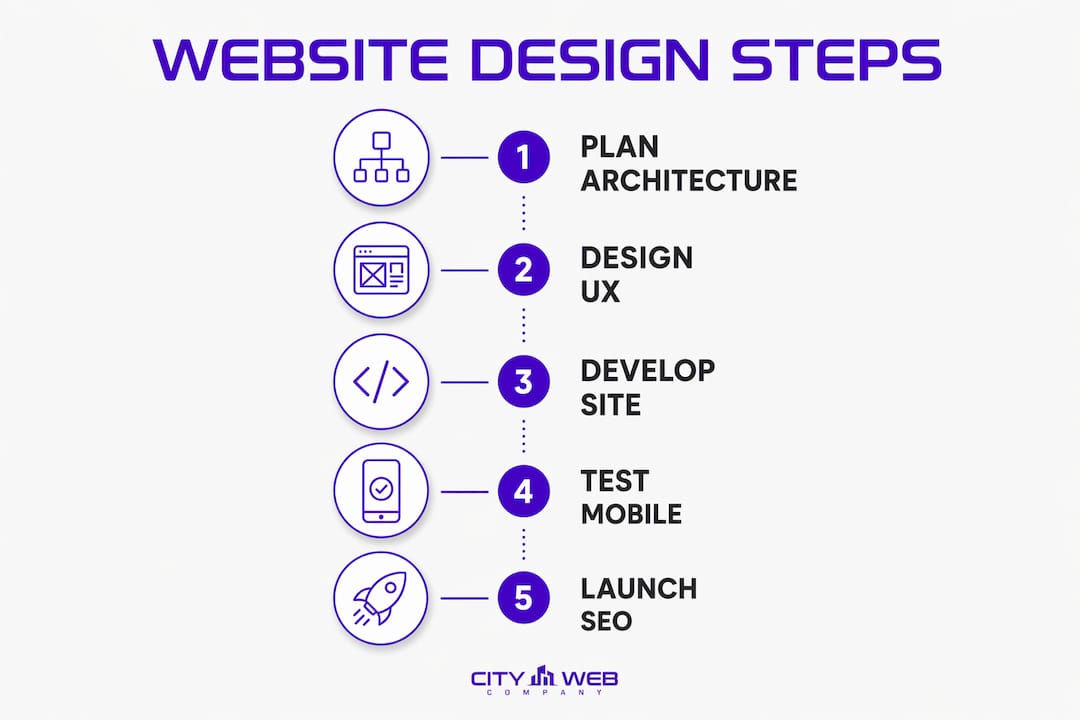
Pro Tip: Plan your URL structure before you build. A clean path like /practice-areas/personal-injury/ is easier for Google to crawl and easier for a client to remember than a string of random parameters.
Use breadcrumb trails on every interior page to reinforce hierarchy and help visitors orient themselves. Broken links and 404 errors undermine both user trust and rankings, so audit them before launch and on a quarterly schedule after.
3. Design and user experience considerations for law firm websites
Mobile-first design is not optional. Over half of visitors reach law firm sites via smartphone, and Google ranks the mobile version of your site first. Build for the smallest screen and scale up, not the other way around.


Strong branding means a consistent color palette, two or three typefaces maximum, and photography that is actually of your firm. Stock photos of gavels and generic handshakes signal inauthenticity immediately. Real attorney headshots and office photos build the kind of trust that converts a visitor into a consultation request.
WCAG 2.1 AA accessibility standards require alt text on every image, keyboard-navigable menus, and screen-reader-friendly forms. Accessibility also widens your potential client base and keeps you in compliance with the Americans with Disabilities Act. For a deeper look at how accessibility intersects with SEO, the web accessibility and SEO guide from BabyLove Growth covers the technical overlap clearly.
Appointment schedulers and live chat have become baseline expectations for legal websites. Clients want to act on their legal issue the moment they land on your site. Give them a way to book directly without a phone call.
Pro Tip: Target a page load time under 2.5 seconds. Large, uncompressed images and unnecessary third-party scripts are the most common culprits. Compress images before uploading and audit your scripts quarterly.
4. Legal compliance requirements and disclaimers for law firm websites
Most attorneys make the mistake of choosing a platform before reviewing their state bar’s advertising rules. Those rules dictate what you can say, how you can say it, and what disclaimers you must display, and they vary significantly by state.
- Review your state bar’s advertising rules before writing a single page of content.
- Include a “no attorney-client relationship formed” disclaimer on every contact form and consultation page.
- Add results disclaimers near any case outcome you publish: “Past results do not guarantee a similar outcome.”
- Use TCPA-compliant intake forms with an explicit consent checkbox, not pre-checked boxes, before collecting any phone number or email.
- Keep your privacy policy current, accessible from the footer on every page, and updated whenever your data practices change.
- Install an SSL certificate so your site runs on HTTPS. This is both a Google ranking signal and a basic security requirement for protecting client data.
- Schedule compliance audits at least twice a year. Bar advertising rules change, and a page that was compliant at launch may not be compliant twelve months later.
5. Step-by-step process to build and launch your law firm website
This is the sequence that produces a compliant, high-performing site without costly rework.
- Review state bar advertising rules before selecting any platform or writing any content. Compliance shapes every subsequent decision.
- Register and control your own domain name through a registrar like Cloudflare, Porkbun, or Namecheap. Losing domain access can take down your website and your firm’s email simultaneously.
- Choose your platform based on firm size, budget, and technical capacity. WordPress offers the most flexibility and SEO control. Clio Grow suits solo attorneys who want a fast, integrated setup.
- Plan site architecture and content around your practice areas and the specific clients you want to attract. Map every page before building anything.
- Develop content with client-focused language. Write for the person searching “car accident lawyer near me,” not for a law school admissions committee.
- Build the site using mobile-first design, WCAG 2.1 AA accessibility features, and Google Schema markup that tags your site as a legal service and identifies each practice area.
- Test rigorously before launch: page speed, mobile rendering, form functionality, navigation links, disclaimer presence, and SEO metadata on every page.
- Launch and announce the site to referral sources, former clients, and your professional network. A launch announcement generates early backlinks and direct traffic.
- Maintain and update regularly. Attorney bios, practice area pages, and blog content all need ongoing attention to hold rankings and reflect current bar status.
- Integrate SEO and digital marketing continuously. Local SEO, Google Business Profile optimization, and paid search campaigns compound the organic work your site does. For a detailed breakdown of how digital marketing drives results for law firms, City Web Company has published a focused resource on exactly that.
City Web Company builds law firm websites that generate real leads
Law firm owners who want a site that actually brings in clients, not just one that looks professional, need more than a template. City Web Company builds custom, mobile-first websites for local service businesses, including law firms, with compliance, speed, and lead generation built into the process from day one.
The difference between a site that ranks and one that sits idle usually comes down to the work done before launch: architecture planning, compliance review, local SEO structure, and conversion-focused copy. City Web Company handles all of it, including ongoing SEO, Google Ads management, and content updates that keep your site competitive month after month. If you are ready to stop guessing about what your website should do and start seeing it produce consultations, visit the web design and development services page to see what a purpose-built law firm site looks like in practice.
FAQ
What pages does a law firm website need at minimum?
A compliant, conversion-ready law firm site needs at least eight page types: homepage, attorney bios, practice area pages, case results, testimonials, a blog, a contact page with a TCPA-compliant form, and sitewide advertising disclaimers.
How important is mobile design for a law firm website?
Critical. Over half of visitors reach law firm sites on smartphones, and Google indexes the mobile version of your site first, so a layout that breaks on small screens directly hurts your search rankings.
What is a TCPA-compliant intake form?
A TCPA-compliant form includes an explicit, unchecked consent checkbox that informs the user they agree to be contacted before you collect their phone number or email. Pre-checked boxes do not satisfy the requirement.
How often should a law firm update its website content?
Twice-weekly blog posts are the benchmark for firms actively building organic traffic. At minimum, audit and update practice area pages and attorney bios regularly to maintain trust signals and search visibility.
Can City Web Company handle law firm website design and SEO together?
Yes. City Web Company provides integrated web design, local SEO, and ongoing digital marketing for law firms, covering everything from site architecture to Google Business Profile optimization and paid search.
Key Takeaways
A compliant, mobile-first law firm website built on a logical site architecture, with TCPA-compliant forms and regular content updates, is the foundation for consistent lead generation.
| Point | Details |
|---|---|
| Compliance comes first | Review state bar advertising rules before choosing a platform or writing any content. |
| Architecture drives SEO | Every practice area page should sit one click from the homepage to build topical authority. |
| Mobile-first is mandatory | Over half of law firm site visitors use smartphones; Google ranks the mobile version first. |
| Speed under 2.5 seconds | Pages that load faster reduce bounce rates and improve lead conversion for law firms. |
| City Web Company | Builds custom, compliant law firm websites with integrated SEO and ongoing digital marketing. |
Recommended
These articles were popular with other readers too: