
Pass Google Business verification with a video-first checklist. Film one continuous 30 second take, fix flagged issues, and know when to hire help.
Why Update Your Website: a Small Business Owner’s Guide
Yes. Regular website updates drive measurable gains in traffic, trust, and revenue for small and medium businesses. Research cited by HubSpot found that 75% of consumers abandoned purchases because a website looked outdated or unprofessional, and 92% felt more confident when a site functioned smoothly. Those two numbers alone make the business case.
Updating your website is not a one-time project. It is an ongoing business activity that protects your search rankings, keeps customers converting, and prevents security incidents that can cost far more than the update itself.
The five categories that matter most for small businesses are: design and branding, user experience and conversions, mobile performance, technical security, and SEO and content. Fix these in priority order and you protect revenue. Ignore them and you hand customers to whoever updated their site last month.
Your 30-minute starting point: Open Google Analytics or Search Console, pull your top five pages by traffic, and check each one for a slow load, a broken CTA, or content older than 18 months. That audit tells you exactly where to start.
Table of Contents
Table of Contents
- Why every small business should update its website regularly
- 1. Modern design and branding build credibility before a visitor reads a word
- 2. UX and conversion fixes turn existing traffic into paying customers
- 3. Poor mobile performance costs you local customers every day
- 4. Speed, security, and technical hygiene protect your rankings and your reputation
- 5. Fresh content and on-site SEO keep organic traffic growing
- 6. Your CMS and maintenance schedule determine the long-term cost of your site
- 7. How to prioritize updates using an impact-effort framework
- 8. What typical website updates cost and how long they take
- 9. What happens when you don’t update your website
- 10. How City Web Company runs a website update: checklist and client outcomes
- Key Takeaways
- The update that most owners skip is the one that costs them the most
- City Web Company helps local businesses turn their website into a lead machine
- Useful sources and tools for running your own audit
- FAQ
Why every small business should update its website regularly
Here is a fast-scan checklist of the primary reasons owners refresh their sites, organized by business impact:
Design and brand
- Visuals look dated compared to competitors
- Logo, colors, or messaging no longer match your current brand
- Hero section does not state a clear value proposition
User experience and conversions
- Bounce rate on key pages is above 60%
- Contact forms are long, broken, or hard to find on mobile
- No clear call to action above the fold
Mobile performance
- Site is not responsive on phones or tablets
- Tap targets are too small or text requires pinching to read
- Mobile load time exceeds three seconds
Technical and security
- Site runs on HTTP, not HTTPS
- CMS, plugins, or themes have not been updated in months
- No automated backups in place
SEO and content
- Pages contain outdated pricing, services, or staff information
- No new content published in six or more months
- Title tags and meta descriptions are missing or duplicated
Operations and CMS
- Admin panel requires a developer for basic edits
- Plugin conflicts cause recurring errors
- No maintenance schedule or documentation exists
If three or more of these apply to your site, the sections below give you a prioritized plan to fix them.
1. Modern design and branding build credibility before a visitor reads a word
First impressions on a website form in roughly 50 milliseconds, according to research published in Behaviour and Information Technology. That is faster than a blink. Visitors decide whether your business looks trustworthy before they read your headline, which means your visual design is doing sales work whether you manage it or not.

For most small businesses, the question is not whether to update the design but whether a refresh or a full redesign is the right call. Intrada Technologies draws a clear line: a refresh updates visuals, responsiveness, and content without touching the underlying structure. A redesign rethinks both form and function and is warranted when the site fails business goals or carries deep technical debt. Most SMBs with a structurally sound site need a refresh, not a rebuild.
| Situation | Recommended approach | Typical scope |
|---|---|---|
| Dated visuals, same services and goals | Refresh | New photos, updated copy, color and font alignment |
| Brand identity has changed | Refresh plus messaging overhaul | Logo, value props, hero section rewrite |
| Site fails to convert or has major UX problems | Redesign | New layout, navigation, and conversion architecture |
| CMS is unsupported or technically broken | Redesign with migration | Platform change plus new design |
Pro Tip: Three low-cost visual fixes that move the trust needle fast: swap stock photos for real photos of your team or work, rewrite the hero headline to state exactly what you do and who you serve, and add one or two specific social proof signals (a review count or a named client result) above the fold. These changes take a few hours and often lift inquiry rates noticeably.
Good website design best practices also intersect with accessibility. WCAG 2.1 guidelines require sufficient color contrast and readable font sizes, and meeting those standards improves the experience for all visitors, not just those with disabilities.
2. UX and conversion fixes turn existing traffic into paying customers
Traffic without conversions is just a vanity metric. The good news is that most conversion problems on small business sites are fixable without a redesign. They come down to a handful of structural issues that a focused audit surfaces in an afternoon.
Core conversion elements to audit:
- CTA placement and clarity – Every key page needs one primary call to action above the fold. “Call us” and “Learn more” on the same page split attention; pick one.
- Form length – Contact forms with more than four fields see significantly higher abandonment. Cut every field that is not strictly necessary.
- Page hierarchy – Visitors should be able to identify what you do, who you serve, and how to contact you within five seconds of landing on any page.
- Trust signals – Reviews, certifications, years in business, and named client results reduce friction. Place them near CTAs, not buried at the bottom.
- Navigation simplicity – If your main menu has more than seven items, visitors spend cognitive energy on navigation instead of your offer.
- Mobile CTA behavior – Tap-to-call buttons must be large enough to tap without zooming and must fire the phone dialer directly.
- Form analytics – Tools like Hotjar or Microsoft Clarity show exactly where users drop off in a form. One session recording session often reveals the fix.
HubSpot recommends prioritizing high-impact pages (homepage, service landing pages, pricing) and running small, frequent experiments rather than waiting for a full redesign. A single headline test on your homepage costs nothing and can be measured in two weeks with Google Analytics goals.
A short testing plan: pick one page, change one element (headline, CTA text, or button color), set a conversion goal in GA4, and measure for two weeks. That is a real A/B test that does not require a developer or a big budget.
3. Poor mobile performance costs you local customers every day
More than half of all web traffic now comes from mobile devices. For local service businesses, the share is even higher because people searching for a plumber, HVAC tech, or landscaper are usually doing it from their phone, often while standing in a room with a problem. If your site loads slowly or breaks on mobile, that customer calls your competitor.
According to Google, 53% of mobile users abandon a site that takes longer than three seconds to load.
Mobile audit checklist:
- Viewport meta tag – Confirm
<meta name="viewport" content="width=device-width, initial-scale=1">is present in your page source. - Tap targets – Buttons and links should be at least 48×48 pixels with adequate spacing between them.
- Responsive images – Images should scale to screen width and not overflow the viewport.
- Content order – On mobile, your most important content (headline, CTA, phone number) should appear before any images or navigation.
- Mobile page speed – Run your URL through Google PageSpeed Insights and aim for a score above 75 on mobile. The three metrics that matter most are Largest Contentful Paint (under 2.5 seconds), Cumulative Layout Shift (under 0.1), and Interaction to Next Paint (under 200 milliseconds).
Local search behavior amplifies this. When someone searches “HVAC repair near me” on a phone and clicks your result, they expect a tap-to-call button within seconds. A site that requires pinching, zooming, or scrolling past a full-width desktop image to find your phone number loses that lead immediately.
Pro Tip: Run Google’s PageSpeed Insights on your homepage right now. The “Opportunities” section lists specific fixes ranked by estimated time savings. Share that report with your developer or agency and ask them to address the top three items.
4. Speed, security, and technical hygiene protect your rankings and your reputation
Technical problems are the silent killers of small business websites. A site that loads slowly loses rankings. A site with an expired SSL certificate shows a browser warning that sends visitors straight back to Google. A site with unpatched plugins is one exploit away from a full takedown.
Technical performance checklist:
- Core Web Vitals passing in Google Search Console
- Server response time under 200 milliseconds (check with Lighthouse)
- Images compressed and served in next-gen formats (WebP)
- Browser caching enabled
- A content delivery network (CDN) in place for sites with national reach
- CSS and JavaScript minified
Security checklist:
- HTTPS active with a valid SSL certificate
- All plugins, themes, and CMS core updated within the last 30 days
- Admin login protected with multi-factor authentication
- Automated daily or weekly backups stored off-server
- Dependency vulnerability scanning scheduled (tools like WPScan for WordPress)
Network Solutions recommends treating security patches as the top maintenance priority, ahead of performance and content. One exploited plugin can cause downtime and reputational damage that far exceeds the cost of a year’s worth of maintenance. Backup and recovery planning belongs in the same conversation: if your site goes down, how long before it is back up, and what data can you recover?
Prioritization guidance: patch security vulnerabilities first, fix broken pages and 404 errors second, then address performance improvements, and schedule content updates last. This order protects you from the highest-cost risks before optimizing for growth.


For a deeper look at what Google’s ranking systems actually reward, the Core Web Vitals and ranking factors guide from City Web Company walks through each signal and what to fix first.
5. Fresh content and on-site SEO keep organic traffic growing
Search engines reward pages that stay current, accurate, and useful. Updating an existing high-traffic page often produces faster organic gains than publishing a brand-new one, because the page already has backlinks, indexed history, and some ranking authority. You are improving an asset that already has momentum.
Content update workflow:
- Identify – Pull your top 10 pages by organic traffic in Google Search Console. Flag any with declining clicks over the past 90 days.
- Audit – Check each page for outdated facts, missing FAQs, thin word count, and missing or duplicate title tags and meta descriptions.
- Update – Add current information, expand thin sections, add one or two internal links to related pages, and rewrite the title tag to match current search intent.
- Measure – Track impressions and clicks in Search Console for 30 days after the update. Most pages show movement within four to six weeks.
Updating old content consistently outperforms new-page creation for sites with existing traffic, because you are compounding existing authority rather than starting from zero.
Local SEO specifics for service businesses:
- Align your Google Business Profile categories, services, and hours with what your website says. Inconsistencies confuse both users and Google.
- Check NAP (name, address, phone) consistency across your site, GBP, and major directories like Yelp and the Better Business Bureau.
- Create or update local landing pages for each service area you actually serve. A page titled “HVAC Repair in [City]” with real local content outperforms a generic services page for local searches.
For owners who want to go deeper on organic traffic growth, the step-by-step process covers keyword targeting, internal linking, and content structure in detail.
6. Your CMS and maintenance schedule determine the long-term cost of your site
A website that is hard to maintain costs more every year. Outdated platforms, plugin conflicts, and poor version control turn routine updates into expensive developer calls. The maintenance schedule you set today determines whether your site is an asset or a liability in three years.
Common CMS problems that inflate costs:
- Running an unsupported CMS version (WordPress 5.x when 6.x is current, for example)
- Plugins that conflict with each other or with the theme, causing recurring errors
- No staging environment, so every update goes live without testing
- Single admin account with no backup access, creating a single point of failure
- No documentation of what plugins are installed and why
Maintenance schedule template:
- Weekly: Check for plugin and CMS core updates; review uptime monitoring alerts; scan for 404 errors.
- Monthly: Run a PageSpeed Insights check; review Google Search Console for crawl errors; verify backups completed successfully; check all contact forms and CTAs.
- Quarterly: Audit content for accuracy (pricing, team, services); review analytics for traffic and conversion trends; test site on current iOS and Android versions.
- Annually: Full technical audit (Core Web Vitals, security scan, accessibility check); review CMS and hosting contract; assess whether the platform still meets business needs.
Migration triggers worth knowing: repeated plugin conflicts, an unsupported CMS version, inability to hit performance targets after optimization, and maintenance costs that exceed the cost of a rebuild all justify moving to a modern platform. Intrada Technologies lists these as the clearest signals that technical debt has outgrown the current setup.
Backup and recovery planning is not optional. At minimum, you need automated daily backups stored in a location separate from your hosting server, a tested restore process, and a documented recovery time objective (how long you can afford to be down).
7. How to prioritize updates using an impact-effort framework
Not every fix deserves the same urgency. Small business owners with limited budgets need a method to rank updates so the highest-return work gets done first. An impact-effort matrix does this in about 20 minutes.
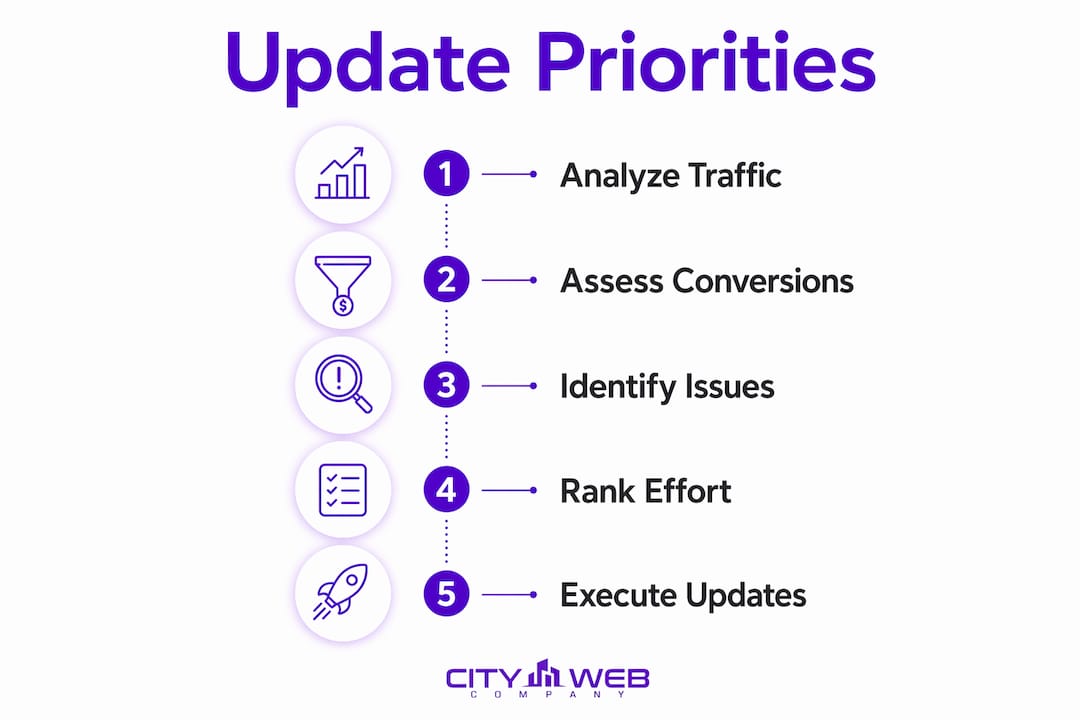
How to score updates:
Rate each potential update on two dimensions, each on a 1–3 scale:
- Impact: How much will this fix affect traffic, conversions, or security? (1 = minor, 3 = major)
- Effort: How much time and cost does this require? (1 = low, 3 = high)
Divide impact by effort. Items with a score of 3 (high impact, low effort) are your quick wins. Items with a score of 1 (low impact, high effort) go to the bottom of the list.
Prioritization checklist:
- Security patches and HTTPS: always urgent, regardless of score
- Broken CTAs or forms on top-converting pages: quick win
- Mobile responsiveness on homepage and service pages: quick win
- Title tag and meta description fixes: quick win
- Content updates on top-traffic pages: quick win
- Page speed improvements: medium effort, high impact
- Full content audit and refresh: medium effort, high impact
- CMS migration or redesign: high effort, high impact, plan carefully
- New feature additions (chatbots, booking integrations): score individually
Combining analytics and customer feedback:
Pull your top five pages by traffic and your top five by conversion rate. Any page that ranks high on traffic but low on conversions is a priority candidate. Then check your customer-facing team: what questions do callers ask that the website should answer? Those gaps are content update opportunities with real business value.
HubSpot’s guidance on prioritizing high-traffic, high-conversion pages aligns with this approach. Treat those pages as experiments, not monuments. A quick headline change or CTA rewrite on your homepage costs an hour and can be measured in two weeks.
For a complete step-by-step optimization process built for local businesses, the website optimization guide covers each phase from audit to implementation.
8. What typical website updates cost and how long they take
Budget and timeline questions are the ones most owners ask before committing to any update project. The ranges below reflect typical agency and freelancer pricing in the United States market; actual costs vary based on scope, integrations, and the complexity of your current site.
| Update type | Typical cost range | Typical timeline |
|---|---|---|
| Visual refresh (new photos, fonts, colors, copy) | — | 2 to 4 weeks |
| Content refresh (update copy, FAQs, meta tags) | — | 1 to 3 weeks |
| Speed and technical fixes | — | 1 to 2 weeks |
| Accessibility audit and remediation | — | 2 to 4 weeks |
| CMS migration (e.g., to WordPress or a modern builder) | — | 4 to 10 weeks |
| Full redesign with new architecture | — | 8 to 20 weeks |
A few factors push costs higher: custom integrations (booking systems, CRMs, payment gateways), large page counts, e-commerce functionality, and multilingual requirements. A smaller vendor or freelancer typically costs less than a full-service agency but may have less capacity for complex projects or ongoing maintenance.
What to expect at each milestone: a good vendor delivers a discovery and audit in week one, a design or content draft by week two or three, a staging review before anything goes live, and a post-launch check at 30 days. If a vendor skips the staging review or the post-launch check, ask why.
Experts recommend planning a full site refresh every two to three years, with continuous incremental updates in between. That cadence keeps your site current without the shock of a full rebuild every few years.
9. What happens when you don’t update your website
Doing nothing is not a neutral choice. An outdated website actively costs you traffic, customers, and money. The risks compound over time.
SEO degradation: Search engines favor fresh, accurate, and technically sound pages. A site with stale content, slow load times, and failing Core Web Vitals loses ranking positions gradually. Once competitors with updated sites take those positions, recovering them takes months of work.
Security incidents: Outdated plugins and unpatched CMS versions are the most common entry points for website attacks. A compromised site can be blacklisted by Google, which removes it from search results entirely. Recovering from a blacklisting takes weeks and requires cleaning the site, submitting a reconsideration request, and waiting for Google to re-crawl.
Credibility and trust loss: Research cited by HubSpot found that 75% of consumers abandoned purchases when a site looked outdated or unprofessional. For a local service business, that means a prospect who found you through a referral or a Google search still bounced because your site looked like it was built in 2014.
Conversion decay: CTAs break. Forms stop submitting. Phone numbers change and the old one stays on the site. Each of these is a silent revenue leak that analytics will show as a rising bounce rate or a falling conversion rate, but only if you are checking.
Increasing cost of future fixes: Technical debt compounds. A site that needed a $1,500 refresh in 2023 may need a $12,000 redesign in 2026 because the CMS is now unsupported, the plugins are incompatible, and the design is so dated that a cosmetic fix is no longer enough. Neglecting updates consistently turns small problems into large, expensive ones.
Compliance exposure: GDPR and CCPA require specific privacy disclosures and data handling practices. An outdated site may lack a compliant privacy policy, a cookie consent mechanism, or proper data deletion procedures. ADA and WCAG accessibility requirements carry legal risk for businesses that ignore them.
10. How City Web Company runs a website update: checklist and client outcomes
A structured update process produces repeatable, measurable results. City Web Company uses a three-part audit framework before recommending any work: technical, content, and conversion. Each audit produces a prioritized list of findings, scored by impact and effort, before a single change is made.
Agency audit checklist:
- Technical audit – Core Web Vitals, HTTPS status, crawl errors, broken links, sitemap validity, mobile responsiveness, and plugin/CMS version check.
- Content audit – Page-by-page review of accuracy, thin content, duplicate title tags, missing meta descriptions, and internal linking gaps.
- Conversion audit – CTA placement and clarity, form functionality, trust signal placement, page hierarchy, and mobile CTA behavior.
- Accessibility check – WCAG 2.1 contrast ratios, alt text on images, keyboard navigation, and form label accuracy.
- Backup and recovery review – Confirm automated backups exist, test a restore, and document the recovery process.
What a client outcome looks like:
A local home services business came in with a site that had not been updated in three years. The technical audit found failing Core Web Vitals, seven outdated plugins with known vulnerabilities, and no SSL certificate on a secondary subdomain. The content audit found 14 pages with duplicate title tags and a services page with pricing from two years prior. The conversion audit found a contact form that was not submitting on mobile.
After a focused refresh (not a redesign), the site passed Core Web Vitals, the mobile form was fixed, and the top-traffic service pages were updated with current pricing and FAQs. Organic traffic to those pages increased within 60 days, and the mobile conversion rate improved measurably.
What to ask an agency before hiring them:
- What does your audit process include, and what deliverables do I receive?
- How do you prioritize fixes, and how do you measure success?
- Do you provide a staging environment before changes go live?
- What does ongoing maintenance include, and how often do you report?
A good agency answers all four questions specifically. Vague answers about “comprehensive solutions” are a red flag.
For a detailed website audit checklist that covers SEO, technical, and content dimensions, the partner resource from BabyLoveGrowth walks through each step in sequence.
Key Takeaways
Regular website updates are the single highest-return maintenance activity for small businesses, protecting search rankings, conversions, and security while preventing the compounding cost of technical debt.
| Point | Details |
|---|---|
| Update cadence | Plan a full refresh every two to three years; run security, content, and technical checks continuously. |
| Prioritize by impact | Fix security vulnerabilities first, then broken CTAs and mobile issues, then content and performance. |
| Content updates beat new pages | Updating high-traffic existing pages typically produces faster organic gains than publishing new ones. |
| Inaction has a cost | Outdated sites lose rankings, fail security checks, and push 75% of consumers away before they convert. |
| City Web Company approach | City Web Company runs a three-part audit (technical, content, conversions) and delivers a 30/90-day roadmap with measurable KPIs before any work begins. |
The update that most owners skip is the one that costs them the most
Most small business owners think about website updates in terms of aesthetics. They notice when the design looks dated and schedule a refresh. What they miss is the compounding cost of the technical and content debt that builds up between those visible moments.
The pattern plays out the same way across service businesses. A site gets built, it performs reasonably well for a year or two, and then the owner gets busy. Plugins go unpatched. Content goes stale. A form breaks on mobile and nobody notices because the owner is not testing from a phone. Six months later, the organic traffic report shows a slow decline, but it is hard to pinpoint why because nothing dramatic happened. That is the nature of technical debt: it does not announce itself.
The owners who avoid this are not the ones with the biggest budgets. They are the ones with a maintenance schedule and someone accountable for running it. A monthly 30-minute check of Search Console, PageSpeed Insights, and a form submission test catches most problems before they compound.
The other thing most guides understate: updating your website is not just a defensive move. A well-maintained, current site is a sales asset. When a prospect lands on a page that loads fast, answers their question clearly, and makes it easy to call or book, that is a conversion that a neglected site would have lost. The revenue difference between a maintained site and an ignored one is not theoretical. It shows up in your inquiry volume.
City Web Company helps local businesses turn their website into a lead machine
If your site has not been audited in the last 12 months, there is a good chance it has at least one silent revenue leak: a broken form, a failing Core Web Vitals score, stale content on a high-traffic page, or a security vulnerability waiting to be exploited. City Web Company’s audit-first approach finds those problems before they cost you customers.

City Web Company works with local service businesses across home services, HVAC, pest control, med spas, landscaping, and more. The process starts with a three-part audit covering technical performance, content accuracy, and conversion architecture. From there, you get a prioritized roadmap with clear timelines and measurable goals, not a vague proposal. Implementation covers everything from speed fixes and plugin hygiene to content refreshes and local SEO services that keep your site visible in the searches that matter. Ongoing maintenance means you are never back in the position of discovering a three-year-old problem.
Ready to see what your site is actually leaving on the table? Get a digital marketing assessment and find out exactly what to fix first.
Useful sources and tools for running your own audit
Use these tools and standards to run checks yourself or share with your web team:
- Google PageSpeed Insights – Free tool that scores your site on Core Web Vitals and lists specific fixes ranked by impact. Run it on your homepage and top service pages.
- Google Lighthouse – Built into Chrome DevTools; audits performance, accessibility, SEO, and best practices in one report.
- Google Search Console – Shows crawl errors, manual actions, Core Web Vitals status, and which pages are losing impressions. Free and essential.
- WCAG 2.1 Guidelines – The W3C’s official accessibility standard; the basis for ADA web compliance in the United States.
- WebAIM Contrast Checker – Free tool to verify that your text and background color combinations meet WCAG contrast requirements.
- Why updating old content ignites SEO gains – A practical breakdown of the content refresh workflow and why existing pages outperform new ones for organic growth.
- City Web Company website optimization guide – Step-by-step optimization process built specifically for local service businesses.
- City Web Company web design and development services – For owners who need a professional to handle the audit, refresh, or redesign.
FAQ
Why is it important to update your website regularly?
Regular updates keep your site secure, visible in search results, and effective at converting visitors. An outdated site loses rankings, fails security checks, and pushes potential customers away before they contact you.
What happens if you don’t update your website?
Neglecting updates leads to declining search rankings, security vulnerabilities, broken functionality, and credibility loss. Research found that 75% of consumers abandoned purchases on sites that looked outdated or unprofessional.
How often should you update your website?
Plan a full visual and content refresh every two to three years, as recommended by web professionals. Security patches, plugin updates, and content accuracy checks should happen continuously, at least monthly.
Why is it important to keep website information current?
Outdated pricing, discontinued services, or wrong contact details send customers to competitors and damage your credibility. Search engines also treat accurate, current content as a positive ranking signal.
What is the difference between a website refresh and a redesign?
A refresh updates visuals, content, and performance without changing the site’s structure. A redesign rethinks the architecture, navigation, and goals from the ground up. Most small businesses with a structurally sound site need a refresh, which is faster and less expensive.
Recommended
These articles were popular with other readers too: