
Pass Google Business verification with a video-first checklist. Film one continuous 30 second take, fix flagged issues, and know when to hire help.
Ad Retargeting Explained: What Marketers Need to Know
Ad retargeting shows paid ads to people who already visited your website or engaged with your brand, giving you a second shot at converting them. You are not advertising to strangers. You are advertising to people who already raised their hand.
Use retargeting when you want to:
- Recover abandoned carts by showing the exact products a shopper left behind
- Nurture warm leads who visited your pricing or service pages but never filled out a form
- Re-engage recent visitors who browsed product or service pages within the last 30 days
According to Shopify, 96% of website visitors are not ready to buy on their first visit. Retargeting is how you stay in front of that 96% until they are. Platforms like Google Ads, Meta (Facebook and Instagram), and tools managed by agencies like City Web Company make it possible to run these campaigns across search, display, and social from a single strategy.
Table of Contents
Table of Contents
- How Does Ad Retargeting Work Technically?
- What Are the Main Types of Retargeting Campaigns?
- How Do You Set Up a Retargeting Campaign Step by Step?
- Which Platforms Should You Use for Retargeting?
- How Do You Measure Retargeting Success?
- What Are the Best Practices and Common Mistakes in Retargeting?
- What Privacy and Legal Rules Affect Retargeting in the US?
- Should You DIY Retargeting or Hire an Agency?
- Key Takeaways
- What Actually Works for Local Service Businesses
- City Web Company Runs Retargeting That Converts Local Leads
- Useful Sources
- FAQ
How Does Ad Retargeting Work Technically?
Retargeting runs on two core methods: pixel-based tracking and list-based matching. Understanding the difference helps you pick the right approach before you touch a single ad platform.
Pixel-based retargeting
A pixel is a small snippet of JavaScript code you place on your website. When someone visits a page, the pixel fires and drops a cookie or records a device ID in their browser. The ad platform, say Google Ads or Meta, then recognizes that person when they browse other sites or scroll through social media, and serves your ad. The whole sequence looks like this: visitor lands on your site, pixel fires, audience list updates, ad appears on another property within hours.
The shift to first-party data is not optional anymore. Browsers like Safari and Firefox already block most third-party cookies by default, and Chrome has been phasing in restrictions. Pixel-based retargeting still works, but server-side event tracking and Conversions API (CAPI) implementations recover signal lost to browser restrictions and ad blockers. Build your setup to include both.
List-based retargeting
You upload a hashed customer list (email addresses converted to anonymized strings) directly to an ad platform. Google Ads calls this Customer Match. Meta has its own Custom Audiences upload. The platform matches your list against its logged-in users and serves ads to the ones it finds. Match rates vary, typically 40–60% depending on list quality and platform, so a clean, current email list matters.
Quick developer handoff checklist:
- Place the pixel in the
<head>of every page, not just the homepage - Name standard events consistently:
PageView,ViewContent,AddToCart,InitiateCheckout,Purchase - Set up a product feed (XML or Google Merchant Center format) if you sell products
- Implement server-side events via CAPI or Google’s server-side tagging for signal resilience
- Verify firing with browser developer tools or Google Tag Manager’s preview mode
Pixel-based and list-based methods are the two primary technical approaches, and most mature retargeting programs use both together.
What Are the Main Types of Retargeting Campaigns?
Not every retargeting campaign serves the same purpose. Picking the wrong type for your objective wastes budget on audiences that were never going to convert anyway.
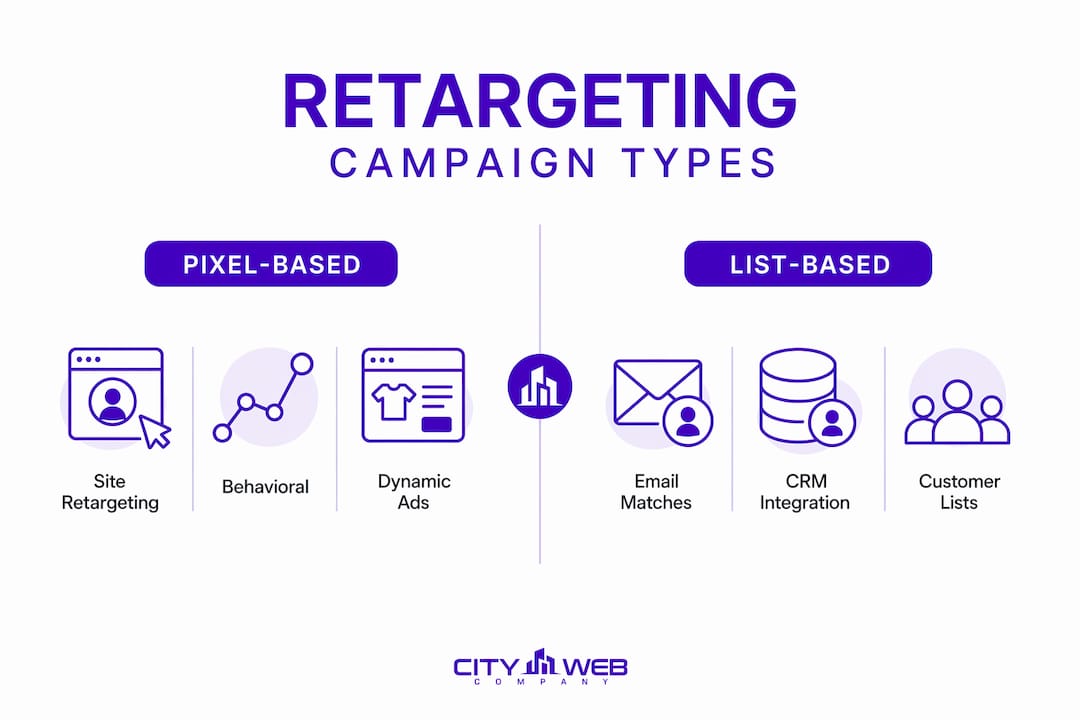
| Campaign Type | Best For | Example Use Case |
|---|---|---|
| Site-based pixel retargeting | General visitors, broad re-engagement | Show brand awareness ads to anyone who visited your homepage in the last 30 days |
| Dynamic/product retargeting | Ecommerce product views, cart abandonment | Automatically display the exact shoes a shopper viewed, pulled from your product catalog |
| List-based (Customer Match) | Owned audiences, high-value leads | Upload past customers and offer them a loyalty discount on a new service |
| Search retargeting / RLSA | Re-engaging visitors who return to search | Bid higher on branded keywords when a past visitor searches again |
| Social engagement retargeting | Video viewers, post engagers, profile visitors | Retarget people who watched 50% of your Instagram video but never clicked through |
| Email list retargeting | Subscribers who opened but did not convert | Show display ads to email subscribers who clicked a link but abandoned the landing page |
Dynamic retargeting pulls product catalog data automatically, so the ad shows the exact item a visitor viewed. For ecommerce, this is the highest-intent campaign type you can run. For a local service business, the equivalent is showing a testimonial ad to someone who visited your “Get a Quote” page but never submitted the form.
When to use each type:
- Site-based: You have traffic but no product feed; good starting point for any business
- Dynamic/product: You run an online store with 20+ SKUs and measurable cart abandonment
- Customer Match: You have a CRM list of 1,000+ contacts and want to cross-sell or upsell
- RLSA: Your branded search terms have high CPC; past visitors convert at a much higher rate, so you bid up for them specifically
- Social engagement: You run video content on Instagram or Facebook and want to convert viewers
How Do You Set Up a Retargeting Campaign Step by Step?
Core campaign setup follows a consistent sequence regardless of platform: deploy tracking, build audiences, map creatives, set budgets, then launch. Here is the full checklist.
-
Prepare your assets. Gather your product feed (if applicable), customer email lists, privacy policy URL, and the URLs of your key conversion pages (thank-you pages, confirmation pages). You need these before you touch any ad platform.
-
Install and verify tracking. Place your pixel via Google Tag Manager so you can manage all tags from one interface without touching code every time. Verify that the pixel fires on every page using GTM’s built-in preview mode. Confirm standard events fire on the right pages:
ViewContenton product pages,AddToCarton cart actions,Purchaseon the confirmation page. -
Create segmented audiences. Do not dump all visitors into one bucket. Build separate audiences for: all site visitors (30-day window), product/service page viewers (14-day window), add-to-cart or form starters (7-day window), and past converters (90-day window, for exclusion or upsell). Shorter lookback windows for high-intent actions keep your audience warm and your spend efficient.
-
Map creatives to segments. Product viewers get dynamic product ads showing what they viewed. Pricing or service page visitors get social proof ads with a testimonial or a “Here’s what clients say” angle. Cart abandoners get a direct offer, sometimes a small discount or a free shipping reminder. Matching the creative to the behavior is what separates a retargeting campaign that converts from one that just annoys people.
-
Set budgets and frequency caps. Start with a daily budget that allows at least 20–30 impressions per day across your audience. Cap frequency at no more than 2 impressions per user per day for high-intent segments, and rotate creatives every 7–14 days to prevent ad fatigue. These are practical starting rules, not hard limits; adjust based on your audience size and campaign performance.
-
Launch and run immediate checks. After launch, confirm within 24 hours: tag is firing (check GTM or platform pixel helper), audience is populating (most platforms need 100+ users before ads serve), and creatives are rendering correctly across placements.
Pro Tip: Use UTM parameters on every retargeting ad URL so you can isolate retargeting traffic in Google Analytics. Without them, retargeting clicks blend into your general paid traffic and you cannot measure what is actually working.
Troubleshooting quick checks:
- Audience not populating: confirm the pixel fires on the correct pages and the event names match exactly
- Ads not serving: audience size is likely below platform minimums (Google Display requires 100 users; Meta requires 1,000)
- Low CTR: creative is probably too generic; segment more tightly and personalize the message to the specific page visited
Which Platforms Should You Use for Retargeting?
Each platform has a different strength. Choosing based on where your audience spends time and what creative format fits your offer matters more than picking the biggest name.


Platform comparison:
| Platform | Best For | Channels | Audience Matching | Dynamic Creative | Ease of Setup |
|---|---|---|---|---|---|
| Google Ads | Search, display, YouTube, Gmail | Search, Display Network, YouTube, Gmail | Pixel (remarketing tag) + Customer Match | Yes (dynamic display ads, product feed) | Moderate |
| Meta (Facebook and Instagram Ads) | Social, visual products, local services | Facebook, Instagram, Messenger, Audience Network | Pixel + Conversions API + Custom Audiences list upload | Yes (catalog ads) | Moderate |
| Google Tag Manager | Tag management only | N/A | N/A | N/A | Easy |
| AdRoll | Cross-channel web display, B2B | Web display, social, email | Pixel + list upload | Yes | Easy to moderate |
| Mailchimp | Email retargeting, ecommerce | Email, Facebook ads integration | Email list | Limited | Easy |
Google Ads supports remarketing across Search, Display, YouTube, and Gmail using RLSAs and Customer Match. Meta uses its pixel plus Conversions API and engagement-based audiences for social retargeting. Together, these two platforms cover the majority of US digital ad inventory.
Platform strengths by use case:
- Ecommerce: Google Ads (Shopping + dynamic display) and Meta (catalog ads) together cover the full funnel from search intent to social browsing
- Local service businesses: Meta is often the stronger starting point because of its geographic and interest targeting; Google Display adds reach across local news sites and niche content
- B2B or high-ticket services: AdRoll works well for cross-channel display retargeting when your audience is too small for Google’s minimums on individual placements
- Email-first programs: Mailchimp connects directly to your subscriber list and can trigger product retargeting emails when a Shopify store is linked, making it a low-friction entry point
Google Tag Manager is not an ad platform. It is the tag management layer that sits between your website and every ad platform. Install GTM once, then deploy your Google Ads remarketing tag, Meta pixel, and any third-party tags through it. This keeps your site code clean and makes it far easier to verify and update tracking without a developer on call.
For paid advertising management that spans Google Ads and social retargeting, City Web Company handles pixel setup, audience architecture, and cross-channel coordination as part of its managed service.
How Do You Measure Retargeting Success?
Retargeting produces measurable results, but the metrics you watch depend on your campaign goal. Here are the ones that matter and how to calculate them.
-
CTR (click-through rate): Clicks divided by impressions. Retargeting display ads typically see click-through rates in the 0.7–1.0% range, which is significantly higher than cold prospecting display ads at 0.1–0.3%. Social retargeting on Meta can run even higher depending on creative quality and audience size.
-
Conversion rate: Conversions divided by clicks. Retargeting visitors convert at a higher rate than first-time visitors because they are already familiar with your offer.
-
CPA (cost per acquisition): Total ad spend divided by number of conversions. If you spend $500 and generate 25 conversions, your CPA is $20. Retargeting typically produces lower CPAs than prospecting because it targets warm audiences.
-
ROAS (return on ad spend): Revenue generated divided by ad spend. A $500 spend that drives $2,500 in revenue equals a 5x ROAS. Cart abandonment retargeting campaigns tend to produce the strongest ROAS of any campaign type because the audience was moments away from purchasing.
-
CPM (cost per thousand impressions): What you pay for visibility. Retargeting audiences are smaller than prospecting audiences, so CPMs can run higher, but the conversion efficiency usually offsets the cost.
-
View-through conversions: A user sees your ad but does not click, then converts later. Most platforms count these in a default attribution window (often 1 day for view-through). Be careful: view-through attribution inflates retargeting performance numbers because many of those users would have converted anyway.
Attribution window caution: Retargeting campaigns almost always look better than they are when you use a 30-day click attribution window. A visitor who was going to come back and buy regardless gets credited to your retargeting campaign. Use a 7-day click window as a more conservative benchmark, and compare retargeting performance against a holdout group when possible to see true incrementality.
Pro Tip: For conversion rate optimization, run A/B tests on your retargeting landing pages, not just your ads. A 10% lift in landing page conversion rate has the same effect on CPA as a 10% reduction in CPC, and landing page tests are often easier to run.
What Are the Best Practices and Common Mistakes in Retargeting?
Most retargeting campaigns underperform not because the strategy is wrong but because of execution errors that are easy to fix once you know what to look for.
Do this:
- Segment audiences by intent level, not just by page visited. Someone who started checkout is worth more than someone who read a blog post. Treat them differently.
- Refresh creatives every 7–14 days for high-frequency segments. The same ad shown to the same person more than a few times stops working and starts annoying.
- Set frequency caps before launch, not after you notice performance dropping. Starting at 2 impressions per user per day is a practical rule for high-intent segments.
- Exclude converters from your active retargeting audiences. Showing a “buy now” ad to someone who already bought is a waste of spend and a bad experience.
- Use audience segmentation best practices to build tighter, more relevant audience groups from the start.
Avoid these:
- Retargeting every site visitor the same way. Someone who spent 10 seconds on your homepage is not the same as someone who spent 3 minutes on your pricing page.
- Running a single creative for 60+ days. Creative fatigue is real and measurable: watch for CTR declining week over week as a signal to rotate.
- Ignoring audience size minimums. A 50-person retargeting audience will not serve ads on most platforms and will produce statistically meaningless data even if it does.
- Skipping exclusion lists. Without excluding past converters, you burn budget on people who are already customers.
Pro Tip: Try ad sequencing for high-value segments: show a brand awareness ad first, then a product-specific ad, then a direct offer. This mirrors a natural sales conversation and tends to outperform showing the same offer repeatedly.
A corrected mistake example: a local HVAC company was retargeting all site visitors with the same “Call us today” ad. CTR was low and conversions were flat. After segmenting visitors by page (homepage visitors vs. “AC repair” page visitors) and creating a testimonial-led ad specifically for the repair page audience, the campaign produced a measurable lift in form submissions from that segment within the first two weeks.
What Privacy and Legal Rules Affect Retargeting in the US?
The US privacy picture for retargeting is not a single federal law. It is a patchwork of state regulations, platform policies, and browser-level changes that you need to account for in your setup.
What you need to know:
- CCPA/CPRA (California): California residents have the right to opt out of the “sale” or “sharing” of their personal data, which includes behavioral data used for cross-context advertising. If you have California visitors, your site needs a “Do Not Sell or Share My Personal Information” link and a mechanism to honor opt-out requests. The CPRA expanded these rights in 2023.
- Cookie consent banners: While the US does not have a federal cookie consent law equivalent to the EU’s GDPR, California’s rules effectively require disclosure and opt-out mechanisms for tracking. A cookie consent banner that lets users decline tracking is a practical compliance step for any US business with California traffic.
- Third-party cookie deprecation: Browsers are restricting third-party cookies, which affects pixel-based retargeting. First-party data strategies like email capture, hashed Customer Match lists, and server-side events are the practical response.
Concrete compliance steps:
- Add a cookie consent banner that fires before the pixel loads for opt-out users
- Include a privacy policy that discloses your use of tracking pixels and retargeting
- Honor opt-out signals; most major ad platforms support consent mode integrations
- Use hashed email lists instead of raw PII when uploading to ad platforms
- Document your data processing practices in case of a regulatory inquiry
Pro Tip: The Network Advertising Initiative (networkadvertising.org) maintains an opt-out tool that many ad networks honor. Linking to it in your privacy policy is a low-effort transparency signal.
This article covers general information about US privacy considerations for retargeting. For advice specific to your business and state, consult a qualified attorney.
Should You DIY Retargeting or Hire an Agency?
The honest answer depends on three variables: your traffic volume, your team’s bandwidth, and how many channels you want to run simultaneously.
Decision checklist:
- You have fewer than 500 monthly site visitors: retargeting audiences will be too small to serve ads reliably on most platforms. Focus on growing traffic first.
- You have 500–2,000 monthly visitors: a single-platform retargeting campaign (Meta or Google Display) is manageable in-house with a few hours per week.
- You have 2,000+ monthly visitors and want cross-channel retargeting across Google, Meta, and display networks: the technical complexity of managing pixels, audiences, creative rotation, and attribution across platforms makes agency involvement worth considering.
- You run a local service business with phone-based leads: tracking offline conversions (calls, form fills, booked appointments) requires additional setup that most in-house teams skip, which means your retargeting data is incomplete.
Questions to ask an agency before signing:
- How do you build and segment retargeting audiences for a business like mine?
- How do you verify that pixels and conversion events are firing correctly before launch?
- What is your reporting cadence and what metrics do you include?
- What ROAS or CPA targets are realistic for my industry and traffic volume?
- How do you handle creative refresh and frequency management?
DIY vs. agency for local service businesses:
| Scenario | DIY Feasibility | Agency Value |
|---|---|---|
| Single platform, 1,000+ monthly visitors, ecommerce | Manageable | Useful for creative production and optimization |
| Multi-platform, local service, phone leads | Difficult without technical setup | High: pixel verification, call tracking, offline conversion import |
| Low traffic (under 500/month) | Not yet viable | Focus on traffic growth first |
| B2B, long sales cycle, CRM integration | Complex | High: Customer Match setup, CRM sync, attribution modeling |
City Web Company’s retargeting case studies show how local service businesses have used cross-channel retargeting to re-engage visitors who viewed service pages but never called. For businesses running multiple digital campaign types, retargeting fits as the conversion layer on top of prospecting campaigns.
Key Takeaways
Ad retargeting works because it targets people who already know your brand, which produces higher conversion rates and lower CPAs than cold prospecting campaigns.

| Point | Details |
|---|---|
| Start with the right method | Use pixel-based tracking for anonymous visitors and list-based Customer Match for your owned contacts. |
| Segment before you launch | Build separate audiences for page viewers, cart starters, and past converters; never retarget all visitors the same way. |
| Frequency caps protect ROI | Cap high-intent segments at 2 impressions per user per day and rotate creatives every 7–14 days to prevent fatigue. |
| Measure CPA and ROAS, not just CTR | Retargeting display CTR benchmarks run 0.7–1.0%; the real win is lower CPA and stronger ROAS versus prospecting. |
| City Web Company manages the full setup | City Web Company handles pixel deployment, audience architecture, creative production, and cross-channel reporting for local service businesses. |
What Actually Works for Local Service Businesses
Most retargeting guides are written for ecommerce. Local service businesses have a different problem: their conversions are phone calls and form submissions, not cart checkouts, and their monthly traffic is often under 2,000 visitors. That changes the playbook.
Short local case examples:
A pest control company running Google Display retargeting to all site visitors saw minimal results. After narrowing the audience to visitors of the “residential pest control” service page with a 14-day lookback window, and switching the creative to a before/after testimonial format, the campaign started generating form submissions at a cost that made sense for the business.
A moving company used list-based retargeting by uploading past customer emails to Meta Custom Audiences and running a referral offer ad. Because the list was warm and the offer was specific, the match rate was high enough to generate booked calls within the first week.
Practical recommendations for low-traffic local businesses:
- Use a 60-day lookback window instead of the default 30 days to build a large enough audience to serve ads
- Prioritize list-based Customer Match over pixel-only retargeting when monthly traffic is below 1,000 visitors
- Lead with testimonial-based creatives rather than direct-offer ads; local service buyers need trust before they call
- Set up call tracking (Google Ads call extensions, CallRail, or similar) so phone conversions feed back into your retargeting audiences as conversion signals
Tracking phone leads and offline conversions:
- Import call conversions into Google Ads using the Google forwarding number or a third-party call tracking tool
- Use Meta’s offline conversions API to upload booked appointments back to the platform so it can optimize toward actual revenue, not just clicks
- Create a “past caller” or “past booker” audience from your CRM list and exclude them from acquisition campaigns while targeting them with upsell or seasonal offer ads
For local businesses, retargeting is not a set-it-and-forget-it tactic. It needs ongoing attention: refreshed creatives, updated exclusion lists as new customers convert, and seasonal adjustments to messaging. The businesses that get the most from it treat it as a live campaign, not a background automation.
City Web Company Runs Retargeting That Converts Local Leads
Running retargeting in-house sounds straightforward until you are debugging a pixel that stopped firing, managing creative fatigue across three platforms, and trying to figure out why your CPA doubled last month. That is where most local service businesses stall.

City Web Company builds and manages retargeting programs specifically for local service businesses: HVAC, pest control, home services, med spas, moving companies, and more. The engagement covers pixel installation and verification, audience segmentation by intent, creative production and rotation, and monthly reporting on CPA, ROAS, and conversion volume. In the first 90 days, clients get a verified tracking setup, at least two segmented audiences live, and a reporting dashboard that shows what the campaigns are actually producing.
If you want retargeting that is set up correctly from day one and managed to produce leads, not just impressions, see how City Web Company drives local leads or review the full service offering to find the right fit for your business.
Useful Sources
- Search Engine Land: Retargeting guide: Technical overview of pixel-based and list-based methods, plus first-party data strategy
- AdRoll: Retargeting definition and types: Clear breakdown of retargeting vs. remarketing and campaign type definitions
- Shopify: What is retargeting and how does it work: Practical ecommerce-focused guide covering dynamic retargeting and the 96% first-visit stat
- Mailchimp: What is retargeting: Email-first perspective on retargeting campaigns and use cases for small businesses
- Network Advertising Initiative: Industry body managing ad network opt-out standards; useful for privacy compliance reference
- Adwisely: Retargeting ads glossary: Frequency cap guidance and platform-specific retargeting mechanics
- City Web Company: Retargeting case study: Local service business retargeting examples and agency proof points
- City Web Company: Paid advertising guide for local businesses: Broader paid advertising context for businesses new to retargeting
FAQ
How does ad retargeting work?
Ad retargeting places a small tracking pixel on your website that drops a cookie or device ID when someone visits. Ad platforms use that signal to serve your ads to that person on other sites and social media until they return and convert.
What is a good CTR for retargeting ads?
Retargeting display ads typically achieve click-through rates of 0.7–1.0%, much higher than cold prospecting display ads at 0.1–0.3%. Social retargeting on Meta can see even stronger CTRs depending on your creative and audience targeting.
What is the primary goal of retargeting ads?
The primary goal is to re-engage people who already showed interest in your brand but did not convert, and bring them back to complete a purchase, book a service, or fill out a form. Because these audiences are already familiar with your offer, they convert at a higher rate and typically at a lower CPA than cold traffic.
What is the difference between retargeting and remarketing?
Retargeting and remarketing are related but distinct: retargeting typically refers to ad-platform campaigns using pixels or hashed lists, while remarketing more often refers to owned-channel re-engagement like email sequences sent to your existing contacts.
Do small businesses with low traffic benefit from retargeting?
Retargeting requires a minimum audience size to serve ads reliably. Most platforms need at least 100–1,000 matched users before campaigns activate. For businesses with under 500 monthly visitors, building traffic first is the more productive investment. List-based Customer Match using an existing email list can work at lower traffic volumes.
Recommended
- The Power of Retargeting – How to Bring Back Lost Customers – City Web Company | Digital Marketing Agency
- How to Track ROI From Your Facebook and Google Ads – City Web Company | Digital Marketing Agency
- Boosting Your Brand Awareness Through Targeted PPC Campaigns – City Web Company | Digital Marketing Agency
These articles were popular with other readers too: