Pass Google Business verification with a video-first checklist. Film one continuous 30 second take, fix flagged issues, and know when to hire help.
How to Improve Website Loading Speed: A Guide for Business Owners
Many business owners believe that if their website looks good, it's doing its job. This common misconception overlooks a critical, hidden problem: slow performance is silently costing them customers and revenue every single day. The focus on aesthetics often comes at the expense of speed, turning a potential asset into a liability.
The core issue is simple to define in business terms. A slow website directly translates to missed revenue. For every second a potential customer waits for your page to load, the likelihood they will give up and contact a competitor increases dramatically. This isn't just a technical problem; it's a direct leak in your sales funnel, wasting marketing spend and sabotaging your growth.
Table of Contents
The Disconnect Between a Beautiful Site and a Profitable One
It’s a frustrating scenario many entrepreneurs face. You invest significantly in a professional website design, complete with high-quality photos and carefully crafted copy, but the phone doesn't ring. The leads you expected from your online presence simply aren't materializing. The missing element is almost always performance.
Consider a practical example. A homeowner has a burst pipe and urgently searches for an "emergency plumber near me" on their smartphone. They need help immediately. Your ad might appear first, but if your website takes several seconds to load, they will hit the back button and click the next result. In that moment, you have lost a customer and the money you spent on that ad click.
This isn't a hypothetical situation; it's the daily reality for local service businesses. The performance gap between a desktop computer and a mobile phone is often vast. One analysis found the average desktop site loads in 2.5 seconds, while the mobile equivalent takes a frustrating 8.6 seconds. This is a significant problem when most of your customers find you on their phones.
The data on user patience is clear and unforgiving.
Load Time Impact on User Abandonment
This table illustrates how quickly potential customers will abandon your website as the load time increases.
| Load Time (Seconds) | Bounce Rate Increase | Mobile User Abandonment |
|---|---|---|
| 1 to 3 seconds | +32% | 53% of users leave |
| 1 to 5 seconds | +90% | Over 60% of users leave |
| 1 to 6 seconds | +106% | Over 65% of users leave |
| 1 to 10 seconds | +123% | Over 70% of users leave |
Source: Analysis of top webpages by Tooltester
The numbers confirm the reality: a delay of just a few seconds causes more than half of your mobile visitors to leave. The longer they are forced to wait, the more certain their departure becomes.
Speed as a Core Business Strategy
Understanding this direct cause-and-effect relationship reframes website optimization. It is not a technical chore but a core business strategy. For a local service business where customers make rapid decisions, a slow website is a significant competitive disadvantage. It undermines every dollar you invest in other marketing efforts, from Google Ads to local SEO.
This transition from seeing speed as a technical detail to a strategic pillar is where clarity begins. A fast website does more than appease search engines, although you can learn more about that in our guide on how website speed impacts Google rankings. It respects your customer's time and provides a seamless path from their initial search to contacting your business. This is how a website evolves from a digital brochure into a reliable engine for growth.
Diagnosing Your Website's Speed Problem
Before you can fix a slow website, you must understand precisely why it is slow. Many business owners make the mistake of judging their site's speed from their own office computer. This is a flawed test. Your browser has likely saved, or cached, parts of your site, and your fast office internet connection is not representative of what your average customer uses, especially on a mobile device.
To truly understand your site's performance and learn how to improve website loading speed, you need to use objective, impartial tools. Relying on your own perception is unreliable. You need to look under the hood with the right diagnostic equipment.
From Vague Frustration to Clear Data
This is the role of professional tools like Google PageSpeed Insights and GTmetrix. They provide an objective analysis by testing your site from different locations and simulating various network conditions. While the reports can seem technical, a few key metrics reveal most of the story.
- Largest Contentful Paint (LCP): This measures the time it takes for the most significant piece of content, like a large image or text block, to appear. A slow LCP is what makes a page feel sluggish to a visitor.
- Time to First Byte (TTFB): This tracks how quickly your server sends the first piece of data to the browser. A high TTFB often indicates an issue with your hosting or server configuration.
- First Input Delay (FID): This measures how responsive your site is. It is the time between a user's first action, like clicking a button, and the browser's response. A long delay is extremely frustrating.
Understanding these metrics is the first step toward a real solution. It turns a general feeling of "my site is slow" into a concrete action plan by pinpointing the bottlenecks, whether they are large images, a slow server, or inefficient code.
These technical issues have direct consequences for your business.
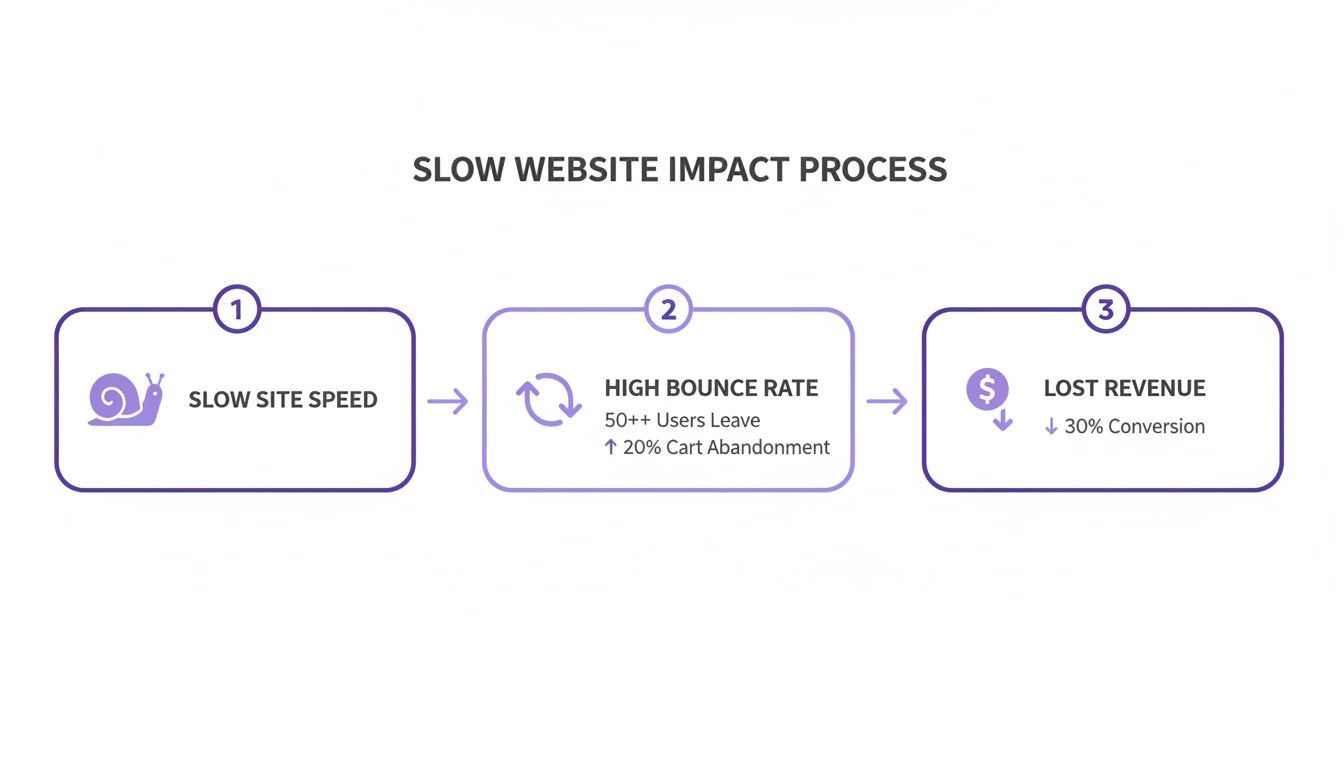

As the diagram shows, poor performance leads to high bounce rates. When visitors leave, you lose potential customers and revenue. It is a straight line from technical lag to a weaker bottom line.
Decoding the Waterfall Chart
One of the most useful diagnostic tools is the "waterfall chart," available in services like GTmetrix. It may look complex, but the concept is simple. It provides a visual breakdown of every file your website loads, showing exactly how long each one takes.
For example, I analyzed a local dentist's website that felt sluggish. The waterfall chart showed that while the main content loaded quickly, a single, unoptimized photo of the office staff was taking four seconds to load by itself. That one file was holding the entire page hostage.
By reading the waterfall, you can immediately identify the problem areas. You might discover:
- A third-party script for a chat widget is slowing everything down.
- Your WordPress theme is loading five different font files when it only uses two.
- The main image on your homepage is a 2 MB file when it could be 200 KB.
This is the moment you move from problem awareness to solution clarity. You no longer have a "slow website." You have an oversized image and two unnecessary scripts to address. This level of precision is the foundation of any effective optimization strategy. For a more in-depth look at enhancing your site's responsiveness, it's worth exploring a holistic approach to Application Performance Optimization.
Without this initial diagnostic step, any attempts to fix the problem are just guesswork. It ensures you focus your resources where they will have the greatest impact, transforming your website from a liability into a high-performing asset.
Quick Wins with Front-End Optimization
Forget complex server configurations for a moment. The most common reasons for a slow website are often hiding in plain sight. These are "front-end" elements, which include everything a visitor's browser must download and assemble to display your page, such as images, fonts, and code.
Focusing here is where you can achieve the most significant and fastest improvements. You are addressing the heaviest parts of your site, the very things that cause a potential customer on a mobile phone to abandon the page. Learning how to improve website loading speed begins with the elements you can directly see and control.

Taming Your Website's Heaviest Assets
In most cases, oversized images are the primary cause of a slow website. This presents a challenge for local service businesses. High-quality photos are essential. A landscaping company needs to showcase its beautiful gardens, and a dentist must project a clean, modern office. The problem is that crisp photos from a professional camera are massive files, often several megabytes each.
Uploading these files directly is inefficient and slow. The solution is image optimization, which involves two key actions:
- Resizing: If an image will only be displayed at 800 pixels wide on your site, there is no need to upload a 4000-pixel version. The browser is forced to download the large file and then shrink it, wasting data and time.
- Compressing: Modern file formats like WebP offer excellent quality at a fraction of the file size of older formats like JPEG and PNG. Effective compression can reduce an image's size by 70-90% with almost no noticeable loss in quality.
A local roofing contractor we worked with had a gallery where each project photo was over 3 MB. Their site was taking nearly 12 seconds to load on a phone. After we properly resized and converted their images to WebP, the page's total size dropped by 85 percent, and the load time fell to under 3 seconds.
That single change stopped the company from losing potential leads who were leaving before the page even finished loading.
Minimizing Code and External Scripts
Images are not the only heavy elements. Your site's performance is also affected by its code, specifically CSS for styling and JavaScript for interactive features. Many pre-made themes and plugins are loaded with bloated code and connect to numerous third-party services, each adding a small delay.
For regional businesses, from landscapers to veterinarians, ignoring this means leaving money on the table. While 75 percent of sites achieve a fast LCP on desktop, only 62 percent do so on mobile. The numbers are worse for Core Web Vitals, where just 53 percent of desktop sites pass. I once saw an e-commerce site reduce its load time from 6 seconds to 2.3 seconds by switching to WebP images, deleting unused plugins, and using a CDN. The result was a 15 percent increase in conversions. With mobile traffic dominant and bounce rates hitting 53 percent for loads over 3 seconds, front-end optimization is critical.
Here is what you should review:
- Minification: This process removes unnecessary characters from code files, such as spaces and comments that developers use but browsers ignore. Smaller files download faster.
- Combining Files: Instead of forcing a browser to fetch ten different CSS files, an efficient setup combines them into one. Fewer requests lead to a faster, more streamlined process.
- Auditing Third-Party Scripts: That live chat widget or social media feed might look good, but is it worth adding two seconds to your load time? Every external script is a performance trade-off.
The Problem with Custom Fonts
Custom fonts are excellent for branding but come at a performance cost. When someone visits your site, their browser must download these special font files before it can display your text correctly.
If you are using multiple font families and several different weights (like light, regular, and bold), each one is a separate file that adds to the delay. A simple and effective solution is to limit yourself to one or two system fonts or a single custom font family. You can see how these small adjustments fit into a broader strategy in our complete website optimization guide for local businesses.
These front-end optimizations are called "quick wins" because they target the most common and heaviest performance issues, delivering noticeable improvements without requiring a complete website overhaul.
Strengthening Your Site's Foundation with Back-End Tuning
While front-end tweaks like optimizing images provide quick wins, a slow foundation will always hinder your site's performance. If your server is slow, nothing else matters. The "back-end," the engine that runs your website, has a significant impact that most business owners underestimate.
This is where web hosting becomes more than just a monthly expense; it becomes a critical business decision. The temptation to choose the cheapest shared hosting plan is understandable, but that low price comes with a high performance cost.
Hosting Type vs. Performance Impact
Selecting the right hosting is one of the most effective ways to improve site speed. Shared hosting is like living in a large apartment building with thin walls. You share all the important resources, like CPU, memory, and bandwidth, with hundreds or even thousands of other websites.
If another site on the server experiences a traffic surge or is running inefficient code, your site will slow down as well. You have no control, but you suffer the consequences in the form of lost visitors.
This is why businesses focused on growth eventually upgrade. Here is a breakdown of how different hosting types compare for a typical local business.
| Hosting Type | Typical Speed | Best For | Key Limitation |
|---|---|---|---|
| Shared Hosting | Slow to Moderate | Brand new sites, personal blogs, very low-traffic projects. | Resources are shared; "noisy neighbors" can slow you down. |
| Managed WP Hosting | Fast to Very Fast | Any business using WordPress that values speed and security. | Can be more expensive; less control than a VPS. |
| VPS (Virtual Private Server) | Fast to Very Fast | Tech-savvy businesses or sites with custom needs. | Requires technical knowledge to manage and secure. |
| Dedicated Server | Extremely Fast | High-traffic e-commerce, large enterprises. | Most expensive option; complete self-management required. |
Upgrading your hosting is an investment in a reliable and fast experience for your customers. A speedy server leads to happier visitors, which ultimately results in more leads and sales.
Demystifying Caching and CDNs
Two other powerful back-end tools that can make a significant difference are caching and Content Delivery Networks (CDNs). While they sound technical, the concepts are straightforward and essential to understanding how to improve website loading speed.
Server-side caching is like having your most popular dishes pre-made in a restaurant kitchen. Instead of your server building a web page from scratch for every visitor, it serves a ready-made static copy. This single technique dramatically reduces the server's workload and delivers the page almost instantly.
A Content Delivery Network (CDN) expands on this idea. It is a network of servers around the world that stores copies of your site's static files, such as images, CSS, and JavaScript.
When a customer visits your site, the CDN delivers those files from a server that is physically closest to them, rather than from your primary hosting server, which could be thousands of miles away.
Imagine you are a contractor serving all of Colorado. A CDN ensures that a potential client in Durango receives the same fast experience as one in Denver. By reducing the physical distance data must travel, you achieve a measurable improvement in load times.
For a deeper dive into ensuring your site's foundation is robust, you might find this practical guide to improving application performance beneficial. Building a strong back-end is not just about isolated fixes; it's about creating a resilient system for sustained performance.
WordPress-Specific Speed Strategies
The very feature that makes WordPress so popular, its incredible flexibility, is also its greatest performance weakness. For a local business, the vast selection of themes and plugins can seem appealing, but without discipline, it can quickly result in a slow, clunky website that frustrates potential customers.
Experience has shown that mastering WordPress speed is not about adding more; it is about strategically removing and optimizing.
Cull Your Plugins
The first place to look is always the plugin list. It is not uncommon to find sites with 30, 40, or even 50 active plugins. Each one adds code, database queries, and weight to your load time. This is plugin bloat, and it is the primary enemy of a fast WordPress site.
Many of these plugins are redundant or perform a task that could be done more efficiently. The solution is to conduct a thorough plugin audit.
- Deactivate, then Delete: Do not just disable unused plugins; remove them completely. An inactive plugin can still pose a security risk.
- Consolidate: Do you need separate plugins for SEO, social sharing, and contact forms? Look for a single, well-coded plugin that can handle multiple functions more effectively.
- Analyze the Culprits: Use a tool like Query Monitor to identify which plugins are the worst offenders. It can be enlightening to see which ones are making excessive database calls.
Your goal should be to reduce your plugins to the absolute essentials. If a plugin does not serve a critical, well-defined purpose, it is unnecessary weight.
Choose a Lightweight Theme
Like plugins, large, feature-heavy "multipurpose" themes are a significant source of bloat. They often include dozens of features you will never use, such as complex sliders, portfolio layouts, and e-commerce functions, all of which load code on every page. This makes any effort to improve website loading speed more difficult.
A much better approach is to start with a foundation built for speed. Themes like GeneratePress, Astra, or Kadence are excellent choices. They are lightweight and clean, providing a fast base to build upon. You can then add only the specific functionality you need.
A lightweight theme is like building a house on a solid concrete slab instead of sand. No matter how beautiful the structure is, a weak foundation will eventually cause problems. A fast theme provides the stability needed to build a high-performing site.
This shift in mindset, from "what can my theme do?" to "what do I need my theme to do?", is crucial for achieving sustainable speed.
Implement Lazy Loading
For any site with a significant number of images or videos, lazy loading is one of the most effective optimizations available. It is a simple but powerful technique that instructs the browser to delay loading media until it is about to scroll into view.
Imagine a long service page with a dozen photos. Without lazy loading, a visitor's browser must download all twelve images before the page is fully interactive. With it, the browser only loads the first one or two, making the initial page feel dramatically faster.
While WordPress now includes native lazy loading, dedicated plugins often provide more control, allowing you to lazy-load videos and iframes as well. For a local service business with project galleries or video testimonials, this is not just a nice-to-have; it is essential.
The financial stakes here are real. In competitive local markets, from Colorado plumbers to Florida med spas, every second counts. Current statistics show that a one-second load time can see a 40 percent conversion rate, but that plummets to just 29 percent by the third second. We’ve found that 82 percent of consumers say site speed influences their buying decisions, which is why optimizing WordPress is less of a technical chore and more of a core revenue strategy. You can read more about how these speed metrics directly influence conversions on wearetenet.com.
Keeping Your Website Fast for the Long Haul
Achieving a fast website is an important first step, but it is not a one-time task. I have seen it happen many times: a business invests in a major speed overhaul, celebrates the results, and then slowly watches that progress erode over time.
This occurs because websites are dynamic. Every new blog post, photo gallery, or plugin has the potential to slow things down. Without a plan to manage this, your once-fast site will inevitably become sluggish again. This frustrating cycle is known as performance degradation.
The only way to break this cycle is to shift from one-off fixes to a sustainable strategy. A key part of this is creating a performance budget. This is not about money but a set of defined limits for your site, such as a maximum page size, a target load time, or a cap on server requests. These rules act as guardrails, preventing new content or features from compromising your site's speed.
Shifting from Quick Fixes to a Growth Strategy
Instead of viewing speed optimization as a technical checklist, it must be seen as a fundamental part of your overall marketing system. Your site's technical health is directly linked to your ability to attract and convert customers.
Sustained website performance is not about achieving a perfect score on a speed test. It is about ensuring that every marketing dollar has the best possible chance to convert a visitor into a customer, both today and in the future.
This mindset requires a commitment to ongoing monitoring and regular check-ups. You need to understand how each piece of your digital presence affects the others. This is a strategic role, not just a technical one.
This is often the point where business owners realize that managing these details is not the best use of their time. Partnering with a specialist who can manage this entire system for you, aligning your website's performance with your business goals, is often the most intelligent decision. At City Web Company, we build and maintain these exact kinds of growth systems, ensuring your website remains a powerful asset that helps your business grow.
Your Top Website Speed Questions Answered
Even with a solid plan, you may still have questions about how speed optimization affects your business. This is perfectly normal. Let's address some of the most common questions I hear from business owners to provide you with complete confidence.
Many people wonder if website speed is a passing trend. The reality is the opposite. Speed has become a permanent, non-negotiable part of a successful online presence. It is foundational. It affects everything from a visitor's perception of your brand to their ability to find you on Google.
How Fast Is "Fast Enough"?
This is a common question, and the answer is not a single number. It is about being faster than your competition. Aiming for a load time under two seconds is an excellent goal, but context is crucial.
If your site loads in 2.5 seconds, but your top three local competitors all load in under 1.5 seconds, you are at a disadvantage. "Fast enough" is also defined by your visitors' patience, which is limited. Over half of all mobile users will leave if a site takes more than three seconds to load. Therefore, "fast enough" means preventing potential customers from leaving in frustration.
Do I Really Need a CDN for a Local Business?
It is easy to think of a Content Delivery Network (CDN) as a tool for large global corporations, but it offers real advantages for local service businesses as well. Even if all your customers are in the same state, the physical distance between them and your web server can create small but frustrating delays.
A CDN ensures that a customer in a distant suburb has the same fast experience as someone near your server. It is about creating a consistently fast experience for your entire market, which builds trust and helps convert visitors into customers, regardless of their location.
Can't I Just Install a Caching Plugin and Call It a Day?
Caching plugins are extremely effective, and I consider them essential for any WordPress site. However, they are not a complete solution. A great caching plugin can make a well-built website very fast, but it cannot fix fundamental problems.
If your site is burdened by large images, a bloated theme, or a slow server, caching is like putting a high-performance engine in a car with four flat tires. It helps, but it does not solve the root issue. Lasting speed comes from a comprehensive approach that addresses the front-end, back-end, and ongoing maintenance.
Navigating the technical side of website performance requires a partner who understands how site health drives business growth. City Web Company builds and manages integrated systems designed to keep your site fast and your marketing effective. If you are ready to stop worrying about site speed and start focusing on results, schedule your free discovery call today.
These articles were popular with other readers too: